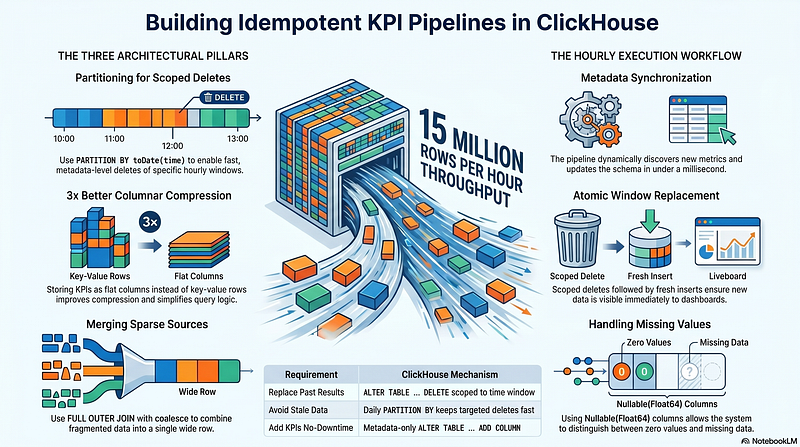
Building a High-Throughput KPI Pipeline on ClickHouse: Partitioning, Idempotent Recalculation, and Flat Column Storage
Every hour, 15 million rows of raw network measurement data land in our ClickHouse cluster. From that data we calculate per-cell, per-technology KPIs — hundreds of them — and store the results for dashboards, alerting, and trend analysis. Sounds straightforward. But there is a catch that makes the design genuinely interesting: some measurement sources go silent for hours, then come back. When they do, we need to recalculate past windows as if the gap never happened, without leaving stale results behind.
This article focuses on the three ClickHouse-specific design decisions that make this work cleanly:
- Partition by date and use
ALTER TABLE … DELETEto replace a time window atomically. - Flatten all KPI values into columns on a single wide table instead of normalizing into rows.
- Build an
INSERT … SELECTwith CTEs andFULL OUTER JOINso every KPI ends up in the right row even when sources are sparse.
Special thanks to mohsen taleb And Taha Amanzadi
The Problem in Concrete Terms
Our data comes from telecom network nodes. Each node sends counters every 15 minutes. An Airflow DAG aggregates those counters into hourly KPIs and writes results to ClickHouse.
Here is what goes wrong in practice:
- A vendor feed goes down at 14:00 and recovers at 17:00. The 14:00–15:00, 15:00–16:00, and 16:00–17:00 windows were computed with incomplete data.
- When the feed recovers we need to re-run those three windows and replace what we wrote.
- Rows cannot simply be updated. ClickHouse’s
MergeTreefamily is optimised for inserts and range scans; in-place updates are expensive mutations that run asynchronously.
The naive fix — just insert again and deduplicate at query time with argMax or ReplacingMergeTree — works but it forces every downstream query to carry dedup logic, and old rows pile up indefinitely.
We chose a cleaner path: delete the window, then re-insert.
Design Decision 1: Partition by Date, Delete by Partition
Table Definition
CREATE TABLE IF NOT EXISTS kpi_flat_hourly (
    time DateTime('UTC'),
    cell_id String,
    vendor String,
    -- ... more dimension columns ...
    updated_at DateTime('UTC') DEFAULT now('UTC'),
    kpi_id_1001 Nullable(Float64),
    kpi_id_1002 Nullable(Float64)
    -- columns are added dynamically as new KPIs are discovered
)
ENGINE = MergeTree
PARTITION BY toDate(time)
ORDER BY (time, cell_id)
SETTINGS index_granularity = 8192;
The PARTITION BY toDate(time) clause is the key. Each calendar day becomes its own partition — a separate set of files on disk. ClickHouse can drop or replace an entire partition in milliseconds because it is purely a filesystem rename.
Replacing a Time Window
When Airflow re-runs an hourly window, the pipeline issues:
ALTER TABLE kpi_flat_hourly
DELETE
WHERE meta_begin_time >= toDateTime('2024-11-01 14:00:00', 'UTC')
  AND meta_begin_time < toDateTime('2024-11-01 15:00:00', 'UTC');
followed immediately by the fresh INSERT … SELECT.
This is a lightweight delete (ALTER TABLE … DELETE), which in recent ClickHouse versions marks rows as deleted in metadata and removes them during the next merge, without rewriting entire parts immediately. For our hourly cadence — where a window is at most a few million rows inside a single daily partition — this is fast enough and keeps the pipeline idempotent.
Why notDROP PARTITIONand re-insert? We run 24 hourly windows per day. Dropping the entire daily partition to replace one hour would destroy the other 23 hours of valid data.ALTER TABLE … DELETEwith atimerange filter is the right tool here.
Performance Characteristics
- The delete touches only the parts whose
timerange overlaps the window. Thanks to theORDER BY (time, cell_id), ClickHouse primary key pruning limits which granules are read. - The delete itself is logged as a mutation and executes asynchronously on the storage layer. The subsequent insert does not wait for the mutation to complete — data is visible to new queries before old rows fully vanish, but since the insert writes new parts,
SELECTqueries see the new values from the fresh parts first (ClickHouse reads the latest parts first during merges). - Old KPI calculations from months ago accumulate in historical partitions and are never touched unless a reprocessing job explicitly targets them. Storage grows predictably at one daily partition per table per day.
Design Decision 2: Flat KPI Columns Instead of a Key-Value Model
The alternative — a normalised (cell_id, timestamp, kpi_id, value) schema — is tempting because it does not require schema changes when new KPIs are added. We rejected it for two reasons.
Query Ergonomics
A flat schema makes per-cell, multi-KPI queries trivial:
SELECT
    time,
    cell_id,
    kpi_id_1001,
    kpi_id_1002,
    kpi_id_1001 / nullIf(kpi_id_1002, 0) AS utilisation_ratio
FROM kpi_flat_hourly
WHERE time >= '2024-11-01 00:00:00'
  AND time < '2024-11-02 00:00:00'
  AND region = 'north';
The same query in a key-value layout requires two self-joins or a groupBy with conditional aggregation. At tens of millions of rows that extra join cost is real.
Column-Store Compression
ClickHouse compresses each column independently using LZ4 or ZSTD. A column of Nullable(Float64) values for a single KPI compresses far better than a mixed value Float64 column that interleaves values from hundreds of different KPIs. Benchmarks in our cluster showed roughly 3× better compression on the flat layout for a 30-day window.
Schema Evolution Without Downtime
New KPIs are added by the pipeline itself:
def ensure_kpi_columns(client, table_name: str, kpi_columns: list[str]):
    existing = get_existing_columns(client, table_name)
    for col in kpi_columns:        if col not in existing:            client.command(
    f"ALTER TABLE {table_name} "                f"ADD COLUMN IF NOT EXISTS {col} Nullable(Float64)"
    )
ALTER TABLE … ADD COLUMN in ClickHouse is a metadata-only operation — it does not rewrite existing data parts. The new column returns NULL for all historical rows, which is the correct semantics: we did not have that KPI before, and NULL is distinguishable from a legitimate zero.
Design Decision 3: Merging Sparse KPI Sources with CTEs and FULL OUTER JOIN
Not every KPI SQL query selects the same set of dimension columns. Some are cell-level, some are site-level. Some include region; others omit it. When we need to combine multiple KPIs into a single wide row we cannot assume the schemas align.
The SQL Builder
The pipeline groups query files by (vendor, technology, entity, granularity) and builds a single INSERT … SELECT using CTEs:
WITH
    kpi_1 AS (
        SELECT
            time,
            cell_id,
            vendor,
            ...,
            sum(counter_a) AS kpi_id_1001
        FROM flat_lte_vendor_a
        WHERE time >= toDateTime('2024-11-01 14:00:00', 'UTC')
          AND time < toDateTime('2024-11-01 15:00:00', 'UTC')
        GROUP BY time, cell_id, vendor, ...
    ),
    kpi_2 AS (
        SELECT
            meta_begin_time,
            cell_id,
            vendor,
            ...,
            avg(counter_b) AS kpi_id_1002
        FROM flat_lte_vendor_a
        WHERE ...
        GROUP BY ...
    )
INSERT INTO kpi_flat_lte_vendor_a_cell_hourly
SELECT
    coalesce(kpi_1.time, kpi_2.time) AS meta_begin_time,
    coalesce(kpi_1.cell_id, kpi_2.cell_id) AS cell_id,
    -- ... coalesce for every dimension column ...
    now('UTC') AS updated_at,
    kpi_1.kpi_id_1001,
    kpi_2.kpi_id_1002
FROM kpi_1
FULL OUTER JOIN kpi_2 ON
    kpi_1.meta_begin_time = kpi_2.meta_begin_time
    AND kpi_1.cell_id = kpi_2.cell_id
    AND kpi_1.vendor = kpi_2.vendor;
FULL OUTER JOIN ensures that a cell which has data for KPI 1001 but not KPI 1002 in a given hour still gets a row, with kpi_id_1002 = NULL. This is exactly what we want: the row represents what we know about that cell in that hour, and absent measurements are explicitly null rather than silently missing.
Putting It All Together: The Hourly Run
Each Airflow DAG run follows this sequence for a given (vendor, technology, entity, granularity) group:
- Discover the SQL files that match the current group.
- Run
ensure_target_table, which usesCREATE TABLE IF NOT EXISTS. After the first run, this is a no-op. - Run
ensure_kpi_columns, which usesADD COLUMN IF NOT EXISTSfor newly discovered KPIs. - Delete existing results in the target window with
ALTER TABLE … DELETE WHERE meta_begin_time >= start AND meta_begin_time < end. - Run the merged
INSERT INTO … WITH … SELECTquery to write the recalculated KPI values.
Steps 2 and 3 are metadata operations and complete in under a millisecond. Step 4 schedules a mutation. Step 5 writes new parts immediately. From the application’s point of view the window has been replaced atomically — no query will see a half-written state because ClickHouse part visibility is atomic at the part level.
Trade-offs and Lessons Learned
Mutations are asynchronous. ALTER TABLE … DELETE returns before the rows are physically removed. If you query immediately after, you may briefly see both old and new rows from the same window. In practice our downstream dashboards tolerate this — they aggregate over the whole window and the fresh parts dominate — but it is worth knowing if you have strict consistency requirements.
Wide tables and column count. We have tables with several hundred KPI columns. ClickHouse handles wide tables well because each column is a separate set of files, but DESCRIBE TABLE output becomes unwieldy and INSERT queries grow long. We generate them programmatically and never write them by hand.
Nullable(Float64) has a cost. ClickHouse stores a separate 1-bit null map alongside each nullable column. For columns that are almost always non-null this is pure overhead. Once a KPI source is stable we could migrate the column to Float64 DEFAULT 0 or Float64 DEFAULT nan, but for operational simplicity we leave everything nullable.
One CTE per KPI file vs. grouping in SQL. We could push multiple KPI calculations into a single SQL file and avoid the FULL OUTER JOIN complexity entirely. We kept the one-file-per-KPI convention because it makes it trivial for analysts to add or remove individual metrics without touching a monolithic query, and the join overhead in ClickHouse is negligible compared to the I/O cost of the source scans.
Summary
Requirement ClickHouse mechanism Replace a past hour’s results ALTER TABLE … DELETE scoped to time window Avoid stale rows accumulating Daily PARTITION BY toDate(time) keeps deletes fast Store many KPIs without row duplication Flat wide table, one Nullable(Float64) column per KPI Add new KPIs without downtime ALTER TABLE … ADD COLUMN IF NOT EXISTS (metadata-only) Merge sparse per-KPI results into one row FULL OUTER JOIN with dynamic join key detection + coalesce on dims
The design is not exotic — it leans on features ClickHouse already does well. The insight is knowing which features to reach for: partitioned deletes instead of updates, column-per-metric instead of EAV, and set-based SQL generation instead of row-by-row Python loops. Together they give us a pipeline that is fast, idempotent, and easy to extend as the network and its KPIs keep growing.