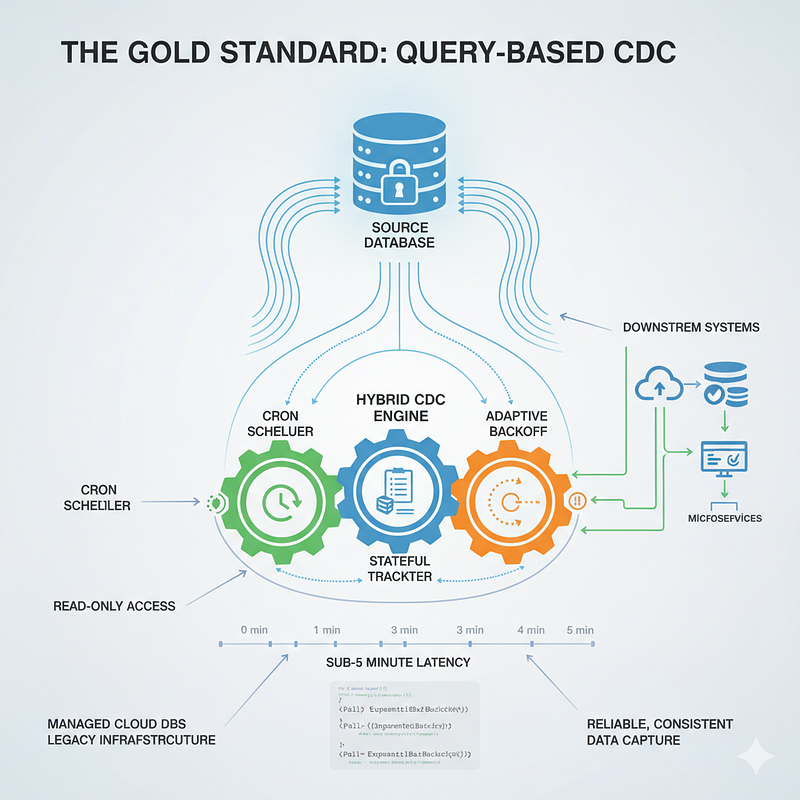
The Best Design Pattern for Query-Based Change Data Capture: Hybrid Stateful Polling with Offset Tracking + Adaptive Backoff
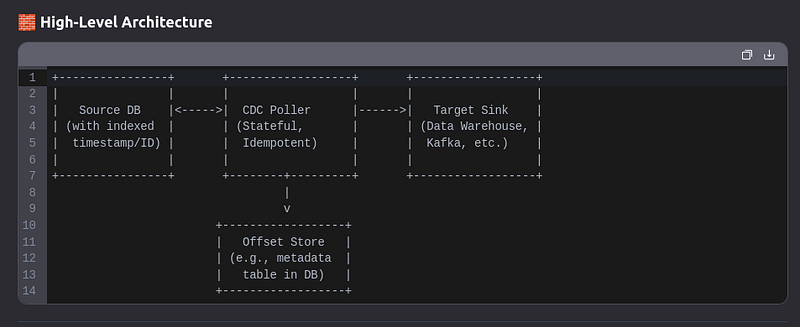
In today’s data-driven architectures, keeping downstream systems synchronized with source databases in near real time is no longer optional — it’s essential. Yet for many engineering teams, the ideal solution for Change Data Capture (CDC) — log-based streaming via transaction logs — is out of reach due to constraints like managed cloud databases, read-only access, or legacy infrastructure. This reality forces a reliance on query-based CDC, where data changes are detected by periodically polling the source. But not all polling is created equal. Naive, full-table scans or rigid fixed-interval checks lead to high database load, missed updates, or unnecessary delays. The true path to reliability and efficiency lies in a smarter approach: Hybrid Stateful Polling with Offset Tracking + Adaptive Backoff. This design pattern blends predictable scheduling, intelligent retry logic, and durable state management to deliver a production-grade CDC pipeline that’s both responsive and resilient — even when you can’t access the database logs.
Polling with Stateful Offset Tracking
Polling with stateful offset tracking is a software design pattern where a system periodically checks a data source for new information, but instead of scanning everything each time, it uses a stored marker (the offset) to resume from where it last left off. This approach is ideal for processing event streams and ensuring no data is missed, even after a system crash.
Polling Design Pattern in iWF
What is the Polling Design Pattern?
The Polling Design Pattern is a workflow architecture approach where your workflow periodically checks an external system or condition until a specific criterion is met. Once the condition is satisfied, the workflow can proceed to its next steps.
Simple Polling: Using a fixed interval timer to check conditions regularly
Backoff Polling: Using an exponential backoff retry mechanism that adapts the polling frequency
Cron Schedule Workflow
A pattern for replacing traditional Orc jobs with workflow-based cron scheduling. This pattern demonstrates how to use scheduled workflows to execute tasks at specified intervals using CRON expressions. Key features include automatic initialization, configurable scheduling, and management through Temporal Cloud UI.
Use Cases: Periodic data processing, cleanup tasks, automated reports, and scheduled maintenance. Endpoints: N/A (automatically scheduled)
When to Use Polling
Polling is invaluable in scenarios like:
- Waiting for External Systems or checking in a loop: When your workflow needs to wait for a database, API, or another service to become available
- Resource Readiness: In cloud environments, waiting for infrastructure components to be ready
- Status Verification: Checking payment gateway statuses or job processing completions
- Data Ingestion: Periodically checking for new data from external providers
Simple Polling Explained
This code shows a polling loop that repeatedly checks if a system is ready:
How it works:
- waitUntil() — Sets a timer for 10 seconds. The workflow pauses and waits this long before doing anything.
- execute() — After 10 seconds pass, it checks if the system is ready by calling
checkSystemReadiness(). - The decision:
- If the system is ready → move forward to the next step (CompletionState)
- If NOT ready → go back to the polling state and wait another 10 seconds
In plain English: “Every 10 seconds, ask ‘Is the system ready yet?’ If yes, continue. If no, ask again in 10 more seconds.”
Real-world analogy: It’s like checking on a pizza in the oven every 10 minutes — you wait 10 minutes, open the oven and look, and either take it out (it’s done) or close the door and check again later (it needs more time).
The downside of this approach is that it’s wasteful if the system becomes ready after just 2 seconds — you’d still wait the full 10 seconds before noticing.
Backoff Polling Explained
This code demonstrates exponential backoff, a more intelligent retry strategy where the wait time increases each time a failure occurs.
How it works:
- initialIntervalSeconds(3) — First retry happens after 3 seconds
- backoffCoefficient(2f) — Each retry doubles the wait time:
- 1st attempt: immediate
- 2nd attempt: wait 3 seconds
- 3rd attempt: wait 6 seconds (3 × 2)
- 4th attempt: wait 12 seconds (6 × 2)
- 5th attempt: wait 24 seconds (12 × 2)
- maximumIntervalSeconds(60) — Never wait longer than 60 seconds (caps the growth)
- maximumAttempts(5) — Give up after 5 tries total
- maximumAttemptsDurationSeconds(3600) — Also give up if 1 hour has passed
In plain English: “Try to call the external service. If it fails, wait a bit and try again. But wait a little longer each time you retry, up to a maximum of 1 minute between tries. Stop trying after 5 attempts or 1 hour, whichever comes first.”
Real-world analogy: It’s like calling customer service — if the line is busy, you hang up and call back. But you get smarter: call back in 3 seconds, then 6 seconds, then 12 seconds, etc., instead of hammering them every second.
Why this is better than simple polling: It’s gentler on the external system (fewer requests when things are struggling) and adapts automatically — the framework handles all the retries for you.
Choosing Between Simple and Backoff Polling
When to Use Simple Polling
Simple polling works best when you want a steady, predictable rhythm. Use it when checking every 10 seconds (or whatever interval you set) is what you actually need. It’s good for time-sensitive situations where delays compound, like monitoring a server that should be up within seconds. It’s also the choice if you need custom logic during each check, since you control exactly what happens.
When to Use Backoff Polling
Backoff polling is smarter when failures are expected and you want to be gentle on both your system and the external service. Use it when you’re retrying something that might be temporarily unavailable (like a network call that’s failing). It automatically backs off, so you’re not hammering a struggling service. The framework handles all the retry logic for you, which is less code to maintain.
Quick comparison:
Simple polling = “Check every X seconds, no matter what” (predictable, rigid)
Backoff polling = “Try, wait a bit, try again, wait longer, repeat” (adaptive, gentle)
In practice: If you’re checking something that should work quickly and predictably, go simple. If you’re dealing with external services that might be flaky or overwhelmed, backoff is usually the better choice because it automatically adapts to the situation.
Backoff Polling is Better for Your Case
Why backoff polling fits better:
You don’t know exactly when the data will be ready, so a fixed 10-second check (simple polling) is a gamble. You might check too early and waste resources, or check too late and delay unnecessarily. Backoff polling handles this uncertainty gracefully — it starts checking quickly (3 seconds), then gradually spaces out the checks if the data isn’t there yet.
How it works for you:
Since you only have read access and no exact timestamp, your checks might fail initially. Backoff polling is designed exactly for this — it expects failures and retries with increasing patience. After a few quick attempts, if the data still isn’t ready, it waits longer between checks instead of constantly hammering your database.
Practical example:
- 1st check: immediate (data not ready yet)
- 2nd check: 3 seconds later (still not ready)
- 3rd check: 6 seconds later (still not ready)
- 4th check: 12 seconds later (data is finally there!)
You end up with fewer total checks while still catching the data reasonably quickly. Plus, you set a maximum wait time (60 seconds max per attempt) and total attempt limit (5 tries), so you don’t wait forever if something goes wrong.
Bottom line: Backoff polling is more forgiving of uncertainty and wastes fewer resources when you don’t know the exact timing of your data.
When to Use Backoff Polling
Rate-Limited APIs — If an external API throttles you for too many requests, backoff polling automatically slows down. Instead of hammering it every 10 seconds, you’re waiting 3, then 6, then 12 seconds. The API stays happy, you don’t get blocked.
Unpredictable Availability — When you have no idea when a resource will be ready (like your database scenario), backoff adapts. It doesn’t waste time with rigid intervals — it naturally spaces out checks as failures continue.
Reduce System Load — The longer intervals mean fewer requests overall. If something takes 5 minutes to be ready, simple polling might check 30 times, but backoff polling checks maybe 10 times. Your system and the external service both benefit.
Simpler Code — You don’t write retry logic. The framework handles everything — the timing, the attempts, and when to give up. You just write the logic for one attempt.
Cost Optimization — Fewer operations mean lower costs if you’re paying per API call or per workflow operation. This is especially valuable at scale.
For your database situation specifically, you get all these benefits. You’re not hammering the database with constant reads; the framework handles the retry logic automatically, and you save resources by spacing out checks intelligently.
How Stateful Offset Tracking Works
The Core Idea: The system remembers where it left off, so it never processes the same data twice or loses track of what’s been done.
The Three Key Steps:
1. Offset Storage — Think of an offset as a bookmark. After processing record #1000, the system saves “1000” in a durable place (database, file, etc.). This bookmark survives crashes and restarts.
2. The Polling Loop:
- Start: When the system boots up, it reads the bookmark (“We last processed record 1000”)
- Fetch: Poll for new data starting from record 1001 onward
- Process: Handle the new batch of records
- Commit: Save the new bookmark (“Now we’ve processed up to record 1050”)
- Repeat: Next poll starts from 1051
3. Failure Recovery — If everything crashes halfway through processing record 1025, the system restarts, reads the bookmark (which still says 1020 because that was the last committed offset), and resumes from there. No data lost, nothing processed twice.
Real-world analogy: It’s like reading a book — you bookmark your current page. If you fall asleep mid-chapter, you wake up, check your bookmark, and continue from exactly where you left off. You don’t restart the book, and you don’t skip ahead either.
Why this matters: With offsets, your system is reliable and predictable, even when things fail unexpectedly.
Exponential Backoff Polling Service with Optimization Tracking
This Go application implements a sophisticated polling service using Uber Fx dependency injection that continuously checks for data availability with exponential backoff strategy. The service operates perpetually in cycles, where each cycle has a maximum duration of 30 minutes. It starts with an initial 1-minute interval between checks and exponentially increases the wait time (doubling each attempt) up to a maximum of 10 minutes, capped at 5 attempts per cycle. After each cycle completes, the service waits 5 minutes before starting the next cycle, allowing for continuous monitoring of external systems or databases with read-only access.
The system intelligently tracks the performance metrics of each polling cycle, automatically calculating the average optimal check interval based on historical data. Thread-safe operations ensure reliable concurrent access to shared state, while graceful shutdown mechanisms properly close channels and prevent resource leaks. The service integrates with Uber Fx’s lifecycle management to handle startup and cleanup operations, and provides detailed logging at each step showing elapsed time, attempt counts, and computed optimal intervals. This design is particularly useful for monitoring systems where the exact timing of data availability is unpredictable, combining resource efficiency with robustness through exponential backoff while maintaining statistical insights into optimal polling behavior.
package main
import (
"context"
"fmt"
"sync"
"time"
"go.uber.org/fx")// BackoffConfig holds the configuration for backoff polling
type BackoffConfig struct {
    InitialIntervalMinutes int
    MaximumIntervalMinutes int
    BackoffCoefficient float64
    MaximumAttempts int
    MaximumAttemptsDurationMinutes int
}
// PollingResult holds the result of a polling attempt
type PollingResult struct {
    Success bool Data
    interface{
    }
    Error error Attempt int
}
// BackoffPoller handles polling with exponential backoff
type BackoffPoller struct {
    config BackoffConfig
}
// NewBackoffPoller creates a new BackoffPoller with given config
func NewBackoffPoller(config BackoffConfig) *BackoffPoller {
    return &BackoffPoller{
        config: config
    }
}
// Poll executes the polling with exponential backoff
func (bp *BackoffPoller) Poll(ctx context.Context, attemptFunc func() (bool, interface{
}, error)) (*PollingResult, error) {
    startTime := time.Now() attempt := 0 currentInterval :=
    time.Duration(bp.config.InitialIntervalMinutes) * time.Minute maxInterval :=
    time.Duration(bp.config.MaximumIntervalMinutes) * time.Minute for {
        attempt++ // Check if
        we've exceeded max attempts  if attempt > bp.config.MaximumAttempts {   return &PollingResult{    Success: false,    Attempt: attempt,    Error:   fmt.Errorf("max attempts (%d) exceeded", bp.config.MaximumAttempts),   }, nil  }  // Check if we've exceeded max duration elapsed := time.Since(startTime) maxDuration := time.Duration(bp.config.MaximumAttemptsDurationMinutes) * time.Minute if elapsed > maxDuration {
            return &PollingResult{
                Success: false,
                Attempt: attempt,
                Error: fmt.Errorf("max duration (%s) exceeded", maxDuration),
            }, nil
        }
        // Check context cancellation select {
            case <-ctx.Done(): return &PollingResult{
                Success: false,
                Attempt: attempt,
                Error: ctx.Err(),
            }, nil default:
        }
        // Execute the attempt fmt.Printf("Attempt %d: Checking... (Elapsed: %.2fs)\n", attempt,
        elapsed.Seconds()) success, data, err := attemptFunc() if success {
            fmt.Printf("Attempt %d: Success! (Elapsed: %.2fs)\n", attempt,
            time.Since(startTime).Seconds()) return &PollingResult{
                Success: true,
                Data:
                data,
                Attempt: attempt,
            }, nil
        }
        // If this is the last attempt,
        return failure if attempt >= bp.config.MaximumAttempts {
            return &PollingResult{
                Success: false,
                Data:
                data,
                Error: err,
                Attempt: attempt,
            }, nil
        }
        // Calculate next backoff interval
        fmt.Printf("Attempt %d: Failed (%v). Waiting %v before retry...\n", attempt, err,
        currentInterval) // Wait before next attempt select {
            case <-time.After(currentInterval): case <-ctx.Done(): return &PollingResult{
                Success: false,
                Attempt: attempt,
                Error: ctx.Err(),
            }, nil
        }
        // Increase interval for next attempt (exponential backoff) nextInterval :=
        time.Duration(float64(currentInterval) * bp.config.BackoffCoefficient) if nextInterval >
        maxInterval {
            currentInterval = maxInterval
        }
        else {
            currentInterval = nextInterval
        }
    }
}
// OptimalCheckResult contains statistics about polling performance
type OptimalCheckResult struct {
    Success bool Data interface{
    }
    TotalDuration time.Duration TotalAttempts int AverageCheckInterval time.Duration OptimalInterval
    time.Duration Error error
}
// PollingService handles the polling operations with optimization tracking
type PollingService struct {
    poller *BackoffPoller stopCh chan struct{
    }
    doneCh chan struct{
    }
    maxGlobalDuration time.Duration checkIntervals []time.Duration mu sync.Mutex
}
// NewPollingService creates a new PollingService
func NewPollingService(poller *BackoffPoller, maxGlobalDuration time.Duration) *PollingService {
    return &PollingService{
        poller: poller, stopCh: make(chan struct{
        }), doneCh: make(chan struct{
        }), maxGlobalDuration: maxGlobalDuration, checkIntervals:
        make([]time.Duration, 0),
    }
}
// recordInterval records the interval between checks for optimization
func (ps *PollingService) recordInterval(interval time.Duration) {
    ps.mu.Lock() defer ps.mu.Unlock() ps.checkIntervals = append(ps.checkIntervals, interval)
}
// calculateOptimalInterval calculates the average interval for future cycles
func (ps *PollingService) calculateOptimalInterval() time.Duration {
    ps.mu.Lock() defer ps.mu.Unlock() if len(ps.checkIntervals) == 0 {
        return 0
    }
    var total time.Duration for _, interval := range ps.checkIntervals {
        total += interval
    }
    return total / time.Duration(len(ps.checkIntervals))
}
// Start begins the perpetual polling loop with maximum global duration per cycle
func (ps *PollingService) Start(ctx context.Context) error {
    cycleCount := 0 for {
        select {
            case <-ctx.Done(): fmt.Println("Polling service context cancelled") close(ps.doneCh)
            return ctx.Err() case <-ps.stopCh: fmt.Println("Polling service stop signal received")
            close(ps.doneCh) return nil default:
        }
        cycleCount++ fmt.Printf("\n=== Polling Cycle #%d ===\n", cycleCount) // Create a context
        with maximum duration for this polling cycle cycleCtx, cancel := context.WithTimeout(ctx,
        ps.maxGlobalDuration) // Example: Polling a database or external service counter := 0
        attemptFunc :=
        func() (bool, interface{
        }, error) {
            counter++ // Simulate: data becomes available after 3 attempts if counter >= 3 {
                return true, "Data is ready!", nil
            }
            return false, nil, fmt.Errorf("data not ready yet")
        }
        startCycle := time.Now() result, err := ps.poller.Poll(cycleCtx, attemptFunc) cycleDuration
        := time.Since(startCycle) cancel() if err != nil {
            fmt.Printf("Polling error: %v\n", err)
        }
        else {
            ps.recordInterval(cycleDuration) fmt.Printf("\n--- Polling Cycle Result ---\n")
            fmt.Printf("Success: %v\n", result.Success) fmt.Printf("Attempts: %d\n", result.Attempt)
            fmt.Printf("Cycle Duration: %.2fs\n", cycleDuration.Seconds()) fmt.Printf("Data: %v\n",
            result.Data) optimalInterval := ps.calculateOptimalInterval()
            fmt.Printf("Average Check Interval: %.2fs\n", optimalInterval.Seconds()) if result.Error
            != nil {
                fmt.Printf("Error: %v\n", result.Error)
            }
        }
        // Wait before starting next cycle (unless stopped)
        fmt.Println("\nWaiting 5 minutes before next cycle...") select {
            case <-time.After(5 * time.Minute): case <-ps.stopCh:
            fmt.Println("Polling service stop signal received during wait") close(ps.doneCh) return
            nil case <-ctx.Done(): fmt.Println("Polling service context cancelled during wait")
            close(ps.doneCh) return ctx.Err()
        }
    }
}
// Stop gracefully stops the polling service
func (ps *PollingService) Stop() {
    close(ps.stopCh) <-ps.doneCh optimalInterval := ps.calculateOptimalInterval()
    fmt.Printf("=== Polling Service Stopped ===\n") fmt.Printf("Total Check Cycles: %d\n",
    len(ps.checkIntervals)) if len(ps.checkIntervals) > 0 {
        fmt.Printf("Average Optimal Interval: %.2fs\n", optimalInterval.Seconds())
    }
    fmt.Println("Polling service stopped successfully")
}
// Providers for dependency injection
func provideBackoffConfig() BackoffConfig {
    return BackoffConfig{
        InitialIntervalMinutes: 1, MaximumIntervalMinutes: 10, BackoffCoefficient: 2.0,
        MaximumAttempts: 5, MaximumAttemptsDurationMinutes: 30,
    }
}
func provideBackoffPoller(config BackoffConfig) *BackoffPoller {
    return NewBackoffPoller(config)
}
// Maximum time to check data in each cycle (e.g., 5 minutes
)
func providePollingService(poller *BackoffPoller) *PollingService {
    maxGlobalDuration := 5 * time.Minute // Maximum time to check data per cycle
    return NewPollingService(poller, maxGlobalDuration)
}
// Lifecycle hook to start polling service
func startPollingService(lc fx.Lifecycle, ps *PollingService) {
    lc.Append(fx.Hook{
        OnStart: func(ctx context.Context) error {
            fmt.Println("Starting polling service...") go ps.Start(ctx) return nil
        }, OnStop: func(ctx context.Context) error {
            fmt.Println("Stopping polling service...") ps.Stop()
            fmt.Println("Polling service cleanup completed") return nil
        },
    })
}
// Example usage
func main() {
    app := fx.New(fx.Provide(provideBackoffConfig, provideBackoffPoller, providePollingService,),
    fx.Invoke(startPollingService),) app.Run()
}
Simple Polling with Cron Jobs in Go
This Go application implements a straightforward polling mechanism using Uber Fx dependency injection and cron-based scheduling that executes a single data fetch attempt at fixed, predictable intervals. Unlike backoff polling, this service makes only one attempt per scheduled execution without any retry logic or exponential delays. The polling is triggered by cron expressions (e.g., every 5 minutes, daily at 9 AM), making it ideal for systems where you need consistent, reliable checks at specific times. Each polling cycle immediately returns success or failure based on that single attempt, and the service operates indefinitely until gracefully stopped, with each execution separated by the cron schedule rather than being continuous.
The service includes built-in statistics tracking that monitors total polls executed, successful attempts, failed attempts, and calculates the success rate in real-time using thread-safe operations. The cron scheduler ensures precise timing control, eliminating the overhead of continuous loops and waiting intervals. Uber Fx manages the service lifecycle with proper startup and shutdown hooks that close channels safely and display final statistics upon termination. This design is particularly useful for periodic data validation, scheduled health checks, or regular data synchronization tasks where you need simple, predictable behavior without the complexity of exponential backoff or adaptive retry mechanisms.
package main
import (
"context"
"fmt"
"sync"
"time"
"github.com/robfig/cron/v3"
"go.uber.org/fx")// SimplePollingConfig holds the configuration for simple polling
type SimplePollingConfig struct {
    CheckIntervalMinutes int
}
// PollingResult holds the result of a polling attempt
type PollingResult struct {
    Success bool Data interface{
    }
    Error error Timestamp time.Time
}
// SimplePoller handles simple polling with fixed intervals
type SimplePoller struct {
    config SimplePollingConfig
}
// NewSimplePoller creates a new SimplePoller with given config
func NewSimplePoller(config SimplePollingConfig) *SimplePoller {
    return &SimplePoller{
        config: config
    }
}
// Poll executes a single polling check
func (sp *SimplePoller) Poll(ctx context.Context, attemptFunc func() (bool, interface{
}, error)) *PollingResult {
    fmt.Println("Executing poll check...") // Check context cancellation select {
        case <-ctx.Done(): return &PollingResult{
            Success: false, Error: ctx.Err(), Timestamp: time.Now(),
        }
        default:
    }
    // Execute the attempt success, data, err := attemptFunc() result := &PollingResult{
        Success: success, Data: data, Error: err, Timestamp: time.Now(),
    }
    if success {
        fmt.Printf("Poll Success! Data: %v\n", data)
    }
    else {
        fmt.Printf("Poll Failed: %v\n", err)
    }
    return result
}
// PollingStatistics tracks polling performance
type PollingStatistics struct {
    TotalPolls int
    SuccessfulPolls int
    FailedPolls int
    LastPollResult *PollingResult
    mu sync.Mutex
}
// recordResult records a polling result
func (ps *PollingStatistics) recordResult(result *PollingResult) {
    ps.mu.Lock() defer ps.mu.Unlock() ps.TotalPolls++ ps.LastPollResult = result if result.Success {
        ps.SuccessfulPolls++
    }
    else {
        ps.FailedPolls++
    }
}
// getStatistics returns current statistics
func (ps *PollingStatistics) getStatistics() (total int, successful int, failed int) {
    ps.mu.Lock() defer ps.mu.Unlock() return ps.TotalPolls, ps.SuccessfulPolls, ps.FailedPolls
}
// SimplePollingService handles cron-scheduled simple polling
type SimplePollingService struct {
    poller *SimplePoller stopCh chan struct{
    }
    doneCh chan struct{
    }
    cronJob
    cron.Cron cronSchedule string statistics *PollingStatistics
}
// NewSimplePollingService creates a new SimplePollingService
func NewSimplePollingService(poller *SimplePoller, cronSchedule string) *SimplePollingService {
    return &SimplePollingService{
        poller: poller, stopCh: make(chan struct{
        }), doneCh: make(chan struct{
        }), cronJob: *cron.New(), cronSchedule: cronSchedule, statistics: &PollingStatistics{
        },
    }
}
// Start begins the cron-scheduled simple polling
func (sps *SimplePollingService) Start(ctx context.Context) error {
    // Add cron job _, err := sps.cronJob.AddFunc(sps.cronSchedule,
    func() {
        select {
            case <-sps.stopCh: return default:
        }
        fmt.Printf("\n=== Polling at %s ===\n", time.Now().Format("2006-01-02 15:04:05")) // Single
        attempt to fetch data (no retries) attemptFunc :=
        func() (bool, interface{
        }, error) {
            // Simulate: try to fetch data once from database or external service // Return success
            or failure on first attempt
            return true, "Data fetched successfully!", nil
        }
        // Execute the poll (single attempt, no retries) result := sps.poller.Poll(ctx, attemptFunc)
        // Record the result sps.statistics.recordResult(result) // Display statistics total,
        successful, failed := sps.statistics.getStatistics() fmt.Printf("\n--- Statistics ---\n")
        fmt.Printf("Total Polls: %d\n", total) fmt.Printf("Successful: %d\n", successful)
        fmt.Printf("Failed: %d\n", failed) fmt.Printf("Success Rate: %.2f%%\n",
        float64(successful)/float64(total)*100)
    }) if err != nil {
        fmt.Printf("Error adding cron job: %v\n", err) close(sps.doneCh) return err
    }
    fmt.Printf("Simple polling started with cron schedule: %s\n", sps.cronSchedule)
    fmt.Println("Poll execution times:") fmt.Println("  */1 * * * * - Every minute")
    fmt.Println("  */5 * * * * - Every 5 minutes") fmt.Println("  0 * * * * - Every hour")
    fmt.Println("  0 9 * * * - Every day at 9:00 AM")
    fmt.Println("  0 0 * * 0 - Every Sunday at midnight") sps.cronJob.Start() // Wait for stop
    signal <-sps.stopCh close(sps.doneCh)
    return nil
}
// Stop gracefully stops the polling service
func (sps *SimplePollingService) Stop() {
    sps.cronJob.Stop() close(sps.stopCh) <-sps.doneCh total, successful, failed :=
    sps.statistics.getStatistics() fmt.Printf("\n=== Polling Service Stopped ===\n")
    fmt.Printf("Total Polls Executed: %d\n", total) fmt.Printf("Successful Polls: %d\n", successful)
    fmt.Printf("Failed Polls: %d\n", failed) if total > 0 {
        fmt.Printf("Success Rate: %.2f%%\n", float64(successful)/float64(total)*100)
    }
    fmt.Println("Polling service stopped successfully")
}
// Providers for dependency injection
func provideSimplePollingConfig() SimplePollingConfig {
    return SimplePollingConfig{
        CheckIntervalMinutes: 5,
    }
}
func provideSimplePoller(config SimplePollingConfig) *SimplePoller {
    return NewSimplePoller(config)
}
// CronSchedule examples:// "*/1 * * * *" - Every 1 minute// "*/5 * * * *" - Every 5 minutes//
"0 * * * *" - Every hour at minute 0// "0 9 * * *" - Every day at 9:00 AM// "0 0 * * 0" - Every
Sunday at midnight
func provideSimplePollingService(poller *SimplePoller) *SimplePollingService {
    cronSchedule := "*/5 * * * *" // Run every 5 minutes
    return NewSimplePollingService(poller, cronSchedule)
}
// Lifecycle hook to start polling service
func startSimplePollingService(lc fx.Lifecycle, sps *SimplePollingService) {
    lc.Append(fx.Hook{
        OnStart: func(ctx context.Context) error {
            fmt.Println("Starting simple polling service with cron scheduling...") go sps.Start(ctx)
            return nil
        }, OnStop: func(ctx context.Context) error {
            fmt.Println("Stopping simple polling service...") sps.Stop()
            fmt.Println("Cleanup completed") return nil
        },
    })
}
// Example usage
func main() {
    app := fx.New(fx.Provide(provideSimplePollingConfig, provideSimplePoller,
    provideSimplePollingService,), fx.Invoke(startSimplePollingService),) app.Run()
}
The Best Design Pattern for Query-Based Change Data Capture:
Hybrid Stateful Polling with Offset Tracking + Adaptive Backoff
In modern data architectures, Change Data Capture (CDC) is essential for keeping downstream systems — like data warehouses, analytics platforms, and microservices — synchronized with source databases in near real time. While log-based CDC (e.g., Debezium, AWS DMS) offers the gold standard in performance and fidelity, it’s often unavailable in managed cloud environments, legacy systems, or read-only database setups.
This is where query-based CDC becomes indispensable. But naive polling — scanning entire tables every few minutes — is inefficient, error-prone, and doesn’t scale. So what’s the best way to build a reliable, efficient, and production-grade query-based CDC pipeline?
The answer lies in a powerful yet practical design pattern:
Hybrid Stateful Polling with Offset Tracking + Adaptive Backoff.
Why Traditional Polling Falls Short
Before diving into the solution, let’s examine the limitations of common approaches:
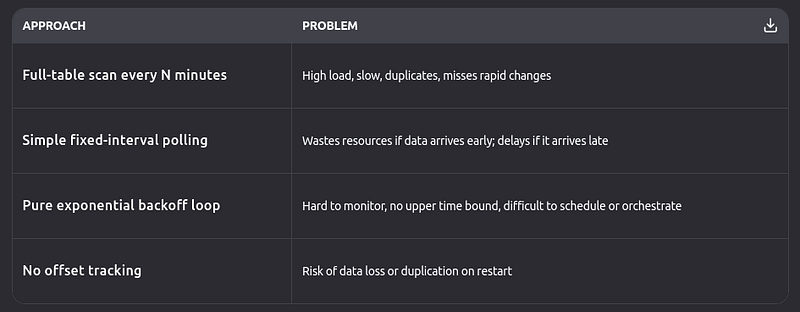
None of these alone provides the reliability, efficiency, and observability needed for production systems.
Introducing the Hybrid Pattern
The Hybrid Stateful Polling with Offset Tracking + Adaptive Backoff pattern combines three proven techniques into a cohesive, resilient architecture:
- Cron-driven scheduling for predictable, bounded execution windows
- Exponential backoff polling within each window for responsiveness
- Stateful offset tracking for exactly-once semantics and crash recovery
This hybrid approach delivers the best of all worlds: low latency when data is ready early, resource efficiency when it’s delayed, and guaranteed progress even after failures.
How It Works: Step by Step
1. Schedule Polling Cycles with Cron
A scheduler (e.g., Airflow, Temporal, cron, or cloud scheduler) triggers a polling cycle at regular intervals, say, every 5 minutes.
🔁 This ensures bounded maximum latency: you’ll never wait more than 5 minutes to start looking for new data.
2. Load the Last Processed Offset
At the start of each cycle, the system reads a persistent offset from a metadata store (e.g., a cdc_offsets table, Redis, or DynamoDB):
{
  "table": "orders",
  "last_id": 10542,
  "last_updated_at": "2025-10-16T12:34:56Z"
}
This offset acts as a bookmark, telling the system where to resume.
3. Run Adaptive Backoff Polling Within the Cycle
Instead of checking just once, the system enters a time-bounded backoff loop (e.g., max 4.5 minutes per 5-minute cycle):
- Attempt 1: Wait 3 seconds → query for changes
- Attempt 2: Wait 6 seconds → query again
- Attempt 3: Wait 12 seconds → query again
- … up to a maximum interval (e.g., 60 seconds) and max attempts (e.g., 5)
Each query uses the offset with a small time buffer to handle clock skew:
SELECT
    id,
    customer_id,
    amount,
    updated_at
FROM orders
WHERE updated_at > '2025-10-16T12:34:46Z' -- offset minus 10s buffer
  AND id > 10542
ORDER BY updated_at ASC, id ASC
LIMIT 1000;
✅ If new records are found:
Process and send to sink (e.g., Kafka, Snowflake, database)
Only then update the offset to the latest id/updated_at
✅ If no records:
Continue backoff until cycle timeout
4. Ensure Idempotent Sink Writes
Downstream systems must handle potential duplicates (e.g., due to retries). Use upserts or deduplication keys:
MERGE INTO analytics.orders AS targetUSING (VALUES ...) AS sourceON target.id = source.idWHEN
MATCHED AND source.updated_at > target.updated_at
THEN UPDATE ...WHEN NOT MATCHED THEN INSERT ...
5. Graceful Failure Handling
- If processing fails → do not update the offset
- On restart, the next cycle resumes from the last committed offset
- Failed batches can be routed to a dead-letter queue for inspection
Real-World Benefits
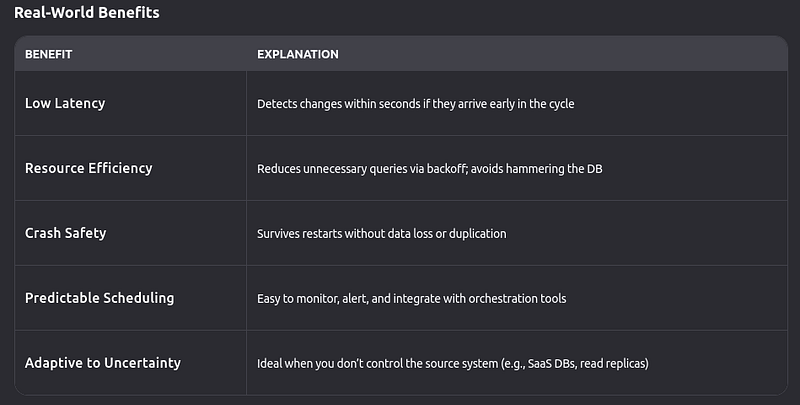
When to Use This Pattern
✅ Ideal for:
- Cloud databases without binlog access (e.g., AWS RDS, Google Cloud SQL)
- Read-only database connections
- Tables with soft deletes and indexed
updated_atcolumns - Near-real-time ETL where sub-5-minute latency is acceptable
❌ Not ideal for:
- Sub-second latency requirements → use log-based CDC
- Tables without monotonic update columns → consider triggers or shadow tables
- Extremely high-volume change streams → query-based CDC may not scale
Conclusion
In the era of data-driven systems, near-real-time synchronization between source databases and downstream systems is critical, yet log-based Change Data Capture (CDC) remains inaccessible for many due to constraints like managed cloud environments, read-only access, or legacy infrastructure. This article underscores the necessity of query-based CDC and introduces the Hybrid Stateful Polling with Offset Tracking + Adaptive Backoff design pattern as the optimal solution for such scenarios.
By integrating three core components — cron-driven scheduling for predictable cycles, exponential backoff polling for adaptive responsiveness, and stateful offset tracking for reliability — the hybrid pattern addresses the inefficiencies and risks of naive query-based CDC. Cron scheduling ensures bounded maximum latency, preventing delays beyond predefined intervals, while adaptive backoff within each cycle minimizes redundant checks and reduces load on the source database by spacing out retries as failures persist. Stateful offset tracking, with durable storage and failure recovery mechanisms, guarantees exactly-once processing semantics, safeguarding against data loss or duplication even during crashes.
This pattern excels in environments where sub-second latency is not required but consistent, reliable data capture is paramount. It is particularly well-suited for cloud databases with limited log access, read-only connections, tables with indexed update timestamps, and ETL pipelines tolerating sub-5-minute latency. However, it is not ideal for ultra-low-latency needs or high-volume change streams where log-based CDC or specialized tools would be more effective.
The provided Go implementations of adaptive backoff and simple polling services further illustrate its practicality, demonstrating features like thread-safe statistics tracking, graceful shutdowns, and integration with dependency injection frameworks (Uber Fx). By balancing responsiveness, resource efficiency, and robustness, the Hybrid Stateful Polling pattern empowers engineering teams to build production-grade CDC pipelines that meet real-world demands without compromising on reliability.
In summary, when log-based CDC is out of reach, the Hybrid Stateful Polling with Offset Tracking + Adaptive Backoff pattern emerges as the gold standard for query-based CDC, offering a structured, efficient, and resilient approach to keep data ecosystems synchronized.
Your Business — On AutoPilot with DDImedia AI Assistant
(Join Our Waitlist)
Visit us at DataDrivenInvestor.com
Join our creator ecosystem here.
DDI Official Telegram Channel: https://t.me/+tafUp6ecEys4YjQ1