
Add Swagger to a Golang Gin Project
In the earlier stage of the project, we implemented middleware components and a health monitoring controller. In this tutorial, I will build on this foundation by integrating Swagger, a tool that enables interactive API documentation and streamlines the processes of testing and development.
Swagger repository
https://github.com/swaggo/swagPrevoius document
✅ Step 1: Install swag CLI
Install the swag command-line tool globally:
go install github.com/swaggo/swag/cmd/swag@latestMake sure$GOPATH/binis in your$PATH, otherwise you won't be able to runswagdirectly.
✅ Step 2: Add Swagger annotations to your handlers
Use comments to annotate your API routes. Example:
// @title           My API// @version         1.0// @description     This is a sample API with Gin
and Swagger.// @host localhost:8080// @BasePath /api/v1package mainfunc main() {
r := gin.Default()
// Serve Swagger docs
r.GET("/swagger/*any", ginSwagger.WrapHandler(swaggerFiles.Handler))
r.Run(":4000")
}✅ Step 3: Install Gin Swagger middleware
go get github.com/swaggo/gin-swagger
go get github.com/swaggo/files
go get github.com/swaggo/swag
✅ Step 4: Generate Swagger docs
swag init --parseDependency --parseInternal -g cmd/web/main.go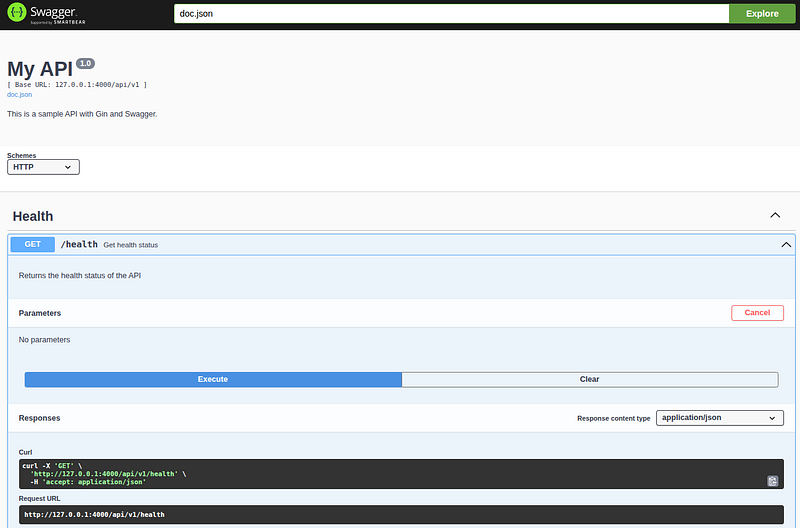
Swagger URL 🧑🎓
http://127.0.0.1:4000/swagger/index.html#/Add Setup Configuration
func (a *Application) Routes() {
    api := a.Router.Group("/api/v1/") api.GET("/health", HealthHandler) api.GET("/slow",
    SlowHandler) // Set Swagger metadata dynamically docs.SwaggerInfo.Title = "My API"
    docs.SwaggerInfo.Version = "1.0" docs.SwaggerInfo.Description =
    "This is a sample API with Gin and Swagger." docs.SwaggerInfo.Host = "127.0.0.1:4000"
    docs.SwaggerInfo.BasePath = "/api/v1" docs.SwaggerInfo.Schemes = []string{
        "http"
    }
    // or {
        "https"
    }
    in production a.Router.GET("/swagger/*any", ginSwagger.WrapHandler(swaggerFiles.Handler))
}
Github Commit
Conclusion 🧙
Integrating Swagger into a Golang Gin project significantly enhances API development and testing by providing clear, interactive, and up-to-date documentation. By following a few simple steps — installing the Swag CLI, adding descriptive annotations to your handlers, installing the necessary Gin Swagger middleware, and generating the documentation — you can quickly enable a powerful self-documenting API system.
In this tutorial, we built upon a previous foundation that included middleware and a health controller, and successfully added Swagger support to visualize and interact with API endpoints in real time. The use of dynamic configuration through docs.SwaggerInfo allows for flexible deployment across different environments, making it easy to manage settings like host, base path, and schemes.
With Swagger now integrated, developers can explore, test, and debug API routes directly from the browser, improving collaboration between teams and reducing the learning curve for new contributors. Overall, Swagger paired with Gin offers a robust solution for modern API development in Go, combining speed, clarity, and functionality in one cohesive package.