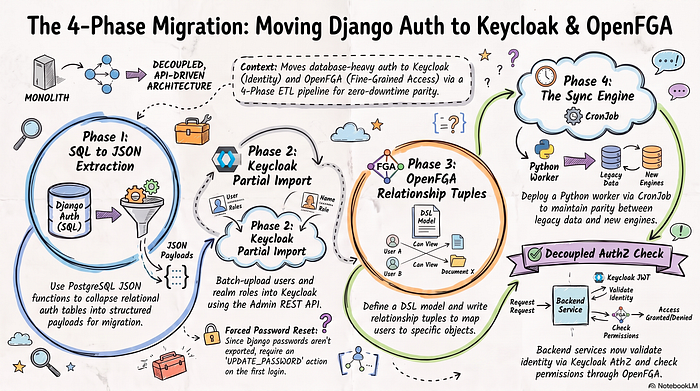
Modernizing identity and authorization infrastructure is a critical step for scaling cloud-native applications. Transitioning from a monolith’s database-backed authorization framework — such as Django’s built-in auth and custom permission models—to a decoupled, API-driven architecture requires careful planning.
By separating Authentication (AuthN) into Keycloak and Fine-Grained Authorization (AuthZ) into OpenFGA, organizations can achieve centralized Single Sign-On (SSO) alongside Google Zanzibar-style relationship-based access control (ReBAC).
This article outlines a production-grade, 4-phase ETL migration strategy to transition from legacy relational authorization to a dual Keycloak and OpenFGA architecture.
Architecture Overview: The Target State
In the legacy architecture, the database performs heavy table joins across users_user, users_user_groups, auth_group, and auth_permission on every request.
In the target state, concerns are strictly decoupled:
DECISION & DATA FLOW ARCHITECTURE

┌──────────────────────────────────────────────────────────────────────┐
│ 1. LEGACY MONOLITH DATABASE                                          │
├──────────────────────────────────────────────────────────────────────┤
│ PostgreSQL / MySQL                                                   │
│ Tables: users_user, users_user_groups, auth_group, auth_permission   │
└──────────────────────────────────┬───────────────────────────────────┘
                                   │ Phase 1: aggregated JSON query
                                   ▼
┌──────────────────────────────────────────────────────────────────────┐
│ 2. ETL SYNC ENGINE / CRON WORKER                                    │
├──────────────────────────────────────────────────────────────────────┤
│ • Extract user profiles, groups, and permissions                    │
│ • Transform into Keycloak JSON and OpenFGA tuples                   │
└───────────────────┬────────────────────────────────┬─────────────────┘
                    │ Phase 2: HTTP REST             │ Phase 3: HTTP REST
                    ▼                                ▼
┌────────────────────────────────┐  ┌──────────────────────────────────┐
│ KEYCLOAK IDENTITY PROVIDER     │  │ OPENFGA AUTHORIZATION ENGINE     │
├────────────────────────────────┤  ├──────────────────────────────────┤
│ • User credentials             │  │ • Relationship graph (ReBAC)    │
│ • Profile attributes           │  │ • Fine-grained permissions      │
│ • Global realm roles           │  │ • Object/resource mapping       │
└────────────────┬───────────────┘  └─────────────────┬────────────────┘
                 │ Authenticate and issue JWT         │ Check permission
                 └──────────────────┬──────────────────┘
                                    ▼
┌──────────────────────────────────────────────────────────────────────┐
│ 3. APPLICATION BACKEND / MICROSERVICES API MIDDLEWARE               │
└──────────────────────────────────────────────────────────────────────┘- Keycloak (Identity & AuthN): Acts as the Identity Provider (IdP). It manages user credentials, user profile attributes (
is_active), and high-level realm roles (Ticketing). - OpenFGA (Relationship AuthZ): Acts as the authorization engine. It stores relationship tuples mapping users to roles, permissions, and specific domain resources (
user:john -> member -> role:admin).
Phase 1: Database Preparation & Dual-Target Aggregation
The first phase involves extracting relational auth state into structured JSON representations optimized for both Keycloak’s Partial Import API and OpenFGA’s Tuple Write API.
The Phase 1 Extraction Query
Using PostgreSQL JSON functions (jsonb_build_object, jsonb_agg), this query collapses raw relational joins into one clean, aggregated row per user.
Phase 2: Keycloak Migration (Authentication & Realm Roles)
Once extracted, the keycloak_payload is ingested into Keycloak using the Partial Import REST API.
Keycloak Partial Import Batch Structure
The ETL worker batches the user records into chunks (e.g., 100 users per request) and executes a POST request against Keycloak:
curl -X POST "http://<KEYCLOAK_HOST>/admin/realms/<YOUR_REALM>/partialImport" \
  -H "Authorization: Bearer <ACCESS_TOKEN>" \
  -H "Content-Type: application/json" \
  -d '{
    "ifResourceExists": "OVERWRITE",
    "users": [
      {
        "username": "user@example.com",
        "email": "user@example.com",
        "enabled": true,
        "emailVerified": true,
        "attributes": {
          "is_staff": [
            "false"
          ]
        },
        "realmRoles": [
          "Generic sdm",
          "TicketingUser"
        ]
      }
    ]
  }'
Credential Note: Passwords are not directly exported in plain text from Django. During initial user migration, users should be imported with temporary credentials or forced to reset passwords on their first OIDC login attempt (requiredActions: ["UPDATE_PASSWORD"]).Phase 3: OpenFGA Migration (Fine-Grained Authorization)
OpenFGA handles relationship graph evaluations. Before ingesting tuples, an Authorization Model written in OpenFGA DSL must be deployed to the target store.
1. The OpenFGA Authorization Model (DSL)
model
  schema 1.1
type user
type role
  relations
    define member: [user]
type feature
  relations
    define viewer: [user, role#member]
    define creator: [user, role#member]
    define can_view_ticket: viewer
    define can_instantiate: creator
2. Ingesting OpenFGA Tuples via API
The ETL pipeline extracts the openfga_tuples generated by the Phase 1 SQL query and posts them to OpenFGA’s Write API:
curl -X POST "http://<OPENFGA_HOST>:8080/stores/<STORE_ID>/write" \
  -H "Content-Type: application/json" \
  -d '{
    "authorization_model_id": "<MODEL_ID>",
    "writes": {
      "tuple_keys": [
        {
          "user": "user:user@example.com",
          "relation": "member",
          "object": "role:generic_sdm"
        },
        {
          "user": "role:generic_sdm#member",
          "relation": "viewer",
          "object": "feature:view_ticket"
        }
      ]
    }
  }'
Phase 4: Automated Synchronization & Application Switchover
Because neither Keycloak nor OpenFGA natively pulls data on a cron schedule from custom REST APIs, an External Sync Worker is deployed to maintain parity during the transition period.
Continuous Sync Pipeline (Python Example)
import os
import requests
import psycopg2
from psycopg2.extras import RealDictCursor

def run_iam_etl_sync():
    conn = psycopg2.connect(os.getenv("DATABASE_URL"))
    with conn.cursor(cursor_factory=RealDictCursor) as cursor:
        cursor.execute("... Phase 1 SQL Query ...")
        records = cursor.fetchall()
    keycloak_users = []
    openfga_writes = []
    for row in records:
        keycloak_users.append(row["keycloak_payload"])
        openfga_writes.extend(row["openfga_tuples"])
    kc_token = get_keycloak_admin_token()
    requests.post(
        f"{os.getenv('KEYCLOAK_HOST')}/admin/realms/{os.getenv('REALM')}/partialImport",
        json={"ifResourceExists": "OVERWRITE", "users": keycloak_users},
        headers={"Authorization": f"Bearer {kc_token}"}
    )
    for i in range(0, len(openfga_writes), 100):
        batch = openfga_writes[i:i + 100]
        requests.post(
            f"{os.getenv('OPENFGA_HOST')}/stores/{os.getenv('STORE_ID')}/write",
            json={"writes": {"tuple_keys": batch}}
        )

if __name__ == "__main__":
    run_iam_etl_sync()
Scheduling the Sync
Deploy the sync worker using an OS crontab, Airflow DAG, or Kubernetes CronJob:
apiVersion: batch/v1
kind: CronJob
metadata:
  name: iam-etl-sync
spec:
  schedule: "0 * * * *"
  jobTemplate:
    spec:
      template:
        spec:
          containers:
            - name: sync-worker
              image: mycompany/iam-etl-worker:latest
          restartPolicy: OnFailure
Application-Level Authorization Check
Once Phase 4 is live, backend services validate identity via Keycloak JWTs and delegate permission checks directly to OpenFGA:
# API Endpoint Permission Check

def check_user_permission(user_email: str, permission: str, resource: str) -> bool:
    response = requests.post(
        "http://openfga:8080/stores/YOUR_STORE_ID/check",
        json={
            "tuple_key": {
                "user": f"user:{user_email}",
                "relation": permission,
                "object": resource
            }
        }
    )
    return response.json().get("allowed", False)

# Usage in API middleware:
# allowed = check_user_permission("user@example.com", "can_view_ticket", "feature:view_ticket")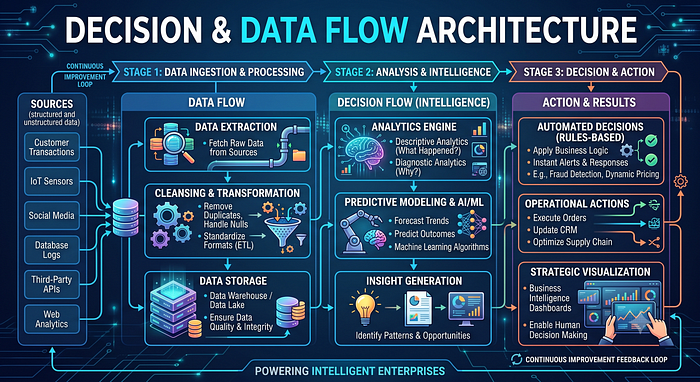
Migration Checklist Summary
- [x] Database Audit: Verified custom user table (
users_user) and role structures (users_user_groups,auth_group). - [x] Extract (Phase 1): Executed aggregated JSON SQL query to prepare dual payloads.
- [x] Load Keycloak (Phase 2): Imported users, profile attributes (
is_active), and macro realm roles via Partial Import API. - [x] Load OpenFGA (Phase 3): Deployed DSL model and written relationship tuples (
member,can_view_ticket). - [x] Automation (Phase 4): Scheduled background sync worker (CronJob/Airflow) to keep authorization state synchronized until cutover