Connect to google cloud object storage with golang Language
Google Cloud Object Storage is the one big and best device for storing sequences of bytes of files. It can handle it easily and store data in distributed locations. working with the SDK is so simple and they had an enormous library for handling the data.
Below explain how to make Storage with the UI of GCS.
Creating a Client
To start working with this package, We need to create a client.The client will use your default application credentials.
import     "cloud.google.com/go/storage"ctx := context.Background()client, err :=
storage.NewClient(ctx)if err != nil {
    // TODO: Handle error.}
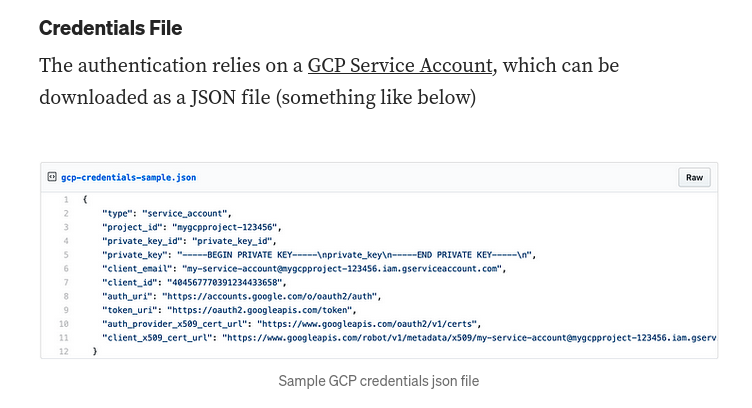
For Authentication and to connect securely to the GCS use the below document.
In our system, we make a JSON authentication and log in with a credential file.
filename := "./address_of_json.json" client, err := storage.NewClient(ctx,
option.WithCredentialsFile(filename)) if err != nil {  logger.Fatal(err) }
Buckets
A Google Cloud Storage bucket is a collection of objects. To work with a bucket, make a bucket handle:
bucketName := "my-first-bucket"bkt := client.Bucket(bucketName)A handle is a reference to a bucket. You can have a handle even if the bucket doesn’t exist yet. To create a bucket in Google Cloud Storage, call BucketHandle.Create:
if err := bkt.Create(ctx, projectID, nil); err != nil {
	// TODO: Handle error.
}
Each bucket has associated metadata, represented in this package by BucketAttrs.
attrs, err := bkt.Attrs(ctx)if err != nil {    // TODO: Handle
error.}fmt.Printf("bucket %s, created at %s, is located in %s with storage class %s\n",
attrs.Name, attrs.Created, attrs.Location, attrs.StorageClass)
Object
An object holds arbitrary data as a sequence of bytes, like a file. You refer to objects using a handle, just as with buckets, but unlike buckets you don’t explicitly create an object.
obj := bkt.Object("new-first-one")Write Bytes into Object
GCS handles the file as a sequence of bytes and puts it into the object. In our case, we need to store bytes of input inside of the object.
// Create a byte slice. bytes := []byte("Hello, world!") writer := obj.NewWriter(ctx) _, err =
writer.Write(bytes) if err != nil {  log.Fatal(err) } // Close the writer. err = writer.Close() if
err != nil {  log.Fatal(err) }
Read Bytes From Object
GCS can read bytes from an object at once or paginate the bytes.
// Create a reader. reader, err := obj.NewReader(ctx) if err != nil {  log.Fatal(err) } // Read the
bytes from the file. bytes, err := io.ReadAll(reader) if err != nil {  log.Fatal(err) } // Close the
reader. err = reader.Close() if err != nil {  log.Fatal(err) } // Convert the bytes to a string and
print it. fmt.Println(string(bytes))
Delete Object
GCS can easily delete the object.
err = obj.Delete(ctx) if err != nil {
    logger.Fatal(err)
}
List of Object
For getting a list of objects inside the bucket they prepare the iterator functionality.
query := &storage.Query{Prefix: ""} var names []string it := bkt.Objects(ctx, query) for {  attrs,
err := it.Next()  if err == iterator.Done {   break  }  if err != nil {   log.Fatal(err)  }  names =
append(names, attrs.Name) }
CheckSum upload file
check file upload successfully on server.
ctx := context.Background() client, err := storage.NewClient(ctx) if err != nil {  // TODO: handle
error. } data := []byte("verify me") wc :=
client.Bucket("bucketname").Object("filename1").NewWriter(ctx) wc.CRC32C = crc32.Checksum(data,
crc32.MakeTable(crc32.Castagnoli)) wc.SendCRC32C = true if _, err :=
wc.Write([]byte("hello world")); err != nil {  // TODO: handle error.  // Note that Write may return
nil in some error situations,  // so always check the error from Close. } if err := wc.Close(); err
!= nil {  // TODO: handle error. } fmt.Println("updated object:", wc.Attrs())
Set time out for client connction
ctx := context.Background() client, err := storage.NewClient(ctx) if err != nil {  // TODO: handle
error. } tctx, cancel := context.WithTimeout(ctx, 30*time.Second) defer cancel() // Cancel when
done, whether we time out or not. wc :=
client.Bucket("bucketname").Object("filename1").NewWriter(tctx) wc.ContentType = "text/plain" wc.ACL
= []storage.ACLRule{{Entity: storage.AllUsers, Role: storage.RoleReader}} if _, err :=
wc.Write([]byte("hello world")); err != nil {  // TODO: handle error.  // Note that Write may return
nil in some error situations,  // so always check the error from Close. } if err := wc.Close(); err
!= nil {  // TODO: handle error. } fmt.Println("updated object:", wc.Attrs())
Set key for each object
func main() {
    ctx := context.Background() client, err := storage.NewClient(ctx) if err != nil {
        // TODO: handle error.
    }
    obj := client.Bucket("my-bucket").Object("my-object") // Encrypt the
    object's contents. w := obj.Key(secretKey).NewWriter(ctx) if _, err := w.Write([]byte("top secret")); err != nil {  // TODO: handle error. } if err := w.Close(); err != nil {  // TODO: handle error. }}
Get attribute of object
func main() {
    ctx := context.Background() client, err := storage.NewClient(ctx) if err != nil {
        // TODO: handle error.
    }
    objAttrs, err := client.Bucket("my-bucket").Object("my-object").Attrs(ctx) if err != nil {
        // TODO: handle error.
    }
    fmt.Println(objAttrs)
}
Update Object Meta data
func main() {
    ctx := context.Background() client, err := storage.NewClient(ctx) if err != nil {
        // TODO: handle error.
    }
    objAttrs, err := client.Bucket("my-bucket").Object("my-object").Attrs(ctx) if err != nil {
        // TODO: handle error.
    }
    fmt.Println(objAttrs)
}
Using GoLang to create Google Cloud Signed URLs to upload images using ReactJS and dealing with CORS
Signed URLs
it ‘s give time-limited access to a specific Cloud Storage resource. Anyone in possession of the signed URL can use it while it’s active, regardless of whether they have a Google account.
A signed URL is a URL that provides limited permission and time to make a request. Signed URLs contain authentication information in their query string, allowing users without credentials to perform specific actions on a resource. When you generate a signed URL, you specify a user or service account which must have sufficient permission to make the request that the signed URL will make. After you generate a signed URL, anyone who possesses it can use the signed URL to perform specified actions, such as reading an object, within a specified period of time.
Serialize a struct to bytes to send GCS
The naive approach: structured text as bytes
The most straightforward but pretty inefficient method to convert a struct into a byte slice is to marshal it to JSON/YAML or any other markup language format but these formats are human-readable.So if performance or size matters, it’s better to utilize something that is faster and more compact rather than JSON or YAML.
The more efficient approach: structured binary encoding
The encoding/gob package of the Go standard library provides you an easy way to serialize your struct to bytes. It consumes less CPU power and memory than JSON but still preserves the field names which makes the output data length greater than it could be. What is really unpleasant is the size of the data sequence. It might be a bit greater than the length of the same struct object in the JSON format.
The encoding/binary package of the Go standard library allows you to convert structs or single values to byte sequences. You should also specify the endianness. The binary.BigEndian byte order is usually applied to transmit data over the network and the binary.LittleEndian byte order is mostly utilized to store data in the RAM and CPU registers. Also we will use our BytesReadWriteSeeker type for read and write operations.
Encoding Data with the Go Binary Package
Sample code for GOB
Special thanks with Mohsen Mottaghi