
Integrating Zarinpal Payment Gateway in NestJS
A guide on how to integrate Zarinpal Payment Gateway in NestJS.
The provided content outlines integrating the Zarinpal payment gateway into a NestJS application. Zarinpal is an Iranian payment service provider, and this implementation allows developers to facilitate online transactions in their web applications.
The integration process begins with installing the necessary package, “zarinpal-nestjs”, and setting up the module in the application. The app module and configuration files specify configuration details, such as the merchant ID and callback URL.
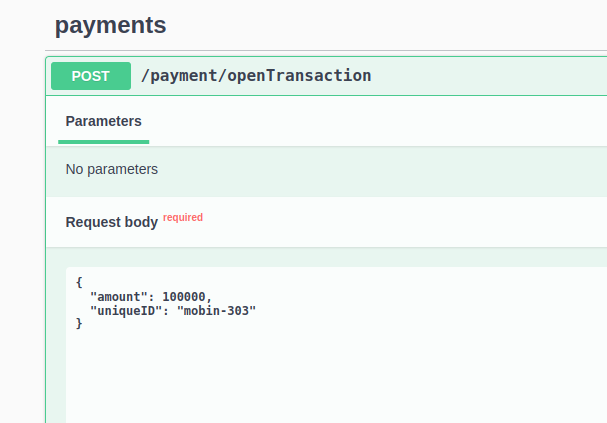
The payment flow consists of two main steps: opening and verifying a transaction. The “openTransaction” function initiates the payment process, creating a link redirecting the user to the bank’s payment page. After the user completes the payment, they are redirected to the application’s callback URL.
The “verifyTransaction” function is crucial for confirming the payment’s success or failure. It checks the payment status and communicates with Zarinpal’s API to verify the transaction details. The implementation includes error handling and updates the payment status in the database accordingly.
The code snippets provided demonstrate the structure of the payment module, including the controller, service, and data transfer objects (DTOs). They also showcase the use of MongoDB with Mongoose to store payment information.
One notable point is mentioning a bug in the package’s verifyTransaction function. The implementation includes a custom verification method using direct HTTP requests to Zarinpal’s API to work around this.
In conclusion, this integration offers a comprehensive solution for handling online payments in a NestJS application, covering the entire payment lifecycle from initiation to verification. It provides a solid foundation for developers looking to implement Zarinpal as their payment gateway in Node.js-based web applications.
Create a resource
nest g resource paymentNodejs sample code
Nestjs sample code
Documentation
Installation
yarn add zarinpal-nestjs
npm install --save zarinpal-nestjs
npm audit fix --force
Open Transaction
In the first step, it is mandatory to initial a transaction.
app.module.ts
ZarinpalModule.register({      callBackUrl: configuration().zarinpal.callBackUrl,      merchantId:
configuration().zarinpal.merchantId,    }),    PaymentModule,
configuration.ts
zarinpal: {    merchantId: process.env.ZARINPAL_MERCHANT_ID,    callBackUrl:
process.env.ZARINPAL_CALLBACK_URL,  },
payment.controller.ts
@Post('/openTransaction/') @UseGuards(CustomerGuard) @ApiOkResponse({
  type: () => CreatePaymentResultDto
}) @ApiBearerAuth() create(@Body() createPaymentDto: CreatePaymentDto, @Req() req: {
  user: Partial<User>
},) {
  return this.paymentService.openTransaction(createPaymentDto, req.user);
}
payment.service.ts
async openTransaction(    createPaymentDto: CreatePaymentDto,    user: Partial<User>,  ):
Promise<CreatePaymentResultDto> {    const transactionResult = await
this.zarinpalService.openTransaction({      amount: createPaymentDto.amount,      description:
createPaymentDto.uniqueID,      metadata: {        mobile: user.phoneNumber,      },    });    try {
const result =        this.zarinpalService.generateStartPayUrl(transactionResult);      await
this.paymentModel.create({        user: user,        amount: createPaymentDto.amount,
uniqueID: createPaymentDto.uniqueID,        status: PaymentStatus.Initial,        gateway:
PaymentGateway.Zarinpal,        paymentLink: result,        authority: transactionResult,      });
return { paymentLink: result };    } catch (e) {      throw InternalServerErrorException;    }  }
create.dto.ts
import {
  ApiProperty
}
from '@nestjs/swagger';
export class CreatePaymentDto {
  @ApiProperty() amount: number;
  @ApiProperty() uniqueID: string;
}
export class CreatePaymentResultDto {
  @ApiProperty() paymentLink: string;
}
payment.entity.ts
import {
  Prop, Schema, SchemaFactory
}
from '@nestjs/mongoose';
import {
  ApiProperty, ApiPropertyOptional
}
from '@nestjs/swagger';
import mongoose, {
  Document
}
from 'mongoose';
import {
  User
}
from 'src/users/schemas/user.schema';
export enum PaymentStatus {
  Initial = 'Initial', Pending = 'Pending', Success = 'Success', Failed = 'Failed',
}
export enum PaymentGateway {
  Zarinpal = 'Zarinpal',
}
@Schema({
  timestamps: true, collection: 'Payment',
})
export class Payment extends Document {
  @ApiProperty() _id: string;
  @ApiProperty({
    type: () => User
  }) @Prop({
    type: mongoose.Schema.Types.ObjectId, ref: 'user'
  }) user: User;
  @ApiProperty() @Prop({
    required: true
  }) amount: number;
  @ApiProperty() @Prop({
    required: true, unique: true
  }) uniqueID: string;
  @ApiProperty({
    type: () => [PaymentStatus]
  }) @Prop({
    required: true
  }) status: string;
  @ApiProperty({
    type: () => [PaymentGateway]
  }) @Prop({
    required: true
  }) gateway: string;
  @ApiProperty() @Prop({
    required: true
  }) paymentLink: string;
  @ApiPropertyOptional() @Prop({
    type: Object
  }) authority: Record<string, any>;
}
const PaymentSchema = SchemaFactory.createForClass(Payment);
export {
  PaymentSchema
};
Payment
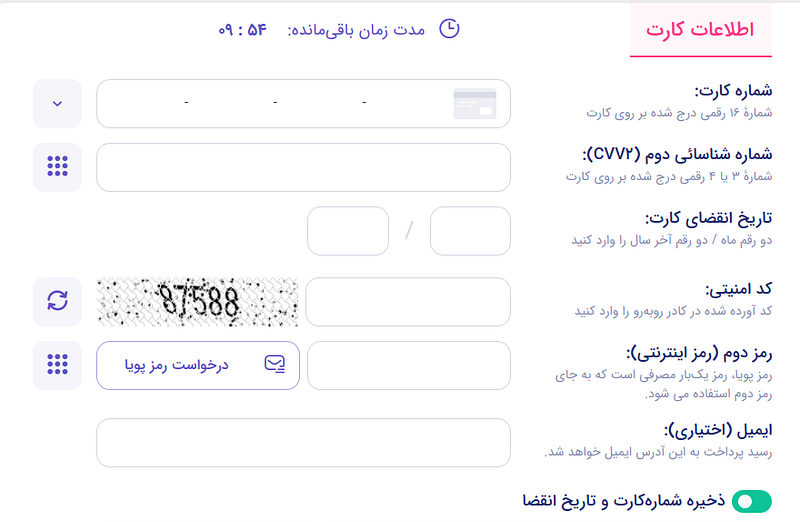
the client will go to the bank page and pay with his cart. Then, the bank sends him back to the callback on the website.
Verify Transaction
If you don’t verify the transaction after 30 minutes, money will be returned to the customer.
payment.controler.ts
@Get('/zarinpal/verify') @ApiOkResponse({
  type: () => VerifyPaymentZarinPalResponseDto
}) async verifyTransaction(@Query() query: VerifyPaymentZarinPalDto) {
  return this.paymentZarinpalService.verifyTransaction(query);
}
payment.module.ts
import {
  Module
}
from '@nestjs/common';
import {
  PaymentZarinpalService
}
from './payment.zarinpal.service';
import {
  PaymentController
}
from './payment.controller';
import {
  AuthModule
}
from 'src/auth/auth.module';
import {
  MongooseModule
}
from '@nestjs/mongoose';
import {
  Payment, PaymentSchema
}
from './entities/payment.entity';
import {
  HttpModule
}
from '@nestjs/axios';
@Module({
  imports: [AuthModule, MongooseModule.forFeature([{
    name: Payment.name, schema: PaymentSchema
  }]), HttpModule,], controllers: [PaymentController], providers: [PaymentZarinpalService],
})
export class PaymentModule {
}
payment.zarinpal.service.
In this case, it is possible to use a verifyTransaction function.
async verifyTransaction(query: VerifyPaymentZarinPalDto) {    const payment = await
this.paymentModel.findOne({      authority_code: query.Authority,    });    if (!payment) {
throw new NotFoundException();    }    if (      payment.status == PaymentStatus.Failed ||
payment.status == PaymentStatus.Success    ) {      return new NotFoundException();    }    if
(query.Status === 'NOK') {      payment.status = PaymentStatus.Failed;      payment.save();
return { status: PaymentStatus.Failed, message: PaymentStatus.Failed };    }    payment.status =
PaymentStatus.Pending;    await payment.save();    try {      const verify = await
this.zarinpalService.verifyTransaction({        authority: query.Authority,        amount:
payment.amount,      });      if (verify.code == 100 || verify.code == 101) {        payment.status
= PaymentStatus.Success;      } else {        payment.status = PaymentStatus.Failed;      }
payment.response = verify;      await payment.save();      return { status: payment.status, message:
verify.message };    } catch (e) {      console.error(e);      payment.response = e;
payment.status = PaymentStatus.Failed;      payment.save();      throw InternalServerErrorException;
}  }
create.dto.ts
export class VerifyPaymentZarinPalDto {
  @ApiProperty() Status: string;
  @ApiProperty() Authority: string;
}
export class VerifyPaymentZarinPalResponseDto {
  @ApiProperty() Status: string;
  @ApiProperty() Message: string;
}
zarinpal.type.ts
export class ZarinPalVerifyResponse {
  data: {
    code: number;
    message: string;
    card_hash: string;
    card_pan: string;
    ref_id: number;
    fee_type: string;
    fee: number;
    shaparak_fee: string;
    order_id: number | null;
  };
  errors: any[];
}
export const ZarinPalVerifyURL = 'https://payment.zarinpal.com/pg/v4/payment/verify.json';
Stackademic 🎓
Thank you for reading until the end. Before you go:
- Please consider clapping and following the writer! 👏
- Follow us X | LinkedIn | YouTube | Discord
- Visit our other platforms: In Plain English | CoFeed | Differ
- More content at Stackademic.com