MongoDB and GraphQL in the Nestjs
The document discusses implementing MongoDB with GraphQL in a NestJS project. It covers:
1. Initial project setup using NestJS
2. Introduction to GraphQL and its comparison with REST APIs
3. Installation and configuration of GraphQL in a NestJS project
4. Creating a basic Lesson module with GraphQL queries and mutations
5. Integrating MongoDB using TypeORM
6. Setting up Docker for MongoDB
7. Implementing CRUD operations for Lessons
8. Adding validation using DTOs
9. Creating a Student module and implementing related operations
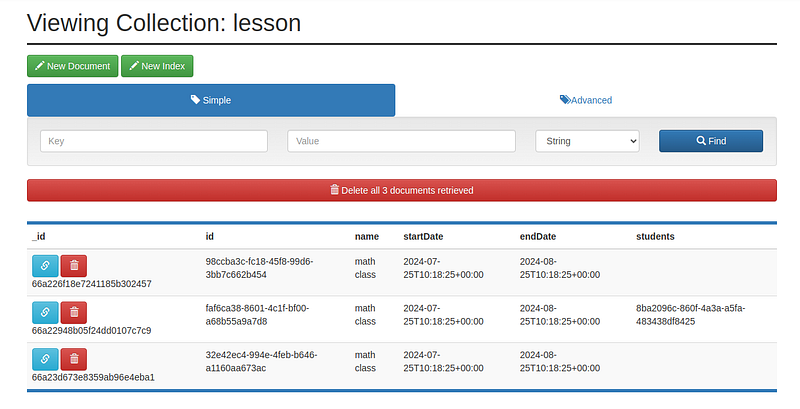
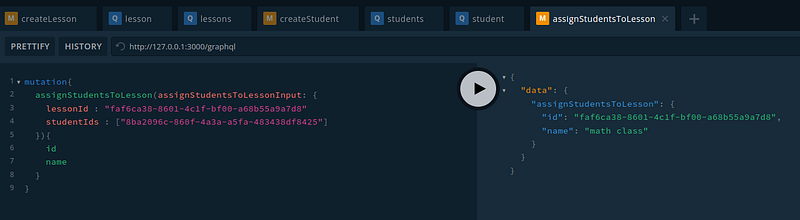
10. Assigning students to lessons
Modernizing Backend Development with NestJS, GraphQL, and MongoDB
In recent years, the landscape of backend development has evolved rapidly, with new technologies and architectures emerging to address the growing demands of modern applications. This essay explores the powerful combination of NestJS, GraphQL, and MongoDB, demonstrating how these technologies can be leveraged to create efficient, scalable, and flexible backend systems.
NestJS, a progressive Node.js framework, provides a robust foundation for building server-side applications. Its modular architecture and dependency injection system allow developers to create maintainable and testable code. By incorporating GraphQL, a query language for APIs, NestJS applications can offer more efficient data fetching and manipulation than traditional REST APIs.
GraphQL’s ability to request precisely the data needed in a single query addresses the over-fetching and under-fetching issues common in REST APIs. This is particularly beneficial when clients require complex, nested data structures or network performance is crucial. GraphQL's schema-first approach also enhances collaboration between frontend and backend teams, as it provides a clear contract for data exchange.
Integrating MongoDB, a popular NoSQL database, with NestJS and GraphQL creates a powerful stack for handling diverse data models and scaling horizontally. MongoDB’s document-based structure aligns well with GraphQL’s flexible schema, allowing for easy adaptation to changing data requirements. The use of TypeORM in this stack provides an abstraction layer that simplifies database operations and supports multiple database systems, enhancing the portability of the application.
The implementation process described in the document showcases the step-by-step approach to building a learning management system. It begins with setting up the NestJS project and gradually introduces GraphQL and MongoDB integration. Creating modules for Lessons and Students demonstrates how to structure a NestJS application and implement basic CRUD operations using GraphQL mutations and queries.
One key advantage of this stack is the safety it provides. By using TypeScript and leveraging GraphQL’s strong typing system, developers can catch potential errors early in development. The addition of DTO (Data Transfer Object) validation further enhances data integrity and provides clear error messages for API consumers.
The use of Docker to set up the MongoDB environment highlights the importance of containerization in modern development workflows. Containerization ensures consistency across different development environments and simplifies the deployment process.
Implementing features like assigning students to lessons demonstrates how complex relationships can be handled effectively in this stack. It showcases MongoDB's flexibility in storing and updating nested data structures, while GraphQL provides an intuitive way to query and mutate this data.
In conclusion, the combination of NestJS, GraphQL, and MongoDB represents a powerful approach to backend development. It addresses many challenges in building modern applications, such as efficient data fetching, flexible data modeling, and scalability. As the tech industry evolves, this stack provides developers the tools to create robust, performant, and maintainable backend systems that can adapt to changing requirements and scale with growing user bases.
Implement project with MongoDB in Nestjs.
Initial project
nest new nestjs-mongodbyarn run start
yarn run start:devVersion
nest --version10.3.2Update version
npm install @nestjs/cli -gIs GraphQL a database or API?
Is GraphQL a Database Technology? No. GraphQL is often confused with being a database technology. This is a misconception. GraphQL is a query language for APIs — not databases.
GraphQL is a query language for your API and a server-side runtime for executing queries using a type system you define for your data. GraphQL isn’t tied to any specific database or storage engine but is backed by your existing code and data.
GraphQL vs. REST API: What’s the difference?
REST
Developed in the early 2000s, REST is a structured architectural style for networked hypermedia applications designed to use a stateless, client/server, cacheable communication protocol. REST APIs, also called RESTful APIs, are the drivers of REST architectures.
REST APIs use unique resource identifiers (URIs) to address resources. They work by having different endpoints perform CRUD (“create,” “read,” “update,” and “delete”) operations for network resources. They rely on a predefined data format—called a media type or MIME type—to determine the shape and size of resources they provide to clients. The most common formats are JSON and XML (and sometimes HTML or plain text).
When the client requests a resource, the server processes the query and returns all the data that is associated with that resource. The response includes HTTP response codes like “200 OK” (for successful REST requests) and “404 Not Found” (for resources that don’t exist).
GraphQL
GraphQL is a query language and API runtime that Facebook developed internally in 2012 before it became open-source in 2015.
GraphQL is defined by API schema written in the GraphQL schema definition language. Each schema specifies the types of data the user can query or modify, as well as the relationships between the types. A resolver backs each field in a schema. The resolver provides instructions for turning GraphQL queries, mutations, and subscriptions into data and retrieves data from databases, cloud services, and other sources. Resolvers also provide data format specifications and enable the system to stitch together data from various sources.
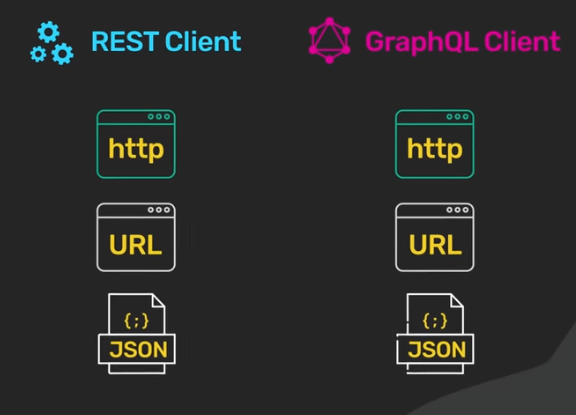
Unlike REST, which typically uses multiple endpoints to fetch data and perform network operations, GraphQL exposes data models by using a single endpoint through which clients send GraphQL requests, regardless of what they’re asking for. The API then accesses resource properties — and follows the references between resources — to get the client all the data they need from a single query to the GraphQL server.
Both GraphQL and REST APIs are resource-based data interchanges that use HTTP methods (like PUT and GET requests) that dictate which operations a client can perform. However, key differences exist between them that explain not only the proliferation of GraphQL but also why RESTful systems have such staying power.
GraphQL Explained in 100 Seconds
What Is GraphQL? REST vs. GraphQL
Install Graphql
npm install graphql graphql-tools apollo-server-express @nestjs/graphqlnpm install @nestjs/apolloAdd into app.module.ts
import {
  ApolloDriver, ApolloDriverConfig
}
from '@nestjs/apollo';
import {
  Module
}
from '@nestjs/common';
import {
  GraphQLModule
}
from '@nestjs/graphql';
@Module({
  imports: [GraphQLModule.forRoot<ApolloDriverConfig>({
    driver: ApolloDriver, autoSchemaFile: 'schema.gql',
  }),],
})
export class AppModule {
}
Generate module
nest g module lessonapp.module.ts
import {
  Module
}
from '@nestjs/common';
import {
  GraphQLModule
}
from '@nestjs/graphql';
import {
  ApolloDriver, ApolloDriverConfig
}
from '@nestjs/apollo';
import {
  LessonModule
}
from './lesson/lesson.module';
@Module({
  imports: [GraphQLModule.forRoot<ApolloDriverConfig>({
    driver: ApolloDriver, autoSchemaFile: 'schema.gql',
  }), LessonModule,], controllers: [], providers: [],
})
export class AppModule {
}
lesson.module.ts
import {
  Module
}
from '@nestjs/common';
import {
  LessonResolver
}
from './lesson.resolver';
@Module({
  providers: [LessonResolver],
})
export class LessonModule {
}
lesson.resolver.ts
import {
  Resolver, Query
}
from '@nestjs/graphql';
import {
  LessonType
}
from './lesson.type';
@Resolver(() => LessonType)
export class LessonResolver {
  @Query(() => LessonType) lesson() {
    return {
      id: '1', name: 'Physics Class', startDate: new Date().toISOString(), endDate: new
      Date().toISOString(), createdAt: new Date().toISOString(),
    };
  }
}
lesson.type.ts
import {
  ObjectType, Field, ID
}
from '@nestjs/graphql';
@ObjectType('Lesson')
export class LessonType {
  @Field(() => ID) id: string;
  @Field() name: string;
  @Field() startDate: string;
  @Field() endDate: string;
  @Field() createdAt: string;
}
Run GraphQL
http://127.0.0.1:3000/graphql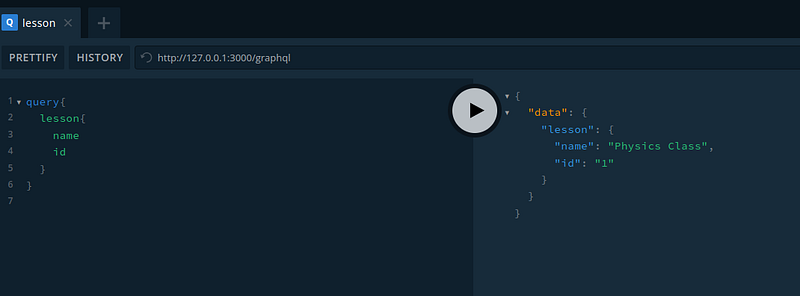
Add MongoDB
npm install typeorm @nestjs/typeorm mongodb @types/mongodbapp.module.ts
import {
  Module
}
from '@nestjs/common';
import {
  GraphQLModule
}
from '@nestjs/graphql';
import {
  ApolloDriver, ApolloDriverConfig
}
from '@nestjs/apollo';
import {
  LessonModule
}
from './lesson/lesson.module';
import {
  TypeOrmModule
}
from '@nestjs/typeorm';
import {
  Lesson
}
from './lesson/lesson.entity';
@Module({
  imports: [TypeOrmModule.forRoot({
    type: 'mongodb', url: 'mongodb://localhost/school', port: 27017, synchronize: true,
    useUnifiedTopology: true, entities: [Lesson],
  }), GraphQLModule.forRoot<ApolloDriverConfig>({
    driver: ApolloDriver, autoSchemaFile: 'schema.gql',
  }), LessonModule,], controllers: [], providers: [],
})
export class AppModule {
}
lesson.entity.ts
import {
  Entity, Column, ObjectIdColumn
}
from 'typeorm';
@Entity()
export class Lesson {
  @ObjectIdColumn() _id: string;
  @Column() name: string;
  @Column() startDate: string;
  @Column() endDate: string;
}
Add Docker-compose
version: '3.9'services:
  mongo:
    image: mongo:latest
    restart: always
    ports:
      - "27017:27017"
  mongoexpress:
    image: mongo-express
    ports:
      - "8081:8081"
    environment:       - ME_CONFIG_MONGODB_URL=mongodb://mongo:27017
    depends_on:
      - mongo
    restart: alwaysvolumes:
  mongo_data:
    driver: local networks:
  default:
    external:
      name: mongo-school-network
Add Service
nest g service lesson --no-specnpm install uuidlesson.entity.ts
import {
  Entity, Column, ObjectIdColumn, PrimaryColumn
}
from 'typeorm';
@Entity()
export class Lesson {
  @ObjectIdColumn() _id: string;
  @PrimaryColumn() id: string;
  @Column() name: string;
  @Column() startDate: string;
  @Column() endDate: string;
}
lesson.module.ts
import {
  Module
}
from '@nestjs/common';
import {
  LessonResolver
}
from './lesson.resolver';
import {
  LessonService
}
from './lesson.service';
import {
  TypeOrmModule
}
from '@nestjs/typeorm';
import {
  Lesson
}
from './lesson.entity';
@Module({
  imports: [TypeOrmModule.forFeature([Lesson])], providers: [LessonResolver, LessonService],
})
export class LessonModule {
}
lesson.resolver.ts
import {
  Resolver, Query, Mutation, Args
}
from '@nestjs/graphql';
import {
  LessonType
}
from './lesson.type';
import {
  LessonService
}
from './lesson.service';
@Resolver(() => LessonType)
export class LessonResolver {
  constructor(private lessonService: LessonService) {
  }
  @Query(() => LessonType) lesson() {
    return {
      id: '1', name: 'Physics Class', startDate: new Date().toISOString(), endDate: new
      Date().toISOString(), createdAt: new Date().toISOString(),
    };
  }
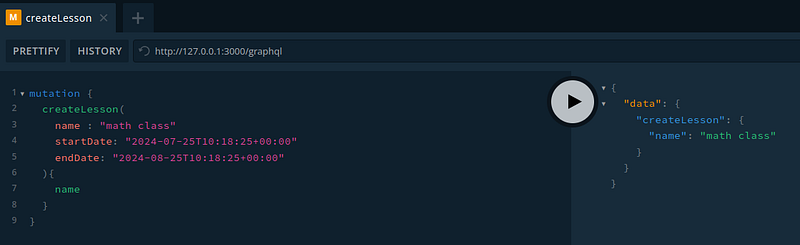
  @Mutation(() => LessonType) createLesson(@Args('name') name: string, @Args('startDate') startDate:
  string, @Args('endDate') endDate: string,) {
    return this.lessonService.createLesson(name, startDate, endDate);
  }
}
lesson.service.ts
import {
  Injectable
}
from '@nestjs/common';
import {
  InjectRepository
}
from '@nestjs/typeorm';
import {
  Lesson
}
from './lesson.entity';
import {
  Repository
}
from 'typeorm';
import {
  v4 as uuid
}
from 'uuid';
@Injectable()
export class LessonService {
  constructor(@InjectRepository(Lesson) private lessonRepository: Repository<Lesson>,) {
  }
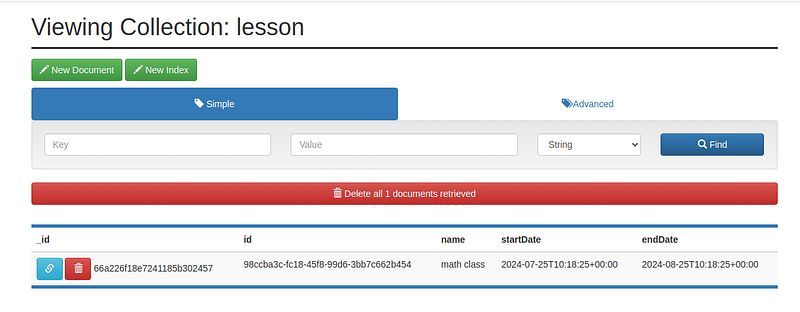
  createLesson(name, startDate, endDate): Promise<Lesson> {
    const lesson = this.lessonRepository.create({
      id: uuid(), name, startDate, endDate,
    });
    return this.lessonRepository.save(lesson);
  }
}
Get lesson
lesson.resolver.ts
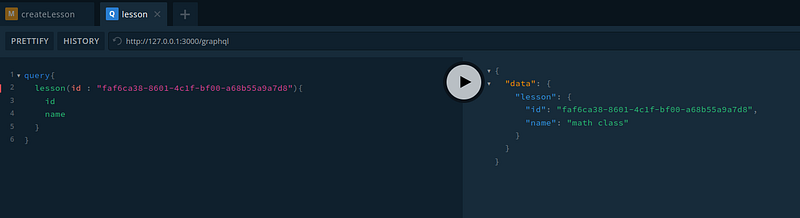
@Query(() => LessonType) lesson(@Args('id') id: string) {
  return this.lessonService.getLesson(id);
}
lesson.service.ts
getLesson(id: string): Promise<Lesson> {    return this.lessonRepository.findOne({ where: { id } });
}
DTO Validation
npm install class-validator class-transformer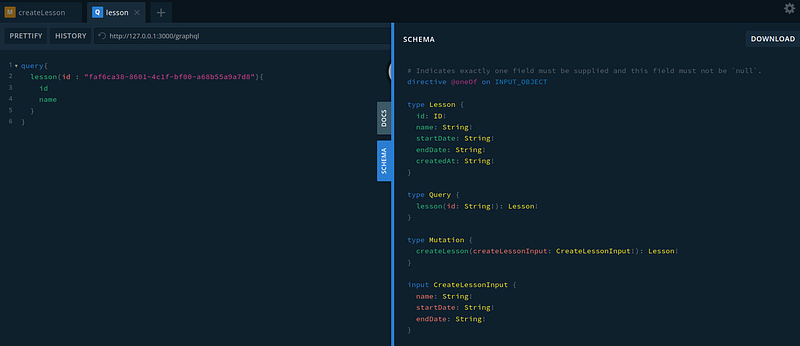
main.ts
import {
  NestFactory
}
from '@nestjs/core';
import {
  AppModule
}
from './app.module';
import {
  ValidationPipe
}
from '@nestjs/common';
async function bootstrap() {
  const app = await NestFactory.create(AppModule);
  app.useGlobalPipes(new ValidationPipe());
  await app.listen(3000);
}
bootstrap();
lesson.input.ts
mport {
  Field, InputType
}
from '@nestjs/graphql';
import {
  MinLength, IsDateString
}
from 'class-validator';
@InputType()
export class CreateLessonInput {
  @MinLength(2) @Field() name: string;
  @IsDateString() @Field() startDate: string;
  @IsDateString() @Field() endDate: string;
}
lesson.resolver.ts
@Mutation(() => LessonType) createLesson(@Args('name') name: string, @Args('startDate') startDate:
string, @Args('endDate') endDate: string,) {
  return this.lessonService.createLesson(name, startDate, endDate);
}
lesson.service.ts
async createLesson(createLessonInput: CreateLessonInput): Promise<Lesson> {    const { name,
startDate, endDate } = createLessonInput;    const lesson = this.lessonRepository.create({      id:
uuid(),      name,      startDate,      endDate,    });    return
this.lessonRepository.save(lesson);  }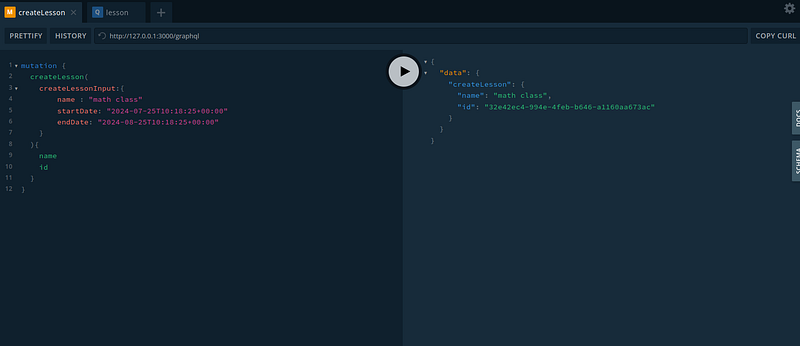
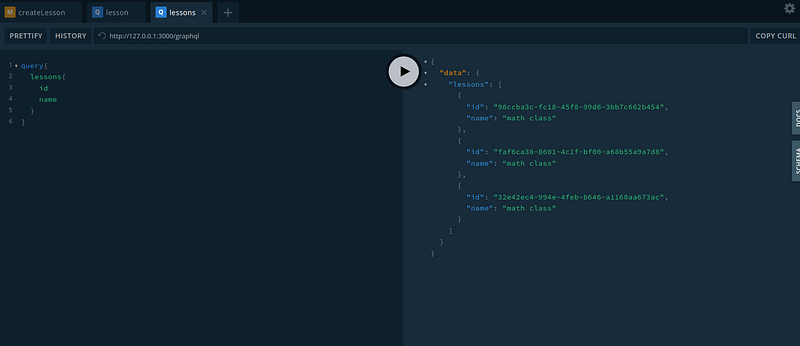
Get all lessons
lesson.resolver.ts
@Query(() => [LessonType]) lessons() {
  return this.lessonService.getLessons();
}
lesson.service.ts
getLessons(): Promise<Lesson[]> {
  return this.lessonRepository.find();
}
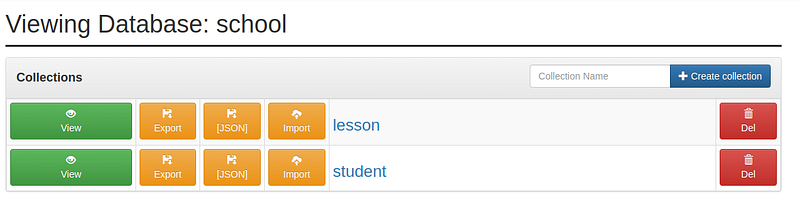
Create student module
nest g module studentnest g service student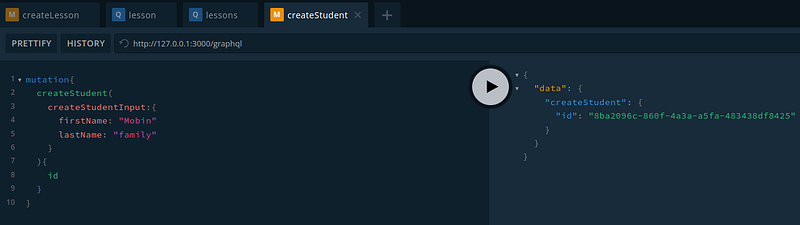
Get students
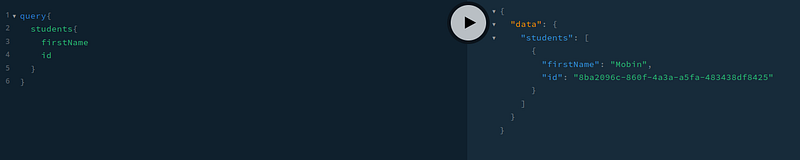
student.resolver.ts
@Query(() => [StudentType]) async students() {
  return this.studentService.getStudents();
}
student.service.ts
async getStudents(): Promise<Student[]> {
  return this.studentRepository.find();
}
Get student by ID
student.resolver.ts
@Query(() => StudentType) async student(@Args('id') id: string) {
  return this.studentService.getStudent(id);
}
student.service.ts
async getStudent(id: string): Promise<Student> {    return this.studentRepository.findOne({ where: {
id } });  }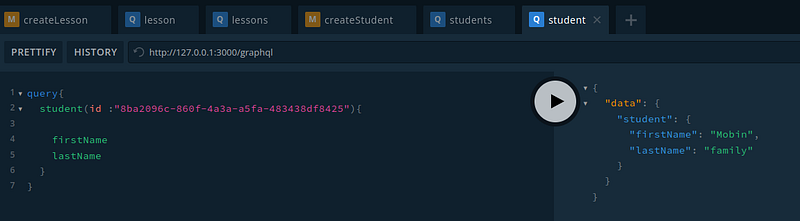
Assign Students to the lesson
lesson.entity.ts
@Column() students: string[];lesson.input.ts
@InputType()
export class AssignStudentsToLessonInput {
  @IsUUID() @Field(() => ID) lessonId: string;
  @IsUUID('4', {
    each: true
  }) @Field(() => [ID]) studentIds: string[];
}
lesson.resolver.ts
@Mutation(() => LessonType) assignStudentsToLesson(@Args('assignStudentsToLessonInput')
assignStudentsToLessonInput: AssignStudentsToLessonInput,) {
  return this.lessonService.assignStudentsToLesson(assignStudentsToLessonInput,);
}
lesson.service.ts
async assignStudentsToLesson(    assignStudentsToLessonInput: AssignStudentsToLessonInput,  ):
Promise<Lesson> {    const { lessonId, studentIds } = assignStudentsToLessonInput;    const lesson =
await this.lessonRepository.findOne({      where: { id: lessonId },    });    if (!lesson) {
throw new Error(`Lesson with ID ${lessonId} not found`);    }    console.log(lesson.students);    if
(lesson.students === undefined || lesson.students.length == 0) {      lesson.students =
[...studentIds];    } else {      lesson.students = [...lesson.students, ...studentIds];    }
return this.lessonRepository.save(lesson);  }
lesson.type.ts
@Field(() => [StudentType]) students: string[];