
Amazon DynamoDB is a powerful, serverless NoSQL database service designed for scalability and high performance. It’s an excellent choice for Golang developers building modern applications that require fast, reliable data storage and retrieval at any scale. This introduction will cover DynamoDB's key features, its core components, and how to get started using it with Go.
Key features of DynamoDB include:
- Serverless architecture: No need to manage servers with automatic scaling and pay-per-use pricing.
- High availability: 99.999% availability SLA with multi-region, multi-active capabilities.
- Performance at scale: Ability to handle trillions of requests per day.
- Flexible data model: Key-value and document data structures.
- Strong consistency: Synchronous writes to multiple availability zones.
- Security and compliance: Broad set of security controls and compliance standards.
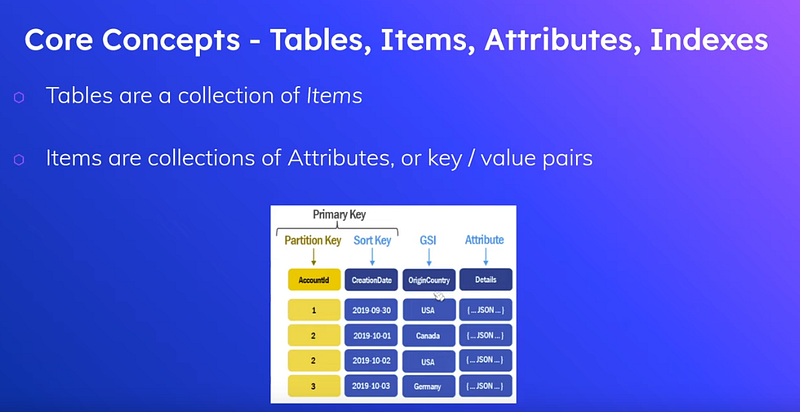
Core components of DynamoDB include tables, items (rows), attributes (columns), and indexes. The database uses a primary key system with partition keys and optional sort keys to uniquely identify items. Secondary indexes, both local and global, provide additional query capabilities.
AWS provides an SDK that simplifies Golang developers' interaction with DynamoDB. This tutorial will guide you through setting up a local DynamoDB instance for development, creating tables, performing CRUD operations, and querying data using Go.
By the end of this introduction, you’ll have a solid foundation for building scalable applications with AWS DynamoDB and Go.
What is Amazon DynamoDB?
Amazon DynamoDB is a serverless, NoSQL database service that enables you to develop modern applications at any scale. As a serverless database, you only pay for what you use and DynamoDB scales to zero, has no cold starts, no version upgrades, no maintenance windows, no patching, and no downtime maintenance. DynamoDB offers a broad set of security controls and compliance standards. For globally distributed applications, DynamoDB global tables is a multi-region, multi-active database with a 99.999% availability SLA and increased resilience. DynamoDB reliability is supported with managed backups, point-in-time recovery, and more. With DynamoDB streams, you can build serverless event-driven applications. It can handle a trillion requests per day.
DynamoDB is a key-value NoSQL database. This makes it Amazon’s preferred database for simple and fast data models, such as managing user profile data or web session information for applications that need to quickly retrieve any amount of data at the Internet scale.
It is important to remember that DynamoDB does not use SQL at all. Nor does it use the NoSQL equivalent, which was made popular by Apache Cassandra, Cassandra Query Language (CQL). Instead, it uses JSON to encapsulate queries.
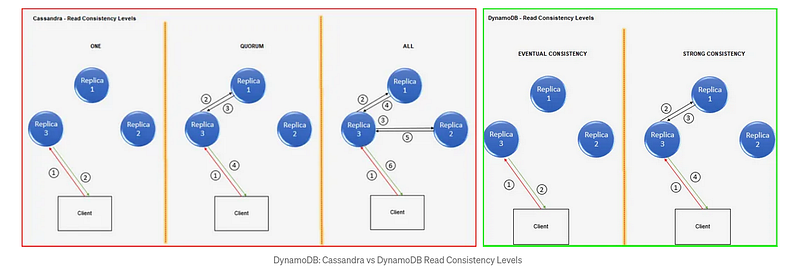
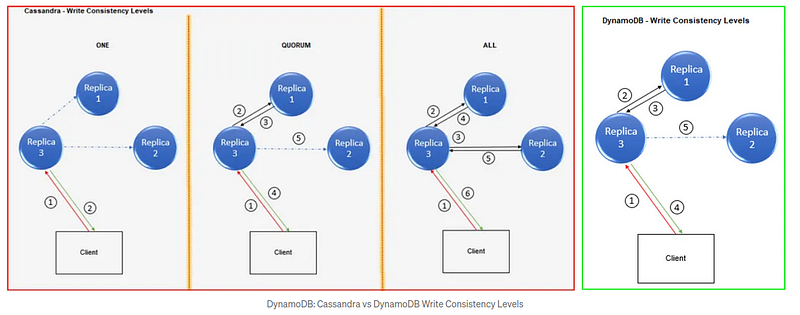
NoSQL datastores like Cassandra and DynamoDB use multiple Replicas (copies of data) to ensure high availability and durability.
with DynamoDB, Amazon makes these decisions for you. The number of replicas in DynamoDB equals 3, and the replicas are placed one per AZ by default, which is not configurable. This way, irrespective of the individual capabilities of the user, DynamoDB offers a certain standard of resiliency.
Writes are always strongly consistent — every write is synchronously written to two replicas (2 AZs) and asynchronously written to one more. This ensures that any data written is durable for the life of the data store. Regarding reads, if consistency is important (for example, travel wallet balance) to the use case, users can choose strong consistency — where DynamoDB will ensure that the data read is the latest. If not (for example, a list of landmarks in an area), eventual consistency is a better option because it is cheaper and faster.
Note: If you provision, for example, 1000 RCU and 1000 WCU for your original partition, the 10 partitions that you end up with will share the same RCU/WCU (not necessarily equally) unless you increase this. This might not be a problem if you only have data growth, but if data growth is accompanied by usage growth, you might want to increase the RCU/WCU provided in the table.
Components of DynamoDB
DynamoDB is a “NoSQL” or “unstructured” database. It shares many concepts with relational databases, barring cross-table referential integrity.
The absence of referential integrity (and thus normalization) primarily contributes to a faster experience in terms of development and performance; however, it leaves more of the data integrity and quality responsibilities up to the developer and the application.
Below are the core components of DynamoDB:
- Tables: A table is a collection of items.
- Items (Rows): An item is a collection of attributes.
- Attributes (Columns): An attribute contains data related to each item.
- Indexes: An index is a hashed data structure that uniquely identifies and groups attributes.
— There are two main types of indexes Primary and Secondary.
— The primary function of indexes is to speed up access to our stored attributes and prevent full scans (the distinctive difference between a database and a file store).
Primary Indexes
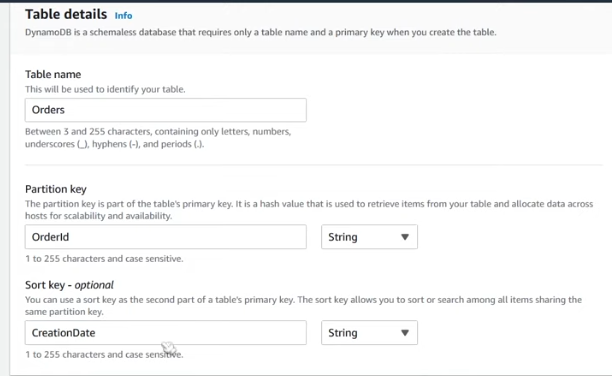
DynamoDb requires a primary index on each table. This index allows each item (row) to be uniquely identified and retrieved.
There are two types of primary indexes to choose from:
- Primary Key (Partition Key): A single (surrogate or natural) attribute identifying each unique item in the table. The Partition key, also known as the hash attribute, helps the index distribute items among the available data storage partitions. Choosing an evenly distributable key is essential. This allows data to spread equally amongst the data storage partitions and reduces stress from mounting onto a single partition.
- Composite Key (Partition Key+Sort Key): A combination of a Partition Key and a Range (surrogate or natural) attribute identifying each unique item in the table. The Range attribute, also known as the sort key, helps the data engine store (physical storage) related items near each other and in sorted order. This allows the engine to retrieve data from these groups of items faster. It also is the only way to sort results database-server-side.
Secondary Indexes
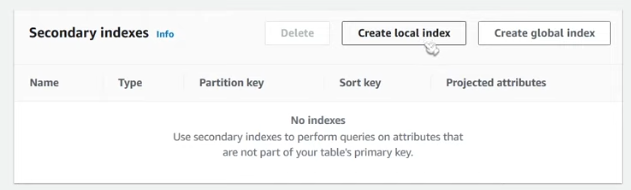
A secondary index provides the ability to efficiently access (as opposed to a full scan) specific attributes of items without using the Primary/Composite Key!
There are two types of secondary indexes to use:
- Local Secondary Index (LSI): Leverages the existing Partition Key and allows the user to add another Range key.
— Created on the base table schema at table creation
— Limited to 5 per table
— Consumes Read/Write capacity of the base table
— More consistent, Strongly or Eventually Consistent Reads - Global Secondary Index (GSI): Creates a new index separate from the base table without identifying an item uniquely or referencing existing primary index attributes.
— Increases storage and throughput because it creates a copy of the resulting indexed data
— Limited to 25 per table
— Maintains its throughput settings.
— Meant to improve access efficiency to non-PK-related attributes
— Less consistent, Eventually Consistent reads
Time to Live (TTL)
Time To Live (TTL) for DynamoDB is a cost-effective method for deleting irrelevant items. TTL allows you to define a per-item expiration timestamp that indicates when an item is no longer needed. DynamoDB automatically deletes expired items within a few days of their expiration time without consuming write throughput.
Deploy local DynamoDB
docker hub repository
https://hub.docker.com/r/amazon/dynamodb-local
Run docker-compose locally
Codes
AWS DynamoDB Tutorial For Beginners
Golang SDK
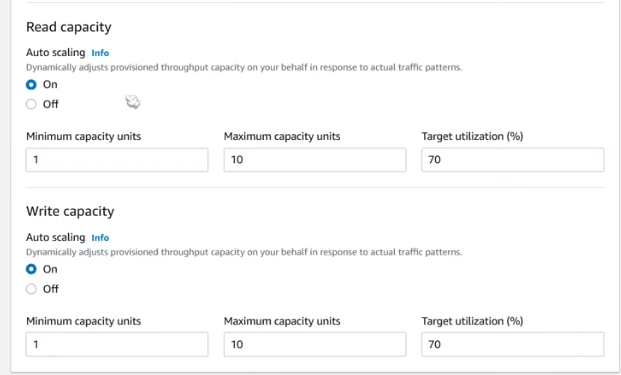
Create a table
You can’t change the sort key after creating a table.
Create secondary key
Install the AWS SDK for Go
To install the SDK and its dependencies, run the following Go command.
go get -u github.com/aws/aws-sdk-go/...Get your AWS access keys.
Access keys consist of an access key ID and a secret access key, which are used to sign programmatic requests you make to AWS. If you don’t have access keys, you can create them by using the AWS Management Console.
We recommend using IAM access keys instead of AWS root account access keys. IAM lets you securely control access to AWS services and resources in your AWS account.
Install aws console on Ubuntu
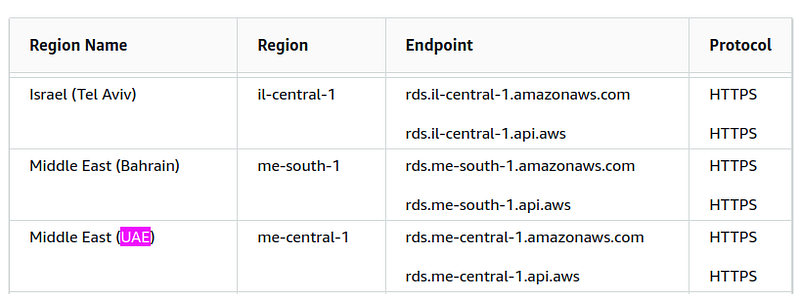
sudo snap install aws-cli --classicAWS Region
AWS configuration
aws configurePermission Error
adds a user: root in docker-compose to solve this problem.
version: '3.8'services: dynamodb-local:   command: "-jar DynamoDBLocal.jar -sharedDb -dbPath ./data"
image: "amazon/dynamodb-local:latest"   container_name: dynamodb-local   ports:     - "8000:8000"
user: root   volumes:     - "./docker/dynamodb:/home/dynamodblocal/data"   working_dir:
/home/dynamodblocal
The command line gets a list of tables.
aws dynamodb list-tables --endpoint-url
http://localhost:8000
Create a database
aws dynamodb create-table \    --table-name Users \    --attribute-definitions \
AttributeName=user_id,AttributeType=S \        AttributeName=second_id,AttributeType=S \
--key-schema \        AttributeName=user_id,KeyType=HASH \    --provisioned-throughput \
ReadCapacityUnits=5,WriteCapacityUnits=5 \    --global-secondary-indexes \
"[            {                \"IndexName\": \"SecondIdIndex\",                \"KeySchema\": [{\"AttributeName\":\"tg_id\",\"KeyType\":\"HASH\"}],                \"Projection\": {\"ProjectionType\":\"ALL\"},                \"ProvisionedThroughput\": {\"ReadCapacityUnits\":5,\"WriteCapacityUnits\":5}            }        ]" \     --endpoint-url=http://localhost:8000
Add another attribute
aws dynamodb put-item \    --table-name Users \    --item
'{        "user_id": {"S": "123456"},        "tg_id": {"S": "tg987654"},        "data": {"S": "John Doe"}    }' \    --endpoint-url=http://localhost:8000
Bill command
The ` — billing-mode PROVISIONED` option in DynamoDB table creation specifies that you want to use provisioned capacity mode for the table. Let me explain what this means:
1. Billing Mode: DynamoDB offers two capacity modes for processing reads and writes on your tables: on-demand and provisioned.
2. Provisioned Capacity Mode:
— In this mode, you specify the number of reads and writes per second that you expect your application to perform.
— You set Read Capacity Units (RCUs) and Write Capacity Units (WCUs) for your table and indexes.
— You’re charged for the provisioned capacity whether you use it or not.
— It’s best when you have predictable application traffic or can forecast capacity requirements.
3. Implications:
— You need to specify ` — provisioned-throughput` with ReadCapacityUnits and WriteCapacityUnits.
— You may need to monitor and adjust these values as your application’s needs change.
— It can be more cost-effective than on-demand if your usage is consistent and predictable.
4. Alternative:
— The alternative is ` — billing-mode PAY_PER_REQUEST,` which is the on-demand capacity mode. — In on-demand mode, you don’t need to specify capacity units; DynamoDB automatically scales to accommodate your workloads.
5. Default:
— If you don’t specify a billing mode, DynamoDB defaults to PROVISIONED.
In the commands I provided earlier, we were implicitly using provisioned capacity mode by specifying the ` — provisioned-throughput` parameter. If you want to make it explicit, you can add ` — billing-mode PROVISIONED` to the command, but it’s not necessary as it’s the default when you specify provisioned throughput.
--billing-mode PAY_PER_REQUEST--billing-mode PROVISIONED \--provisioned-throughput ReadCapacityUnits=10,WriteCapacityUnits=10Checklist of tables.
aws dynamodb list-tables --endpoint-url http://localhost:8000{    "TableNames": [        "Users"
]}
Status of table
aws dynamodb --endpoint-url http://localhost:8000 describe-table --table-name Users | grep
TableStatus"TableStatus": "ACTIVE",Creating an Amazon DynamoDB Table Item
aws dynamodb put-item \    --table-name Users \    --item
'{        "user_id": {"S": "123456"},        "tg_id": {"S": "tg987654"},        "data": {"S": "John Doe"},,        "created_at": {"S": "2024-08-14T10:00:00Z"},        "updated_at": {"S": "2024-08-14T10:00:00Z"}    }' \    --endpoint-url=http://localhost:8000
Get All items
aws dynamodb scan --table-name Users \    --endpoint-url=
http://localhost:8000
Get item by user ID
aws dynamodb get-item \    --table-name Users \    --key '{"user_id": {"S": "12345"}}' \
--endpoint-url=http://localhost:8000func (db *DB) GetByUserID(userID string) (*User, error) {
result, err := db.dynamodb.GetItem(&dynamodb.GetItemInput{
ConsistentRead: aws.Bool(true), Key: map[string]*dynamodb.AttributeValue{
"user_id": {
S: aws.String(userID),
},
}, TableName: aws.String(db.tableName),
}) if err != nil {
log.Fatalf("Got error calling GetItem: %s", err) return nil, err
}
if result.Item == nil {
msg := "Could not find '" + userID + "'" return nil, errors.New(msg)
}
user := User{
}
err = dynamodbattribute.UnmarshalMap(result.Item, &user) if err != nil {
log.Fatalf("Got error un marshalling: %v", err) return nil, err
}
return &user, nil
}ConsistentRead: aws.Bool(true)
Determines the read consistency model: If set to true, the operation uses strongly consistent reads; otherwise, the operation uses eventually consistent reads.
GetByTgID gets items by Global Secondary Index (GSI)
// GetByTgID get item by Global Secondary Index (GSI
)
func (db *DB) GetByTgID(tgID string) ([]User, error) {
    input := &dynamodb.QueryInput{
        TableName: aws.String(db.tableName), IndexName: aws.String(db.gsiIndex), // Replace with
        your GSI name KeyConditionExpression: aws.String("#tg = :v"), ExpressionAttributeNames:
        map[string]*string{
            "#tg": aws.String("tg_id"),
        }, ExpressionAttributeValues: map[string]*dynamodb.AttributeValue{
            ":v": {
                S: aws.String(tgID),
            },
        },
    }
    // Perform the query result, err := db.dynamodb.Query(input) if err != nil {
        log.Fatalf("failed to query items, %v", err) return nil, err
    }
    if result.Items == nil {
        msg := "Could not find '" + tgID + "'" return nil, errors.New(msg)
    }
    users := []User{
    }
    for _, item := range result.Items {
        user := User{
        }
        err := dynamodbattribute.UnmarshalMap(item, &user) if err != nil {
            log.Fatalf("Got error un marshalling: %v", err) return nil, err
        }
        users = append(users, user)
    }
    return users, nil
}
Count all data
func (db *DB) CountAllData() (int64, error) {
    input := &dynamodb.ScanInput{
        TableName: aws.String("Users"),
    }
    result, err := db.dynamodb.Scan(input) if err != nil {
        log.Fatalf("failed to scan table, " + err.Error()) return 0, err
    }
    return *result.Count, nil
}
Delete table
aws dynamodb delete-table --table-name Users \    --endpoint-url=
http://localhost:8000
The consistency of the query cannot be true when using GSI.
Create Table
func (db *DB) CreateTable() error {
    input := &dynamodb.CreateTableInput{
        AttributeDefinitions: []*dynamodb.AttributeDefinition{
            {
                AttributeName: aws.String("user_id"),
                AttributeType: aws.String("S"),
            }, {
                AttributeName: aws.String("tg_id"),
                AttributeType: aws.String("S"),
            }, {
                AttributeName: aws.String("referrer"),
                AttributeType: aws.String("S"),
            }, {
                AttributeName: aws.String("created_at"),
                AttributeType: aws.String("N"),
            },
        }, KeySchema: []*dynamodb.KeySchemaElement{
            {
                AttributeName: aws.String("user_id"),
                KeyType: aws.String("HASH"),
            },
        }, GlobalSecondaryIndexes: []*dynamodb.GlobalSecondaryIndex{
            {
                IndexName: aws.String("TgIdIndex"),
                KeySchema: []*dynamodb.KeySchemaElement{
                    {
                        AttributeName: aws.String("tg_id"), KeyType: aws.String("HASH"),
                    },
                },
                Projection: &dynamodb.Projection{
                    ProjectionType: aws.String("ALL"),
                },
            }, {
                IndexName: aws.String("ReferrerIndex"),
                KeySchema: []*dynamodb.KeySchemaElement{
                    {
                        AttributeName: aws.String("referrer"), KeyType: aws.String("HASH"),
                    }, {
                        AttributeName: aws.String("created_at"), KeyType: aws.String("RANGE"),
                    },
                },
                Projection: &dynamodb.Projection{
                    ProjectionType: aws.String("ALL"),
                },
            },
        }, BillingMode: aws.String("PAY_PER_REQUEST"), TableName: aws.String(db.tableName),
    }
    _, err := db.dynamodb.CreateTable(input) if err != nil {
        log.Fatalf("Got error calling CreateTable: %s", err) return err
    }
    return nil
}
Stackademic 🎓
Thank you for reading until the end. Before you go:
- Please consider clapping and following the writer! 👏
- Follow us X | LinkedIn | YouTube | Discord
- Visit our other platforms: In Plain English | CoFeed | Differ
- More content at Stackademic.com