Overview
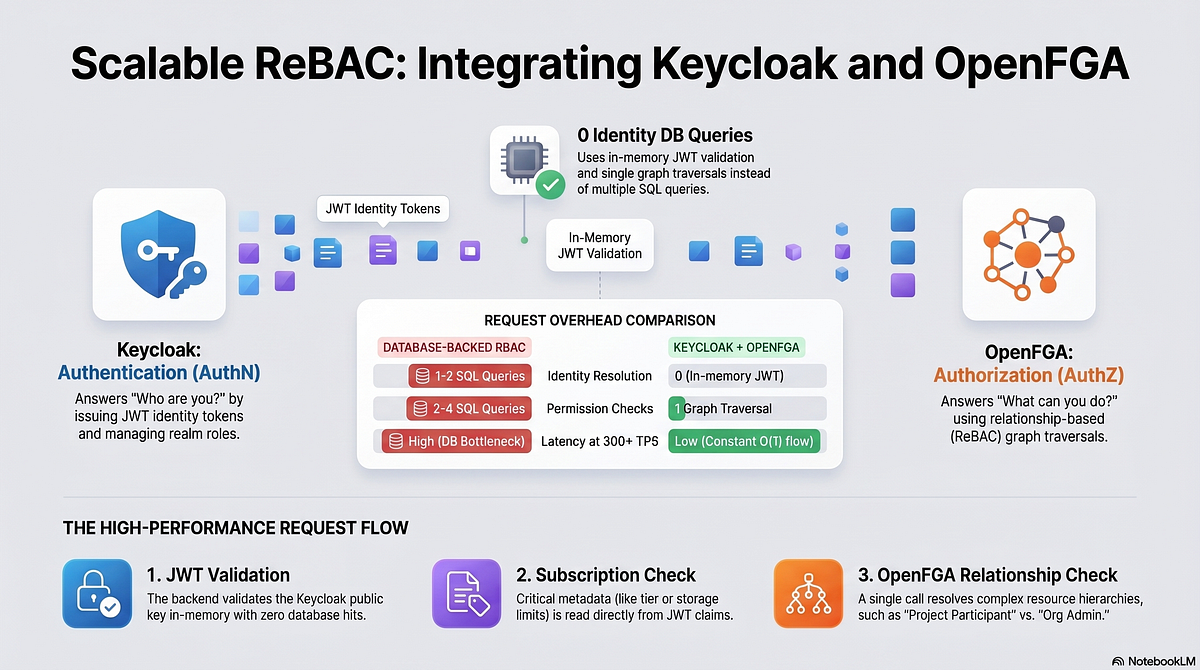
Concern Tool Why Authentication (AuthN) Keycloak JWT issuance, user identity, realm roles, SSO Authorization (AuthZ) OpenFGA Relationship-based permission checks (ReBAC)
Rule: Keycloak answers “who are you?”. OpenFGA answers “what can you do?”. Neither tool does both jobs well. Do not conflate them.
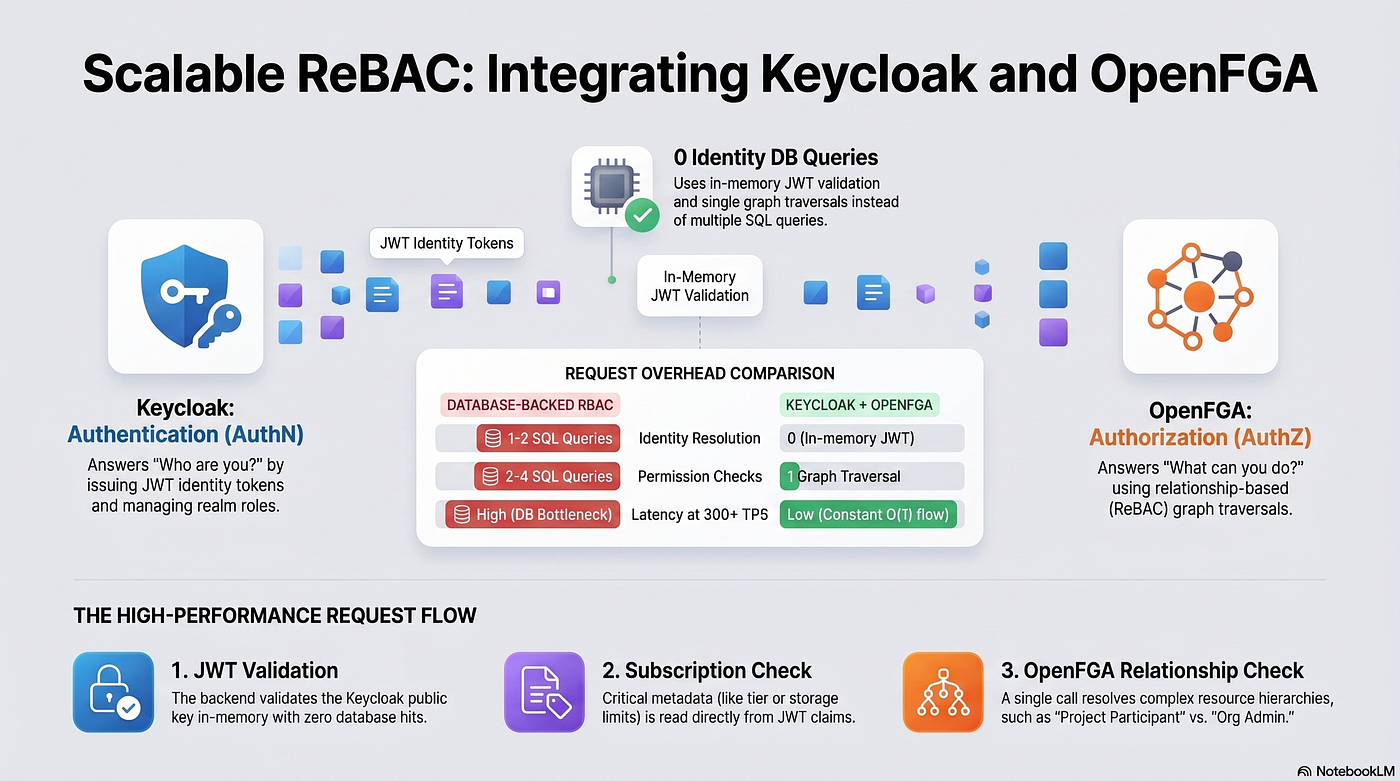
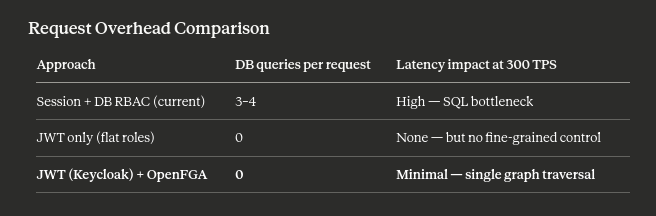
Performance baseline: The combined approach yields zero database queries for identity resolution and a single graph traversal per request for authorization — versus the typical 3–4 SQL queries per request in a database-backed RBAC system.
Core Concepts
Why not Keycloak alone?
Keycloak’s built-in authorization services (UMA, policy evaluation) work for simple role checks but degrade quickly when permissions are resource-scoped and hierarchical:
- “User A can edit Project X because they are a participant” — this is a relationship, not a role.
- “Org admin restricted User A to viewer on Project X” — this is a contextual override, not a role assignment.
- At 300+ TPS, evaluating these relationships against a SQL database on every request causes measurable latency.
Why OpenFGA?
OpenFGA is built on Google Zanzibar (the permission system behind Google Drive). Its data model — relation tuples — maps directly to resource hierarchies:
user:alice   →  participant  →  project:alpha
project:alpha  →  owned_by   →  org:acme
org:acme     →  restricts    →  user:alice (viewer only)
A single Check call traverses all these relationships in one round trip. The result is ALLOW or DENY.
Data flow
POST /projects/:id/bids
        │
        ▼
[1] JWT validation        ← Keycloak public key (in-memory, 0 DB queries)
        │
        ▼
[2] Subscription check    ← Read from JWT claim (in-memory, 0 DB queries)
        │
        ▼
[3] OpenFGA.Check()       ← Single graph traversal
        │                    resolves project role AND org restrictions
        ▼
   Execute handler
Infrastructure Setup
docker-compose.yml
version: "3.9"

services:
  postgres:
    image: postgres:16
    environment:
      POSTGRES_USER: appuser
      POSTGRES_PASSWORD: apppassword
      POSTGRES_MULTIPLE_DATABASES: appdb,keycloak,openfga
    volumes:
      - pg_data:/var/lib/postgresql/data
    ports:
      - "5432:5432"

  keycloak:
    image: quay.io/keycloak/keycloak:24.0
    environment:
      KC_DB: postgres
      KC_DB_URL: jdbc:postgresql://postgres:5432/keycloak
      KC_DB_USERNAME: appuser
      KC_DB_PASSWORD: apppassword
      KEYCLOAK_ADMIN: admin
      KEYCLOAK_ADMIN_PASSWORD: changeme
      KC_HOSTNAME_STRICT: "false"
      KC_HTTP_ENABLED: "true"
    command: start-dev
    ports:
      - "8080:8080"
    depends_on:
      - postgres

  openfga:
    image: openfga/openfga:latest
    command: run
    environment:
      OPENFGA_DATASTORE_ENGINE: postgres
      OPENFGA_DATASTORE_URI: >
        postgres://appuser:apppassword@postgres:5432/openfga?sslmode=disable
      OPENFGA_AUTHN_METHOD: none   # use preshared key in production
    ports:
      - "8081:8081"   # HTTP API
      - "8082:8082"   # gRPC
      - "3000:3000"   # Playground UI
    depends_on:
      - postgres

volumes:
  pg_data:
Run: docker compose up -d
Keycloak Configuration
1. Create realm
# Using kcadm CLI inside the container
docker exec -it <keycloak_container> /opt/keycloak/bin/kcadm.sh \
  config credentials \
  --server http://localhost:8080 \
  --realm master \
  --user admin --password changeme

docker exec -it <keycloak_container> /opt/keycloak/bin/kcadm.sh \
  create realms \
  -s realm=myapp \
  -s enabled=true
2. Create platform roles
for ROLE in architect general-contractor property-owner consultant platform-admin; do
  docker exec -it <keycloak_container> /opt/keycloak/bin/kcadm.sh \
    create roles \
    -r myapp \
    -s name=$ROLE
done
3. Create backend client
docker exec -it <keycloak_container> /opt/keycloak/bin/kcadm.sh \
  create clients \
  -r myapp \
  -s clientId=backend-api \
  -s enabled=true \
  -s "redirectUris=[\"http://localhost:3001/*\"]" \
  -s publicClient=false \
  -s serviceAccountsEnabled=true
4. Add custom JWT claims (Protocol Mappers)
In Keycloak Admin UI → Clients → backend-api → Client Scopes → Dedicated scopes → Add mapper → By configuration → User Attribute:
Mapper Token Claim Name User Attribute Claim JSON Type Subscription tier subscription_tier subscription_tier String Modules subscription_modules subscription_modules JSON Storage storage_gb storage_gb int
Set the attribute on each user after purchase via the Admin API:
curl -X PUT http://localhost:8080/admin/realms/myapp/users/{userId} \
  -H "Authorization: Bearer $ADMIN_TOKEN" \
  -H "Content-Type: application/json" \
  -d '{
    "attributes": {
      "subscription_tier": ["pro"],
      "subscription_modules": ["[\"bidding\",\"material_selection\",\"procurement\"]"],
      "storage_gb": ["50"]
    }
  }'
Resulting JWT payload
{
  "sub": "a3f8c2d1-4e5b-6789-abcd-ef0123456789",
  "email": "[email protected]",
  "realm_access": {
    "roles": ["general-contractor"]
  },
  "subscription_tier": "pro",
  "subscription_modules": ["bidding", "material_selection", "procurement"],
  "storage_gb": 50,
  "iat": 1716580000,
  "exp": 1716583600
}
OpenFGA Configuration
1. Create a store
curl -X POST http://localhost:8081/stores \
  -H "Content-Type: application/json" \
  -d '{"name": "myapp"}' \
  | jq '.id'
# Save this as FGA_STORE_ID
2. Write authorization model
curl -X POST http://localhost:8081/stores/$FGA_STORE_ID/authorization-models \
  -H "Content-Type: application/json" \
  -d '{
  "schema_version": "1.1",
  "type_definitions": [
    {
      "type": "user"
    },
    {
      "type": "organization",
      "relations": {
        "owner":  { "this": {} },
        "admin":  { "union": { "child": [{ "this": {} }, { "computedUserset": { "relation": "owner" } }] } },
        "manager":{ "union": { "child": [{ "this": {} }, { "computedUserset": { "relation": "admin" } }] } },
        "member": { "union": { "child": [{ "this": {} }, { "computedUserset": { "relation": "manager" } }] } }
      },
      "metadata": {
        "relations": {
          "owner":   { "directly_related_user_types": [{ "type": "user" }] },
          "admin":   { "directly_related_user_types": [{ "type": "user" }] },
          "manager": { "directly_related_user_types": [{ "type": "user" }] },
          "member":  { "directly_related_user_types": [{ "type": "user" }] }
        }
      }
    },
    {
      "type": "project",
      "relations": {
        "owner":       { "this": {} },
        "admin":       { "union": { "child": [{ "this": {} }, { "computedUserset": { "relation": "owner" } }] } },
        "participant": { "union": { "child": [{ "this": {} }, { "computedUserset": { "relation": "admin" } }] } },
        "viewer":      { "union": { "child": [{ "this": {} }, { "computedUserset": { "relation": "participant" } }] } },

        "can_view_bidding":    { "computedUserset": { "relation": "viewer" } },
        "can_create_bidding":  { "computedUserset": { "relation": "participant" } },
        "can_confirm_bidding": { "computedUserset": { "relation": "admin" } },

        "can_view_materials":    { "computedUserset": { "relation": "viewer" } },
        "can_select_materials":  { "computedUserset": { "relation": "participant" } },
        "can_approve_materials": { "computedUserset": { "relation": "admin" } },

        "can_upload_files":  { "computedUserset": { "relation": "participant" } },
        "can_delete_project":{ "computedUserset": { "relation": "owner" } }
      },
      "metadata": {
        "relations": {
          "owner":       { "directly_related_user_types": [{ "type": "user" }, { "type": "organization" }] },
          "admin":       { "directly_related_user_types": [{ "type": "user" }] },
          "participant": { "directly_related_user_types": [{ "type": "user" }] },
          "viewer":      { "directly_related_user_types": [{ "type": "user" }] }
        }
      }
    }
  ]
}'
3. Write relation tuples
Tuples are written by your application when domain events occur — not at request time.
# User invited to project as participant
curl -X POST http://localhost:8081/stores/$FGA_STORE_ID/write \
  -H "Content-Type: application/json" \
  -d '{
    "writes": {
      "tuple_keys": [{
        "user": "user:alice",
        "relation": "participant",
        "object": "project:alpha"
      }]
    }
  }'

# Org admin restricts user to viewer (delete participant, write viewer)
curl -X POST http://localhost:8081/stores/$FGA_STORE_ID/write \
  -H "Content-Type: application/json" \
  -d '{
    "deletes": {
      "tuple_keys": [{
        "user": "user:alice",
        "relation": "participant",
        "object": "project:alpha"
      }]
    },
    "writes": {
      "tuple_keys": [{
        "user": "user:alice",
        "relation": "viewer",
        "object": "project:alpha"
      }]
    }
  }'
4. Test a check
curl -X POST http://localhost:8081/stores/$FGA_STORE_ID/check \
  -H "Content-Type: application/json" \
  -d '{
    "tuple_key": {
      "user": "user:alice",
      "relation": "can_create_bidding",
      "object": "project:alpha"
    }
  }'
# { "allowed": true }
NestJS Integration
Install dependencies
npm install @openfga/sdk @nestjs/jwt jwks-rsaEnvironment variables
# .env
KEYCLOAK_JWKS_URI=http://localhost:8080/realms/myapp/protocol/openid-connect/certs
KEYCLOAK_ISSUER=http://localhost:8080/realms/myapp
FGA_API_URL=http://localhost:8081
FGA_STORE_ID=your-store-id
FGA_MODEL_ID=your-model-id   # optional; omit to use latest
FGA module
// fga.module.ts
import { Module, Global } from "@nestjs/common";
import { OpenFgaClient } from "@openfga/sdk";

@Global()
@Module({
  providers: [
    {
      provide: OpenFgaClient,
      useFactory: () =>
        new OpenFgaClient({
          apiUrl: process.env.FGA_API_URL,
          storeId: process.env.FGA_STORE_ID,
          authorizationModelId: process.env.FGA_MODEL_ID,
        }),
    },
  ],
  exports: [OpenFgaClient],
})
export class FgaModule {}
Decorators
// auth.decorators.ts
import { SetMetadata } from "@nestjs/common";

export interface FgaPermission {
  relation: string;
  objectType: string;
  objectParam: string;  // req.params key that holds the resource ID
}

export const RequireModule = (module: string) =>
  SetMetadata("required_module", module);

export const FgaCheck = (permission: FgaPermission) =>
  SetMetadata("fga_permission", permission);
Auth guard
// auth.guard.ts
import {
  Injectable, CanActivate, ExecutionContext,
  UnauthorizedException, ForbiddenException,
} from "@nestjs/common";
import { Reflector } from "@nestjs/core";
import { JwksClient } from "jwks-rsa";
import * as jwt from "jsonwebtoken";
import { OpenFgaClient } from "@openfga/sdk";
import { FgaPermission } from "./auth.decorators";

const jwksClient = new JwksClient({
  jwksUri: process.env.KEYCLOAK_JWKS_URI,
  cache: true,
  cacheMaxEntries: 10,
  cacheMaxAge: 600_000, // 10 min
});

@Injectable()
export class AuthGuard implements CanActivate {
  constructor(
    private readonly reflector: Reflector,
    private readonly fga: OpenFgaClient,
  ) {}

  async canActivate(context: ExecutionContext): Promise<boolean> {
    const req = context.switchToHttp().getRequest();

    // ── 1. Extract + verify JWT ─────────────────────────────────
    const token = req.headers.authorization?.replace("Bearer ", "");
    if (!token) throw new UnauthorizedException("Missing token");

    const claims = await this.verifyJwt(token);

    // ── 2. Subscription gate (in-memory, zero DB) ───────────────
    const requiredModule = this.reflector.get<string>(
      "required_module",
      context.getHandler(),
    );
    if (requiredModule) {
      const modules: string[] = claims.subscription_modules ?? [];
      if (!modules.includes(requiredModule)) {
        throw new ForbiddenException(
          `Your subscription does not include the '${requiredModule}' module`,
        );
      }
    }

    // ── 3. OpenFGA permission check ─────────────────────────────
    const permission = this.reflector.get<FgaPermission>(
      "fga_permission",
      context.getHandler(),
    );
    if (permission) {
      const resourceId = req.params[permission.objectParam];
      if (!resourceId) throw new ForbiddenException("Resource ID missing");

      const { allowed } = await this.fga.check({
        tuple_key: {
          user: `user:${claims.sub}`,
          relation: permission.relation,
          object: `${permission.objectType}:${resourceId}`,
        },
      });

      if (!allowed) throw new ForbiddenException("Access denied");
    }

    req.user = {
      id: claims.sub,
      email: claims.email,
      role: claims.realm_access?.roles?.[0],
      subscriptionTier: claims.subscription_tier,
    };

    return true;
  }

  private verifyJwt(token: string): Promise<any> {
    return new Promise((resolve, reject) => {
      const decoded = jwt.decode(token, { complete: true });
      if (!decoded?.header?.kid) return reject(new UnauthorizedException("Invalid token header"));

      jwksClient.getSigningKey(decoded.header.kid, (err, key) => {
        if (err) return reject(new UnauthorizedException("Key fetch failed"));
        jwt.verify(
          token,
          key.getPublicKey(),
          { issuer: process.env.KEYCLOAK_ISSUER },
          (verifyErr, payload) => {
            if (verifyErr) return reject(new UnauthorizedException("Token verification failed"));
            resolve(payload);
          },
        );
      });
    });
  }
}
Controller usage
// bidding.controller.ts
import { Controller, Post, Get, Param, UseGuards } from "@nestjs/common";
import { AuthGuard } from "./auth.guard";
import { RequireModule, FgaCheck } from "./auth.decorators";

@Controller("projects/:projectId/bidding")
@UseGuards(AuthGuard)
export class BiddingController {

  // Requires: valid JWT + bidding module in subscription + participant on project
  @Post()
  @RequireModule("bidding")
  @FgaCheck({ relation: "can_create_bidding", objectType: "project", objectParam: "projectId" })
  async submitBid(@Param("projectId") projectId: string) {
    return this.biddingService.create(projectId);
  }

  // Requires: valid JWT + bidding module + viewer on project (minimum)
  @Get()
  @RequireModule("bidding")
  @FgaCheck({ relation: "can_view_bidding", objectType: "project", objectParam: "projectId" })
  async listBids(@Param("projectId") projectId: string) {
    return this.biddingService.findAll(projectId);
  }

  // Requires: valid JWT + admin on project
  @Post(":bidId/confirm")
  @FgaCheck({ relation: "can_confirm_bidding", objectType: "project", objectParam: "projectId" })
  async confirmBid(@Param("projectId") projectId: string) {
    return this.biddingService.confirm(projectId);
  }
}
Tuple sync service
Write tuples when domain events occur. Never at request time.
// permission-sync.service.ts
import { Injectable } from "@nestjs/common";
import { OpenFgaClient } from "@openfga/sdk";

type ProjectRole = "owner" | "admin" | "participant" | "viewer";

@Injectable()
export class PermissionSyncService {
  constructor(private readonly fga: OpenFgaClient) {}

  async grantProjectRole(userId: string, projectId: string, role: ProjectRole) {
    await this.fga.write({
      writes: {
        tuple_keys: [{
          user: `user:${userId}`,
          relation: role,
          object: `project:${projectId}`,
        }],
      },
    });
  }

  async changeProjectRole(
    userId: string,
    projectId: string,
    from: ProjectRole,
    to: ProjectRole,
  ) {
    await this.fga.write({
      deletes: { tuple_keys: [{ user: `user:${userId}`, relation: from, object: `project:${projectId}` }] },
      writes:  { tuple_keys: [{ user: `user:${userId}`, relation: to,   object: `project:${projectId}` }] },
    });
  }

  async revokeProjectAccess(userId: string, projectId: string, role: ProjectRole) {
    await this.fga.write({
      deletes: {
        tuple_keys: [{
          user: `user:${userId}`,
          relation: role,
          object: `project:${projectId}`,
        }],
      },
    });
  }

  async addOrgMember(userId: string, orgId: string, role: "admin" | "manager" | "member") {
    await this.fga.write({
      writes: {
        tuple_keys: [{
          user: `user:${userId}`,
          relation: role,
          object: `organization:${orgId}`,
        }],
      },
    });
  }
}
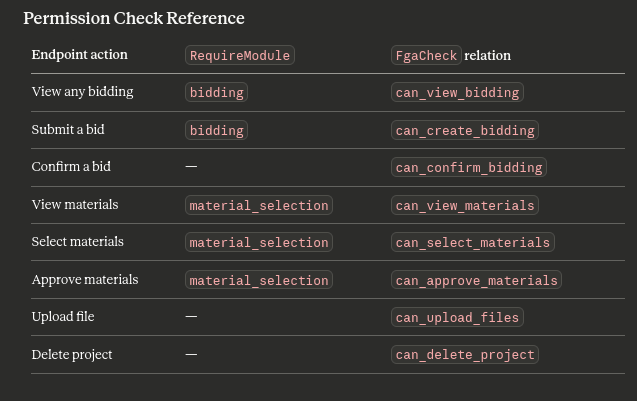
Permission Check Reference
Request Overhead Comparison
Production Checklist
Keycloak
  [ ] Switch from start-dev to start (production mode)
  [ ] Configure TLS termination (nginx/Caddy in front)
  [ ] Set KC_HOSTNAME to your public domain
  [ ] Enable brute force protection in realm settings
  [ ] Rotate admin credentials
  [ ] Configure SMTP for email verification

OpenFGA
  [ ] Set OPENFGA_AUTHN_METHOD=preshared and rotate key
  [ ] Enable TLS on the gRPC port
  [ ] Set up PostgreSQL connection pooling (PgBouncer)
  [ ] Add read replicas for FGA DB under high read load
  [ ] Monitor tuple write latency — spikes indicate missing indexes

Application
  [ ] Cache JWKS keys (jwks-rsa caches by default; verify TTL)
  [ ] Add OpenFGA circuit breaker (fail-closed on FGA timeout)
  [ ] Log all DENY decisions with user ID + resource + relation
  [ ] Write integration tests per permission scenario, not per endpoint
Limitations and Trade-offs
Keycloak
- JVM-based — minimum ~512MB RAM. Use Authentik or Casdoor if memory is constrained.
- UI-heavy to configure; scripting via kcadm or Terraform provider recommended for reproducibility.
- Custom claim mappers require UI or API steps that are easy to miss.
OpenFGA
- Does not handle authentication — you still need Keycloak (or equivalent) for JWT issuance.
- Authorization model changes are additive-safe but deletions require care — removing a relation type that has live tuples causes silent failures.
- No built-in audit log UI; implement your own tuple change log via event hooks.
ListObjects(fetch all resources a user can access) is expensive on large graphs — paginate and cache results.
Further Reading
- OpenFGA documentation
- OpenFGA authorization model playground (runs locally after docker compose up)
- Keycloak Server Administration Guide
- Google Zanzibar paper — the academic foundation for OpenFGA
- OpenFGA SDK for Node.js
Tags: Keycloak OpenFGA Authorization Authentication NestJS ReBAC JWT Self-Hosted Open Source Backend