Python selenium for crawler data from website
Pre-requisites to run Selenium Python
bash
pip install seleniumpython
from selenium
import webdriver
from selenium.webdriver.common.keys
import Keys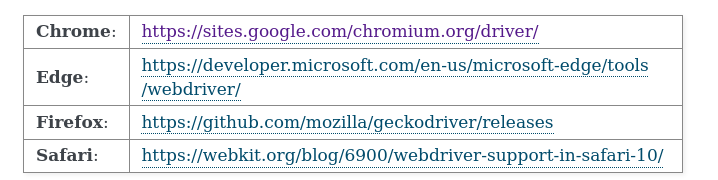
https://chromedriver.storage.googleapis.com/index.html?path=114.0.5735.90/
How install selenium on Ubuntu
Step 1: update the all packages, if necessary
bash
apt update
apt upgrade
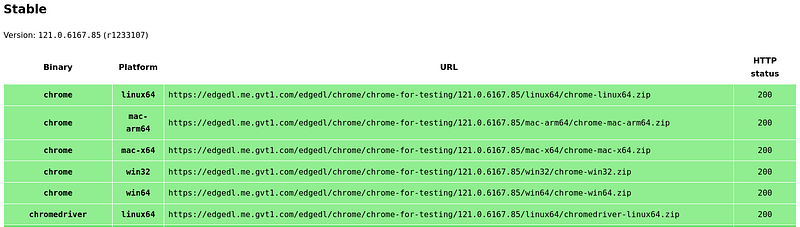
Step 2: download chrome stable package
bash
wget https://dl.google.com/linux/direct/google-chrome-stable_current_amd64.debStep 3: Install google-chrome
bash
sudo dpkg -i google-chrome-stable_current_amd64.debStep 4: check installed chrome version
text
# google-chrome --versionGoogle Chrome 121.0.6167.85Step 5: Install selenium, webdriver-manager
bash
pip3 install selenium
pip3 install webdriver-manager
Step 6— Install Chromedriver
bash
wget https://chromedriver.storage.googleapis.com/92.0.4515.107/chromedriver_linux64.ziptext
unzip chromedriver_linux64.zipbash
sudo mv chromedriver /usr/bin/chromedriver
sudo
chown root:root /usr/bin/chromedriver
sudo
chmod +x /usr/bin/chromedriver
Step 7 — Test Installation
text
chromedriver --url-base=/wd/hubRun test
python
from selenium
import webdriver
from selenium.webdriver.chrome.service
import Serviceservice = Service(executable_path=r'/usr/bin/chromedriver')options =
webdriver.ChromeOptions()# options.add_argument('--headless')#
options.add_argument('--no-sandbox')options.add_argument('--disable-dev-shm-usage')driver =
webdriver.Chrome(service=service,
options=options)driver.get("https://google.com/")print(driver.title)driver.quit()