RAG
retrieval-augmented generation
In this article we can integrate our documents with ChatGPT and search inside our document based on ChatGPT application and get fantastic results.
Normal connection to the ChatGPT Via API key
pip install openaikey = "sk-Fh*******"prompt = 'what is the capital of USA?'client = OpenAI(
api_key = key)chat_completion = client.chat.completions.create(    model="gpt-3.5-turbo",
messages=[{"role": "user", "content": prompt}])message=ChatCompletionMessage(content='The capital of the United States is Washington, D.C.',
role='assistant'LangChain Framework
LangChain has a number of components designed to help build question-answering applications, and RAG applications more generally. To familiarize ourselves with these, we’ll build a simple Q&A application over a text data source. Along the way we’ll go over a typical Q&A architecture, discuss the relevant LangChain components, and highlight additional resources for more advanced Q&A techniques. We’ll also see how LangSmith can help us trace and understand our application. LangSmith will become increasingly helpful as our application grows in complexity.
Indexing
- Load: First we need to load our data. We’ll use DocumentLoaders for this.
- Split: Text splitters break large
Documentsinto smaller chunks. This is useful both for indexing data and for passing it in to a model, since large chunks are harder to search over and won’t fit in a model’s finite context window. - Store: We need somewhere to store and index our splits, so that they can later be searched over. This is often done using a VectorStore and Embeddings model.
ChatGPT API Pricing
The ChatGPT API is priced based on the number of tokens used. A token is a unit of text, and the number of tokens in a given piece of text is equal to the number of words plus the number of spaces.
The current pricing for the ChatGPT API is as follows:
- GPT-3.5-turbo: $0.006 per 1,000 tokens
Step 0 — get API key and connect to ChatGPT
%pip install --upgrade --quiet  langchain langchain-community langchainhub langchain-openai chromadb
bs4
from google.colab import userdata
userdata.get('key')
I put my secret key in collab key store.
import os
from langchain_community.document_loaders.csv_loader
import CSVLoader
import bs4
from langchain
import hub
from langchain.text_splitter
import RecursiveCharacterTextSplitter
from langchain_community.document_loaders
import WebBaseLoader
from langchain_community.vectorstores
import Chroma
from langchain_core.output_parsers
import StrOutputParser
from langchain_core.runnables
import RunnablePassthrough
from langchain_openai
import ChatOpenAI, OpenAIEmbeddings
Set key
os.environ["OPENAI_API_KEY"] = userdata.get('key')
os.environ["LANGCHAIN_TRACING_V2"] = "false"
Step 1 : Read data from CSV
You need to prepare your data into excel to gathering data in other ways.
loader = CSVLoader(file_path="./blogs1.csv")
docs = loader.load()
step 2 : split data
text_splitter = RecursiveCharacterTextSplitter(chunk_size=1000, chunk_overlap=200)
splits =
text_splitter.split_documents(docs)
step 3 : get score from ChatGPT
vectorstore = Chroma.from_documents(documents=splits, embedding=OpenAIEmbeddings())Step 4 : Retrieve data
# Retrieve and generate using the relevant snippets of the blog.retriever =
vectorstore.as_retriever()prompt = hub.pull("rlm/rag-prompt")llm =
ChatOpenAI(model_name="gpt-3.5-turbo", temperature=0)def format_docs(docs):
return "\n\n".join(doc.page_content for doc in docs)rag_chain = ( {"context": retriever | format_docs, "question": RunnablePassthrough()} | prompt
| llm | StrOutputParser())Step 5 : Ask Questions based on your documents.
rag_chain.invoke("How was the weather in the Netherlands?")Find similarity
retriever_2 = vectorstore.as_retriever(search_type="similarity", search_kwargs={"k":
6})
retrieved_docs = retriever.invoke("What is corepass apllicaion?")
Metadata filtering in the Vector Store
https://cassio.org/frameworks/langchain/qa-vector-metadata/
https://python.langchain.com/docs/modules/data_connection/retrievers/vectorstore
Prompt
[HumanMessage(content="You are an assistant for question-answering tasks. Use the following pieces o
f retrieved context to answer the question. If you don't know the answer, just say that you don't
know. Use three sentences maximum and keep the answer concise.\nQuestion: filler question \nContext:
filler context \nAnswer:")]
How to use CSV files in vector stores with Langchain
https://how.wtf/how-to-use-csv-files-in-vector-stores-with-langchain.html
Returning sources
from langchain_core.runnables
import RunnableParallelrag_chain_from_docs = (
    RunnablePassthrough.assign(context=(lambda x: format_docs(x["context"])))
    | prompt
    | llm
    | StrOutputParser())rag_chain_with_source = RunnableParallel(
{"context": retriever, "question": RunnablePassthrough()}).assign(answer=rag_chain_from_docs)res = rag_chain_with_source.invoke("How can I excange CTN o botcoin?")blogs_data.iloc[res['context'][0].metadata['row']]['URL']ChatPromptTemplate
Introduction to OpenAI and LangChain
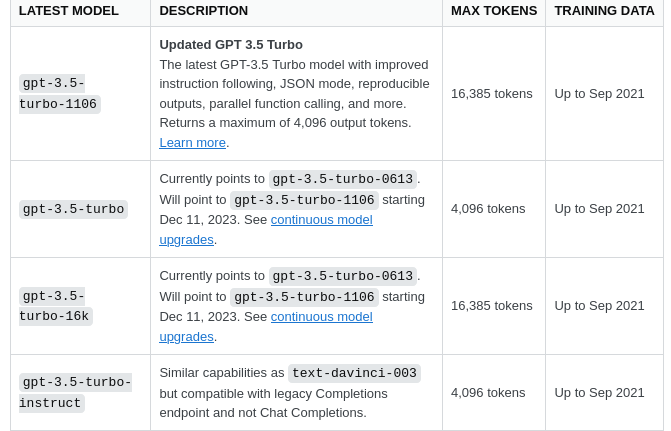
Error This model’s maximum context length is 4097 tokens
This
model's maximum context length is 4097 tokens. However, your messages resulted in 4969 tokens. Please reduce the length of the messages.
Visit us at DataDrivenInvestor.com
Subscribe to DDIntel here.
Have a unique story to share? Submit to DDIntel here.
Join our creator ecosystem here.
DDIntel captures the more notable pieces from our main site and our popular DDI Medium publication. Check us out for more insightful work from our community.
DDI Official Telegram Channel: https://t.me/+tafUp6ecEys4YjQ1