Small Example of Solidity Project
I want to review all the techniques used in this small solidity project in this article.
Type of variables in solidity
// SPDX-License-Identifier: GPL-3.0 pragma solidity >=0.4.22 <0.9.0;
///
@title A contract for demonstrate Value types///
@author Jitendra Kumar///
@notice For now, this contract just show how Value types works in soliditycontract Types {
  // Initializing Bool
  variable bool public boolean = false;
  // Initializing Integer
  variable int32 public int_var = -60313;
  // Initializing String
  variable string public str = "GeeksforGeeks";
  // Initializing Byte
  variable bytes1 public b = "a";
  // Defining an enumerator enum my_enum {
    geeks_, _for, _geeks
  }
  // Defining a
  function to return // values stored in an enumerator
  function Enum() public pure returns(my_enum) {
    return my_enum._geeks;
  }
}// SPDX-License-Identifier: GPL-3.0 pragma solidity >=0.4.22 <0.9.0;
///
@title A contract for demonstrate Reference types///
@author Jitendra Kumar///
@notice For now, this contract just show how Reference types works in soliditycontract
mapping_example {
// Defining an array uint[5] public array = [uint(1), 2, 3, 4, 5];
// Defining a Structure struct student {
string name;
string subject;
uint8 marks;
}
// Creating a structure object student public std1;
// Defining a
function to return // values of the elements of the structure
function structure() public returns(string memory, string memory, uint){
std1.name = "John";
std1.subject = "Chemistry";
std1.marks = 88;
return (std1.name, std1.subject, std1.marks);
}
// Creating a mapping mapping (address => student) result;
address[] student_result;
}Units and Globally Available Variables
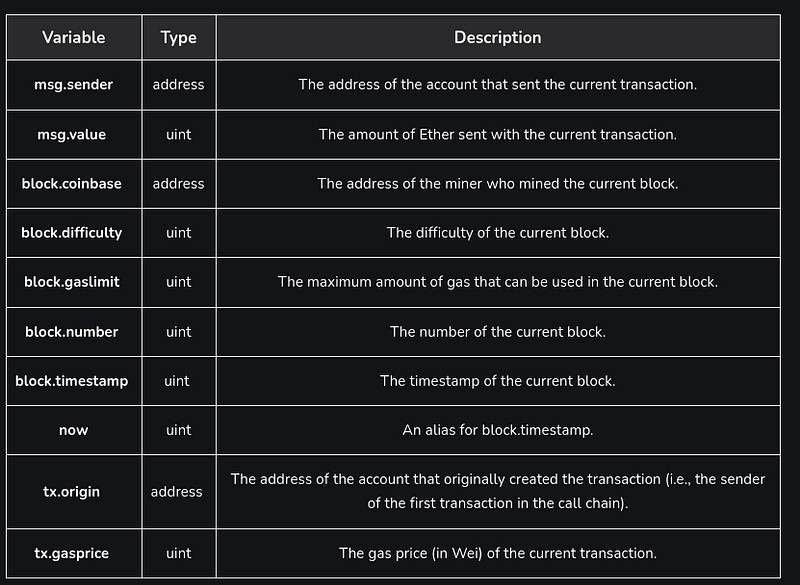
msg.data(bytes calldata): complete calldatamsg.sender(address): sender of the message (current call)msg.sig(bytes4): first four bytes of the calldata (i.e. function identifier)
Solidity — Reference Types
Solidity references store and modify complicated data structures including arrays, structs, maps, and strings. These data types hold a reference to the data’s memory or storage location, unlike value types like integers and booleans. Reference types are vital for developing complicated Ethereum smart contracts since they allow for more data structure and manipulation.
1. Fixed-Size Arrays
// Solidity program to implement // the fixed-size arrays// SPDX-License-Identifier: MITpragma
solidity ^0.8.0;
contract FixedSizeArrayExample {
  uint[5] fixedSizeArray;
  function populateArray() public {
    for (uint i = 0;
    i < 5;
    i++) {
      fixedSizeArray[i] = i + 1;
    }
  }
  function getArray() public view returns (uint[5] memory) {
    return fixedSizeArray;
  }
}
2. Dynamic-Size Arrays
// Solidity program to implement // the Dynamic-Size Arrays// SPDX-License-Identifier: MITpragma
solidity ^0.8.0;
contract DynamicSizeArrayExample {
  uint[] dynamicSizeArray;
  function addElement(uint _value) public {
    dynamicSizeArray.push(_value);
  }
  function getArray() public view returns (uint[] memory) {
    return dynamicSizeArray;
  }
}
3. Array Members
// Solidity program to implement// the array memberspragma solidity ^0.5.0;
// Creating a contractcontract Types {
  // Declaring an array uint[] data = [10, 20, 30, 40, 50];
  // Defining a
  function to find the length // of the array
  function array_length() public returns(uint) {
    uint x = data.length;
    return x;
  }
  // Defining the
  function to push values to the array function array_push() public returns(uint[] memory) {
    data.push(60);
    data.push(70);
    data.push(80);
    return data;
  }
  // Defining a
  function to pop values from the array function array_pop() public returns(uint[] memory) {
    data.pop();
    return data;
  }
}
4. Byte Arrays
// Solidity program to implement // the byte arrayspragma solidity ^0.8.0;
contract ByteArrayExample {
  bytes3 fixedSizeByteArray;
  bytes dynamicSizeByteArray;
  constructor() {
    // "abc" fixedSizeByteArray = 0x616263;
    // "defghi" dynamicSizeByteArray = hex"646566676869";
  }
  function getFixedSizeByteArray() public view returns (bytes3) {
    return fixedSizeByteArray;
  }
  function getDynamicSizeByteArray() public view returns (bytes memory) {
    return dynamicSizeByteArray;
  }
}
Structs
Structs in Solidity allow you to define custom data structures with various properties. A struct is a composite type that groups different properties (of various types) under a single type.
// Solidity program to implement Structspragma solidity ^0.8.0;
contract StructsExample {
  struct Person {
    string name;
    uint age;
  }
  Person[] public people;
  function addPerson(string memory _name, uint _age) public {
    Person memory newPerson = Person(_name, _age);
    people.push(newPerson);
  }
  function getPerson(uint index) public view returns (string memory, uint) {
    Person memory person = people[index];
    return (person.name, person.age);
  }
}
In Solidity, we use the memory keyword to store the data temporarily during the execution of a smart contract. When a variable is declared using the memory keyword, it is stored in the memory area of the EVM Ethereum Virtual Machine . This is the default storage location for variables in Solidity.
Mappings
Mappings are a key-value data structure in Solidity, similar to associative arrays or hash maps in other programming languages. They allow you to associate a value with a key.
// Solidity program to implement // the Mappingspragma solidity ^0.8.0;
contract MappingsExample {
  mapping(address => uint) public balances;
  function updateBalance(address _account, uint _newBalance) public {
    balances[_account] = _newBalance;
  }
  function getBalance(address _account) public view returns (uint) {
    return balances[_account];
  }
}
UnimplementedFeatureError: Nested dynamic arrays not implemented here.
Solidity and Javascript allow nested arrays but we do not have the ability to pull a nested dynamic array from the solidity over to javascript world. it is the limitation of the bridge between solidity and javascript.
Solidity is still in development and that’s why it still lacks in a lot of features that a good programming language should have. One of the features which solidity is missing is that it cannot return or take multi-dimensional arrays as input.
Step 1: Serialize & De-serialize using solidity
Step 2: De-serialize the byte buffer using javascript
Payable Functions
In Solidity, a payable function is a function that can accept ether as an input. When a contract is called with a payable function, the caller can send ether along with the function call. The ether is then stored in the contract’s balance, which can be accessed using the “address(this).balance” property.
How to declare a payable function
In Solidity, you use the payable function when you want to allow a contract to receive ether. A payable function is declared using the ‘payable’ keyword, which makes it possible to receive ether as part of a function call. See code example below;
//SPDX-License-Identifier: MITpragma solidity ^0.8.0;
contract Payable{
  mapping(address => uint256) balances;
  function deposit() external payable {
    require(msg.value > 0, "Zero ether not allowed");
    balances[msg.sender] = balances[msg.sender] + msg.value;
  }
}
What is an example of a Solidity payable function?
Here is an example of a basic payable function in Solidity with the deposit function:
function deposit() payable external {
  // no need to write anything here!
}
Notice, in this case, we didn’t write any code in the deposit function body. Writing a payable function alone is enough to receive ether and you may not need to write any logic.
For example, if this was a payable smart contract that was controlled by a charity accepting cryptocurrency donations, perhaps users would just call deposit and the charity would eventually be able to withdraw these contributions to an address of their choosing. In that case, it may be better to write a receive function:
receive() external payable {    // this built-in function
doesn't require any calldata,    // it will get called if the data field is empty and     // the value field is not empty.    // this allows the smart contract to receive ether just like a     // regular user account controlled by a private key would.}
What is Require in Solidity?
As the word suggests, require basically means to demand something before availing the service to the users. For example, websites require you to create an account or login into an existing account before giving you access to the account which belongs to you. This is the basic flow of how ‘require’ works in Solidity also. Suppose there are is an account used by Suyash and he wants to send five Ethereum to an account used by Aditya. Now in order for Suyash to send Ethereum to Aditya, Suyash should have at least five Ethereum in his account to send the money to Aditya. So in the Solidity code, we can “require” the sender’s balance to be greater than or equal to the balance he wants to send to the receiver otherwise the transaction should obviously fail. This is just an example of the numerous use cases that use “require” and enable us to perform multiple checks before approving a transaction or anything else.
pragma solidity ^0.8.4;
contract Bank {
  mapping(address => uint) balance;
  address owner;
  constructor() {
    owner = msg.sender;
    // address that deploys contract will be the owner
  }
  function addBalance(uint _toAdd) public returns(uint) {
    require(msg.sender == owner);
    balance[msg.sender] += _toAdd;
    return balance[msg.sender];
  }
  function getBalance() public view returns(uint) {
    return balance[msg.sender];
  }
  function transfer(address recipient, uint amount) public {
    require(balance[msg.sender]>=amount, "Insufficient Balance");
    require(msg.sender != recipient, "You can't send money to yourself!");
    _transfer(msg.sender, recipient, amount);
  }
  function _transfer(address from, address to, uint amount) private {
    balance[from] -= amount;
    balance[to] += amount;
  }
}
The Revert Function in Solidity
The revert function is similar to the require function in that it’s used to revert a transaction if a condition is not met. However, the revert function provides more flexibility in error handling and allows you to provide a reason string to explain why the transaction was reverted. Here’s an example:
function withdraw(uint amount) public {
  require(balances[msg.sender] >= amount, "Insufficient balance");
  balances[msg.sender] -= amount;
  if (!msg.sender.send(amount)) {
    revert("Failed to send funds");
  }
}
msg.value is included along with the transaction,
msg.value(uint): number of wei sent with the message
. `require`: Validate Inputs and Conditions
The `require` function acts as a guard, validating inputs and conditions before executing specific parts of the code. It ensures that the specified conditions are met, and if not, it throws an error and reverts all changes made to the contract’s state. This function is commonly used to validate inputs, check conditions before execution, and validate return values from other functions.
require(_i > 10, “Input must be greater than 10”);How to generate random numbers in solidity?
We’ll call the keccak256() function that will compute the hash of the input using the keccak256 hash algorithm. This function takes a single argument of type bytes, and since we want my random number to be computed based on more random values, we will call another function called abi.encode.Packed() is the function that will perform packed encoding of the given arguments and return a variable of type bytes. The function’s arguments are: (msg. sender), (block. timestamp), and our variable, which can also include (block. difficulty) with other global variables to make it more complex.
//SPDX-License-Identifier: GPL-3.0pragma solidity >=0.8.7;
contract RandomNumber {
  uint randNo = 0;
  function setNumber() external {
    randNo= uint (keccak256(abi.encodePacked (msg.sender, block.timestamp, randNo)));
  }
  function getNumber() external view returns (uint) {
    return randNo;
  }
}
Randomness can’t be done in Solidity. If you aren’t worried about someone gaming this, then you can sha256 the timestamp, then hash that hash to get another hash, then hash that hash to get another, and so on.

How to transfer Ether in solidity
- Using the
transferfunction: The transfer function is the simplest and safest method to transfer Ether in Solidity. The transfer function sends the specified amount of Ether to the recipient’s address. If the transfer fails (e.g., due to out-of-gas conditions or revert in the recipient’s contract), an exception is thrown, and the entire transaction is reverted. It provides basic security by reverting the transfer if something goes wrong. Syntax:recipient.transfer(amount);
transfer vs send vs call
- transfer -> the receiving smart contract should have a fallback function defined or else the transfer call will throw an error. There is a gas limit of 2300 gas, which is enough to complete the transfer operation. It is hardcoded to prevent reentrancy attacks.

transfer() function
2. send -> It works in a similar way as to transfer call and has a gas limit of 2300 gas as well. It returns the status as a boolean.

send() function
3. call ->It is the recommended way of sending ETH to a smart contract. The empty argument triggers the fallback function of the receiving address.
How to Get a Smart Contract’s Balance in Solidity
In order to get the balance of a smart contract, you first need to obtain the contract address. For that, you can use the this keyword which refers to the contract itself.
Once you have the contract address, you can call the balance property, which will return the contract balance.
You can do this in a single line of code 👇
address(this).balance;If what you want is to obtain the balance of a different contract, you can use a function like this:
function getContractBalance(address ContractAddress) public view returns(uint){
  return ContractAddress.balance;
}
The amount of Ether in this particular smart contract.
For example: If you deploy this smart contract and send it 5 Eth. Then this function will return “5”.
contract Helper {
  function getBalance() returns (uint bal) {
    return this.balance;
  }
}
New the array address or reset the value of array
address[] myArray = new address[](0);
//dynamic arraymyArray = new address[2](0);
//fix array
Solidity — Function Modifiers
Function Modifiers are used to modify the behaviour of a function. For example to add a prerequisite to a function.
contract Owner {   modifier onlyOwner {      require(msg.sender == owner);      _;   }   modifier
costs(uint price) {      if (msg.value >= price) {         _;      }   }}
toWei
Converts any ether value value into wei.
web3.utils.toWei(number [, unit])Nodejs Try catch
For handling errors must use the try catch mechanism.
try {      await enterPlayerInLottery(lottery, accounts[4], web3, 0);      assert(false);    } catch
(error) {      assert(error);    }
web3.eth.getBalance
Get the balance of an address at a given block.
I deploy a smart contract on network, Is it possible run exact this smart contract on network again ?
No, once you deploy a smart contract on a blockchain network, it cannot be directly deployed again. This is because the blockchain is a distributed ledger, meaning that all of the nodes on the network maintain a copy of the same data. Once a smart contract has been deployed, its code is embedded into the blockchain and can only be modified by consensus of the network participants.
If you need to make changes to the logic of a deployed smart contract, you will need to create a new smart contract and deploy it to the network. This new smart contract can then interact with the old smart contract to make the desired changes. This process is often referred to as “smart contract upgrades” or “contract redeployment.”
Here are some considerations when upgrading a smart contract:
- Compatibility: Ensure that the new smart contract is compatible with the old one. This includes the ABI (Application Binary Interface) and any external dependencies.
- Backward Compatibility: If possible, maintain backward compatibility so that existing applications and users can still interact with the smart contract after the upgrade.
- Testing and Security: Thoroughly test the new smart contract to ensure it functions correctly and does not introduce any new vulnerabilities.
- Migration Plan: Develop a clear migration plan that outlines the steps involved in upgrading the smart contract, including communication with users and stakeholders.
- Gradual Deployment: Consider deploying the new smart contract in stages or with a gradual rollout to minimize any disruptions.
Upgrading smart contracts can be complex and requires careful planning and execution. It’s crucial to prioritize security and compatibility while ensuring a smooth transition for users and applications.
Project code
Writing tests
Stackademic
Thank you for reading until the end. Before you go:
- Please consider clapping and following the writer! 👏
- Follow us on Twitter(X), LinkedIn, and YouTube.
- Visit Stackademic.com to find out more about how we are democratizing free programming education around the world.