NestJS, a progressive Node.js framework, offers robust capabilities for implementing authentication and authorization in web applications. This essay examines the process of integrating these crucial security features using NestJS, focusing on user management, secure password handling, and JSON Web Token (JWT) implementation.
The process begins with the generation of an Auth module, complete with associated controller and service components. This modular approach aligns with NestJS’s architectural principles, promoting code organization and maintainability. The Auth module is then integrated into the application’s main module, establishing a foundation for user-related functionalities.
User management is implemented through a dedicated Users entity, which includes fields for unique identifiers, usernames, passwords, and creation timestamps. This entity is managed via a UsersRepository, which extends TypeORM’s Repository class, providing an abstraction layer for database operations.
A critical aspect of user authentication is secure password handling. The implementation utilizes bcrypt, a well-regarded hashing function, to generate salted and hashed passwords before storage. This approach significantly enhances security by ensuring that plain-text passwords are never stored in the database.
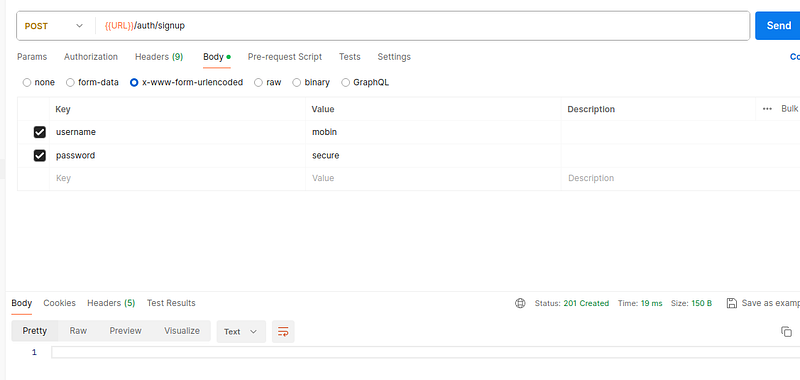
The authentication flow comprises two main operations: user sign-up and sign-in. The sign-up process involves creating new user records with validated credentials, while sign-in verifies provided credentials against stored data. Both operations are exposed through the AuthController, which delegates to the AuthService for business logic execution.
Input validation is enforced using class-validator decorators, ensuring that usernames and passwords meet specified criteria. This includes length constraints and complexity requirements for passwords, thereby enhancing the overall security posture of the application.
The implementation of JSON Web Tokens (JWT) marks a significant step in the authorization process. JWTs are generated upon successful authentication and serve as secure, stateless session management tools. The JwtModule is configured with a secret key and token expiration time, providing a balance between security and user experience.
A custom JWTStrategy is implemented, extending Passport’s strategy pattern. This strategy is responsible for JWT validation and user retrieval based on the token payload. The integration of Passport and JWT in NestJS creates a seamless authentication flow, where valid tokens grant access to protected resources.
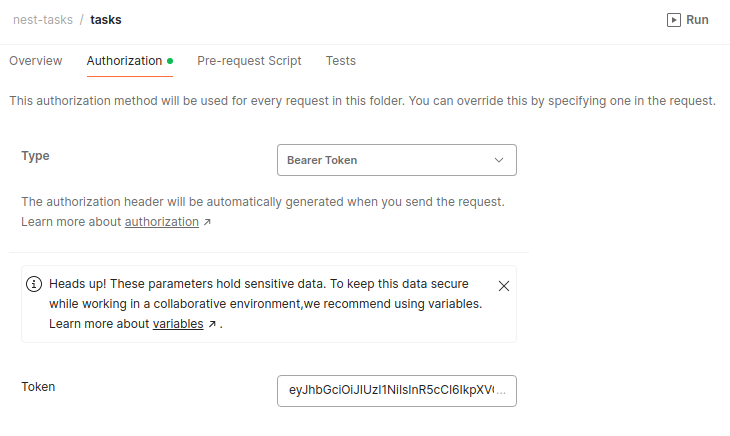
The essay concludes by discussing the integration of JWT-based authentication with the application’s task management feature. By applying the AuthGuard to the TasksController, all task-related endpoints are secured, ensuring that only authenticated users can access these resources.
In conclusion, this comprehensive approach to authentication and authorization in NestJS demonstrates the framework’s flexibility and power in building secure web applications. By leveraging TypeORM for data persistence, Passport for authentication strategies, and JWT for stateless authorization, developers can create robust, scalable systems that prioritize security without compromising on functionality or performance.
Generate Auth module controller and service
nest g module authnest g service auth --no-specnest g controller auth --no-specyarn start:devSource Code :
Initial Auth Folder
app.module.ts
@Module({
  imports: [...TasksModule, AuthModule,],
})
auth.module.ts
import {
  Module
}
from '@nestjs/common';
import {
  AuthService
}
from './auth.service';
import {
  AuthController
}
from './auth.controller';
import {
  TypeOrmModule
}
from '@nestjs/typeorm';
import {
  UsersRepository
}
from './users.repository';
@Module({
  imports: [TypeOrmModule.forFeature([Users])], providers: [AuthService, UsersRepository],
  controllers: [AuthController],
})
export class AuthModule {
}
auth.controller.ts
import {
  Controller
}
from '@nestjs/common';
@Controller('auth')
export class AuthController {
}
auth.service.ts
import {
  Injectable
}
from '@nestjs/common';
import {
  UsersRepository
}
from './users.repository';
import {
  InjectRepository
}
from '@nestjs/typeorm';
@Injectable()
export class AuthService {
  constructor(@InjectRepository(UsersRepository) private userRepository: UsersRepository,) {
  }
}
auth.repository.ts
import {
  Injectable
}
from '@nestjs/common';
import {
  DataSource, Repository
}
from 'typeorm';
import {
  Users
}
from './user.entity';
@Injectable()
export class UsersRepository extends Repository<Users> {
  constructor(private ds: DataSource) {
    super(Users, ds.createEntityManager());
  }
}
auth.entity.ts
import {
  Column, Entity, PrimaryGeneratedColumn
}
from 'typeorm';
@Entity()
export class Users {
  @PrimaryGeneratedColumn('uuid') id: string;
  @Column() username: string;
  @Column() password: string;
  @Column() created_at: Date;
}
Create User or signup
add migration sql
-- liquibase formatted sql
-- changeset mobin:2
CREATE TABLE IF NOT EXISTS "users" (
    "id" UUID NOT NULL DEFAULT gen_random_uuid(),
    "username" TEXT NOT NULL,
    "password" TEXT NOT NULL,
    "created_at" TIMESTAMPTZ NOT NULL DEFAULT NOW(),
    PRIMARY KEY ("id")
);

CREATE INDEX ON "users" ("id");

-- rollback DROP TABLE "tasks";
apply update
sudo
docker-compose -f docker-compose.yml exec liquibase /bin/shliquibase update
--url=jdbc:postgresql://postgres-tasks:5432/task?currentSchema=public --changelog-file=changelog.xml
--username=user --password=pass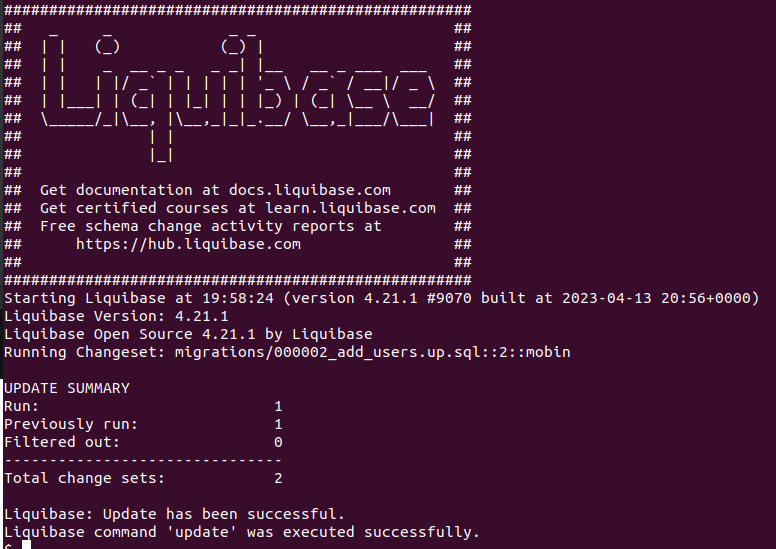
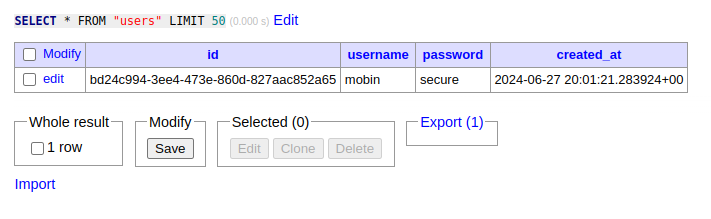
adminer
http://127.0.0.1:10000/?pgsql=postgres-tasks&username=user&db=task&ns=public&table=users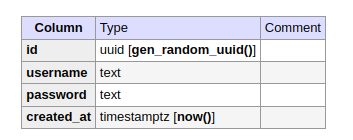
postman
dto
export class AuthCredentialsDto {
  username: string;
  password: string;
}
user.repository.ts
import {
  Injectable
}
from '@nestjs/common';
import {
  DataSource, Repository
}
from 'typeorm';
import {
  Users
}
from './user.entity';
import {
  AuthCredentialsDto
}
from './dto/auth-credentials.dto';
@Injectable()
export class UsersRepository extends Repository<Users> {
  constructor(private ds: DataSource) {
    super(Users, ds.createEntityManager());
  }
  async createUser(authCredentialDto: AuthCredentialsDto): Promise<void> {
    const {
      username, password
    }
    = authCredentialDto;
    const user = this.create({
      username, password,
    });
    await this.save(user);
  }
}
auth.service.ts
import {
  Injectable
}
from '@nestjs/common';
import {
  UsersRepository
}
from './users.repository';
import {
  InjectRepository
}
from '@nestjs/typeorm';
import {
  AuthCredentialsDto
}
from './dto/auth-credentials.dto';
@Injectable()
export class AuthService {
  constructor(@InjectRepository(UsersRepository) private userRepository: UsersRepository,) {
  }
  async signUp(authCredentialsDto: AuthCredentialsDto): Promise<void> {
    return this.userRepository.createUser(authCredentialsDto);
  }
}
auth.controller.ts
import {
  Body, Controller, Post
}
from '@nestjs/common';
import {
  AuthService
}
from './auth.service';
import {
  AuthCredentialsDto
}
from './dto/auth-credentials.dto';
@Controller('auth')
export class AuthController {
  constructor(private authService: AuthService) {
  }
  @Post('/signup') async signUp(@Body() authCredentialsDto: AuthCredentialsDto): Promise<void> {
    return this.authService.signUp(authCredentialsDto);
  }
}
User Validation
import {
  IsString, Matches, MaxLength, MinLength
}
from 'class-validator';
export class AuthCredentialsDto {
  @IsString() @MinLength(4) @MaxLength(20) username: string;
  @IsString() @MinLength(8) @MaxLength(32)
  @Matches(/((?=.*\d)|(?=.*\W+))(?![.\n])(?=.*[A-Z])(?=.*[a-z]).*$/, {
    message: 'Password too weak',
  }) password: string;
}
This regular expression is typically used for password validation. Let’s break it down step by step:
1. `/` at the start and end: These delimit the regular expression.
2. `((?=.*\d)|(?=.*\W+))`: This is a positive lookahead that ensures the string contains either:
— `(?=.*\d)`: At least one digit
— OR
— `(?=.*\W+)`: At least one non-word character (special character)
3. `(?![.\n])`: This is a negative lookahead that ensures the string doesn’t end with a dot or newline.
4. `(?=.*[A-Z])`: This is a positive lookahead that ensures the string contains at least one uppercase letter.
5. `(?=.*[a-z])`: This is a positive lookahead that ensures the string contains at least one lowercase letter.
6. `.*`: This matches any character (except newline) zero or more times.
7. `$`: This asserts the position at the end of the string.
In summary, this regular expression validates a string that meets the following criteria:
- Contains at least one digit or special character
- Does not end with a dot or newline
- Contains at least one uppercase letter
- Contains at least one lowercase letter
- Can contain any characters, and must be at the end of the string
This type of regex is commonly used for ensuring password strength, requiring a mix of character types for security.
Prevent repeated username
entity
import {
  Column, Entity, PrimaryGeneratedColumn
}
from 'typeorm';
@Entity()
export class Users {
  @PrimaryGeneratedColumn('uuid') id: string;
  @Column({
    unique: true
  }) username: string;
  @Column() password: string;
  @Column() created_at: Date;
}
repository
async createUser(authCredentialDto: AuthCredentialsDto): Promise<void> {    const { username,
password } = authCredentialDto;    const user = this.create({      username,      password,    });
try {      await this.save(user);    } catch (error) {      console.error(error);      if
(error.code === '23505') {        throw new ConflictException('Username already exists');      }
else {        throw new InternalServerErrorException();      }    }  }
Using Bcrypt for store hash of password
yarn add bcrypt
repository
async createUser(authCredentialDto: AuthCredentialsDto): Promise<void> {    const { username,
password } = authCredentialDto;    const salt = await bycrypt.genSalt();    const hashedPassword =
await bycrypt.hash(password, salt);    const user = this.create({      username,      password:
hashedPassword,    });    try {      await this.save(user);    } catch (error) {
console.error(error);      if (error.code === '23505') {        throw new
ConflictException('Username already exists');      } else {        throw new
InternalServerErrorException();      }    }  }
Sign in
controller
@Post('/signin') async signIn(@Body() authCredentialsDto: AuthCredentialsDto,): Promise<string> {
  return this.authService.signIn(authCredentialsDto);
}
service
async signIn(authCredentialsDto: AuthCredentialsDto): Promise<string> {    return
this.userRepository.validateUserPassword(authCredentialsDto);  }
repository
async validateUserPassword(    authCredentialDto: AuthCredentialsDto,  ): Promise<string> {    const
{ username, password } = authCredentialDto;    const user = await this.findOne({ where: { username }
});    if (user && (await bycrypt.compare(password, user.password))) {      return 'success';    }
else {      return 'Invalid credentials';    }  }
JWT
install
yarn add @nestjs/jwt @nestjs/passport passport passport-jwtauth.model
import {
  Module
}
from '@nestjs/common';
import {
  AuthService
}
from './auth.service';
import {
  AuthController
}
from './auth.controller';
import {
  TypeOrmModule
}
from '@nestjs/typeorm';
import {
  UsersRepository
}
from './users.repository';
import {
  Users
}
from './user.entity';
import {
  PassportModule
}
from '@nestjs/passport';
import {
  JwtModule
}
from '@nestjs/jwt';
@Module({
  imports: [PassportModule.register({
    defaultStrategy: 'jwt'
  }), JwtModule.register({
    secret: 'topSecret51', signOptions: {
      expiresIn: 3600,
    },
  }), TypeOrmModule.forFeature([Users]),], providers: [AuthService, UsersRepository], controllers:
  [AuthController],
})
export class AuthModule {
}
jwt-payload.interface.ts
export interface JwtPayload {
  username: string;
}
controller
@Post('/signin') async signIn(@Body() authCredentialsDto: AuthCredentialsDto,): Promise<{
  accessToken: string
}
> {
  return this.authService.signIn(authCredentialsDto);
}
service
import {
  Injectable
}
from '@nestjs/common';
import {
  UsersRepository
}
from './users.repository';
import {
  InjectRepository
}
from '@nestjs/typeorm';
import {
  AuthCredentialsDto
}
from './dto/auth-credentials.dto';
import {
  JwtService
}
from '@nestjs/jwt';
import {
  JwtPayload
}
from './jwt-payload.intreface';
@Injectable()
export class AuthService {
  constructor(@InjectRepository(UsersRepository) private userRepository: UsersRepository, private
  jwtService: JwtService,) {
  }
  async signUp(authCredentialsDto: AuthCredentialsDto): Promise<void> {
    return this.userRepository.createUser(authCredentialsDto);
  }
  async signIn(authCredentialsDto: AuthCredentialsDto,): Promise<{
    accessToken: string
  }
  > {
    if (await this.userRepository.validateUserPassword(authCredentialsDto)) {
      const payload: JwtPayload = {
        username: authCredentialsDto.username
      };
      const accessToken: string = this.jwtService.sign(payload);
      return {
        accessToken
      };
    }
  }
}
repository
async validateUserPassword(    authCredentialDto: AuthCredentialsDto,  ): Promise<boolean> {
const { username, password } = authCredentialDto;    const user = await this.findOne({ where: {
username } });    if (user && (await bycrypt.compare(password, user.password))) {      return true;
} else {      return false;    }  }
JWT Validation
Install package
yarn add @types/passport-jwtauth.module.ts
import {
  Module
}
from '@nestjs/common';
import {
  AuthService
}
from './auth.service';
import {
  AuthController
}
from './auth.controller';
import {
  TypeOrmModule
}
from '@nestjs/typeorm';
import {
  UsersRepository
}
from './users.repository';
import {
  Users
}
from './user.entity';
import {
  PassportModule
}
from '@nestjs/passport';
import {
  JwtModule
}
from '@nestjs/jwt';
import {
  JWTStrategy
}
from './jwt.strategy';
@Module({
  imports: [PassportModule.register({
    defaultStrategy: 'jwt'
  }), JwtModule.register({
    secret: 'topSecret51', signOptions: {
      expiresIn: 3600,
    },
  }), TypeOrmModule.forFeature([Users]),], providers: [AuthService, UsersRepository, JWTStrategy],
  controllers: [AuthController], exports: [JWTStrategy, PassportModule],
})
export class AuthModule {
}
jwt.strategy.ts
import {
  Injectable, UnauthorizedException
}
from '@nestjs/common';
import {
  PassportStrategy
}
from '@nestjs/passport';
import {
  ExtractJwt, Strategy
}
from 'passport-jwt';
import {
  UsersRepository
}
from './users.repository';
import {
  InjectRepository
}
from '@nestjs/typeorm';
import {
  JwtPayload
}
from './jwt-payload.intreface';
import {
  Users
}
from './user.entity';
@Injectable()
export class JWTStrategy extends PassportStrategy(Strategy) {
  constructor(@InjectRepository(UsersRepository) private userRepository: UsersRepository,) {
    super({
      secretOrKey: 'topSecret51', jwtFromRequest: ExtractJwt.fromAuthHeaderAsBearerToken(),
    });
  }
  async validate(payload: JwtPayload): Promise<Users> {
    const {
      username
    }
    = payload;
    const user: Users = await this.userRepository.findOne({
      where: {
        username
      },
    });
    if (!user) {
      throw new UnauthorizedException();
    }
    return user;
  }
}
Add JWT to tasks
tasks.module.ts
@Module({
  imports: [TypeOrmModule.forFeature([Tasks]), AuthModule], controllers: [TasksController],
  providers: [TasksService, TaskRepository],
})
tasks.controller.ts
@Controller('tasks')@UseGuards(AuthGuard())add jwt token to bearer