
The document discusses implementing ownership and authentication in NestJS, focusing on many-to-one/one-to-many relationships, custom decorators, and interceptors. It covers topics such as connecting users to tasks, setting entity names, creating custom decorators, implementing JWT authentication, and using transformer interceptors. The document also provides code examples for creating, retrieving, and filtering tasks associated with authenticated users.
NestJS, a progressive Node.js framework, offers robust tools for building scalable and efficient server-side applications. This essay explores the implementation of ownership and authentication in NestJS, focusing on key concepts and best practices.
At the core of this implementation is the many-to-one/one-to-many relationship paradigm. This relational model effectively captures hierarchical relationships, such as between users and tasks. In the context of a task management system, a user can own multiple tasks, while each task belongs to a single user. This relationship is established using TypeORM decorators like @OneToMany and @ManyToOne, allowing for efficient data organization and retrieval.
Custom decorators play a crucial role in this implementation. The @GetUser() decorator, for instance, extracts the authenticated user from the request object. This approach keeps controller methods clean and focused on business logic, promoting code reusability and maintainability. By leveraging ExecutionContext, these decorators can access request data and inject it into route handlers.
Authentication is further enhanced by integrating JWT (JSON Web Tokens). The user’s ID is saved within the JWT, allowing for secure and stateless authentication. This token is then used to identify the user in subsequent requests, ensuring that users can only access and modify their own resources.
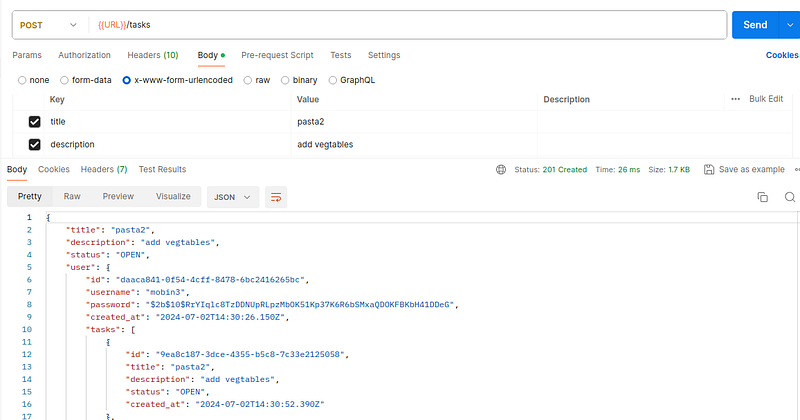
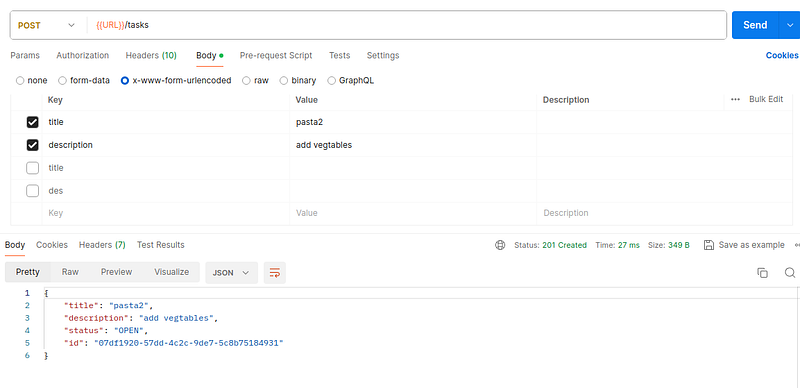
Interceptors, such as the TransformerInterceptor, are utilized to automatically transform response data before sending it back to the client. This is particularly useful for serializing complex objects, handling circular references, and applying exclusion strategies. By using the class-transformer library, developers can control which properties are exposed in the API responses, enhancing security and reducing unnecessary data transfer.
The implementation also focuses on efficient task management. Methods for creating, retrieving, and filtering tasks are designed with user ownership in mind. The getTasks method, for example, uses QueryBuilder to construct database queries that filter tasks based on the authenticated user and additional criteria like status or search terms.
Error handling and validation are integral parts of this implementation. The use of ValidationPipe ensures that incoming data adheres to defined schemas, while custom exception filters can be employed to handle and format error responses consistently.
Source code:
Many-to-one / one-to-many relations
The many-to-one or one-to-many relationship paradigm in database design and entity modeling describes an asymmetric association between two entities. In this relational structure, an entity of type A may be associated with multiple instances of entity type B, while each instance of entity type B is exclusively associated with a single instance of entity type A.
To elucidate this concept, consider the relationship between ‘User’ and ‘Task’ entities in a system. In this scenario, a single User entity may be linked to an arbitrary number of Taks entities, representing the user’s collection of Tasks. Conversely, each individual Task entity is uniquely associated with one and only one User entity, denoting the task’s owner or creator.
This relational model effectively captures the hierarchical nature of many real-world relationships, where ownership or containment is unidirectional and multiplicative in one direction but singular in the other. It allows for efficient data organization and retrieval, supporting scenarios where aggregation of related entities is required from the ‘one’ side of the relationship, or where tracing ownership is necessary from the ‘many’ side.
Connect user to task
user.entity.ts
@OneToMany(() => Tasks, (tasks) => tasks.user, {
  eager: true
}) tasks: Tasks[];
task.entity.ts
@ManyToOne(() => Users, (user) => user.tasks, {
  eager: false
}) user: Users;
Set name for entity
@Entity({
  name: 'system_users'
})
export class User {
  @PrimaryGeneratedColumn() id: number;
  @Column({
    length: 255, name: "first_name"
  }) firstName: string;
  @Column({
    length: 255, name: "last_name"
  }) lastName: string;
}
how to get user data with req.user on decorator in nest js
import {
  createParamDecorator, ExecutionContext
}
from '@nestjs/common';
export const User = createParamDecorator((data: unknown, ctx: ExecutionContext) => {
  const request = ctx.switchToHttp().getRequest();
  return request.user;
},);
Custom route decorators
Nest is built around a language feature called decorators. Decorators are a well-known concept in a lot of commonly used programming languages, but in the JavaScript world, they’re still relatively new. In order to better understand how decorators work, we recommend reading this article. Here’s a simple definition:
Let’s dive deeper into custom decorators in NestJS, particularly focusing on param decorators like @GetUser() in your code.
Custom decorators in NestJS allow you to create reusable pieces of code that can be applied to classes, methods, or parameters. They’re especially useful for extracting and transforming data from the request object, or for applying metadata to route handlers.
Certainly. Let’s dive deeper into custom decorators in NestJS, particularly focusing on param decorators like `@GetUser()` in your code.
Custom decorators in NestJS allow you to create reusable pieces of code that can be applied to classes, methods, or parameters. They’re especially useful for extracting and transforming data from the request object, or for applying metadata to route handlers.
In your case, `@GetUser()` is a custom parameter decorator. Here’s how it likely works:
1. Definition: The `@GetUser()` decorator is probably defined in the `../auth/get-user.decorator.ts` file. It’s used to extract the user object from the request.
2. Implementation: A typical implementation might look like this:
import {
  createParamDecorator, ExecutionContext
}
from '@nestjs/common';
import {
  User
}
from './user.entity';
export const GetUser = createParamDecorator((data: unknown, ctx: ExecutionContext): User => {
  const request = ctx.switchToHttp().getRequest();
  return request.user;
},);
This decorator extracts the `user` object from the request, which is typically set by an authentication middleware or guard.
3. Usage: In your controller method, `@GetUser() user: User` tells NestJS to use this custom decorator to extract the user and inject it as a parameter.
4. Benefit: This approach keeps your controller methods clean and focused on business logic, rather than dealing with request parsing.
In your specific code:
@Post()createTask(@Body() createTaskDto: CreateTaskDto, @GetUser() user: User,): Promise<Task> {
  console.log(user);
  return this.tasksService.createTask(createTaskDto, user);
}
- `@Post()` is a built-in NestJS decorator that defines this method as a POST route handler.
- `@Body()` is another built-in decorator that extracts the request body and injects it as `createTaskDto`.
- `@GetUser()` is your custom decorator that extracts the authenticated user from the request.
The method then logs the user (for debugging purposes) and calls `this.tasksService.createTask()` with both the DTO and the user object.
This pattern allows you to easily access the authenticated user in any route handler, promoting code reuse and keeping your controllers clean and focused on their primary responsibilities.
Save user id with JWT token
user.decorator.ts
import {
  createParamDecorator, ExecutionContext
}
from '@nestjs/common';
export const GetUser = createParamDecorator((data: unknown, ctx: ExecutionContext) => {
  const request = ctx.switchToHttp().getRequest();
  return request.user;
},);
tasks.controller.ts
import {
  User
}
from 'src/auth/user.entity';
import {
  GetUser
}
from 'src/auth/user.decorator';
...@Post() createTask(@Body() createTaskDto: CreateTaskDto, @GetUser() user: User,): Promise<Task> {
  return this.tasksService.createTask(createTaskDto, user);
}
service.controller.ts
createTask(createTaskDto: CreateTaskDto, user: User): Promise<Task> {    const task =
this.taskRepository.createTask(createTaskDto, user);    return task;  }
task.repository.ts
public async createTask(    createTaskDto: CreateTaskDto,    user: User,  ): Promise<Task> {
const { title, description } = createTaskDto;    const task = this.create({      title,
description,      status: TaskStatus.OPEN,      user,    });
Transformer Interceptor
trasnfor.interceptor.ts
import {
  CallHandler, ExecutionContext, Injectable, NestInterceptor,
}
from '@nestjs/common';
import {
  instanceToPlain
}
from 'class-transformer';
import {
  map
}
from 'rxjs/operators';
@Injectable()
export class TransformerInterceptor implements NestInterceptor {
  intercept(context: ExecutionContext, next: CallHandler<any>) {
    return next.handle().pipe(map((data) => instanceToPlain(data)));
  }
}
Class Declaration:
@Injectable()
export class TransformerInterceptor implements NestInterceptor- This declares a class named
TransformerInterceptorthat implements theNestInterceptorinterface. @Injectable()marks this class as a provider that can be injected into other classes.
Intercept Method:
intercept(context: ExecutionContext, next: CallHandler<any>) {  return next.handle().pipe(map((data)
=> instanceToPlain(data)));}- This is the core of the interceptor. It's called for each request that this interceptor is applied to.
context: Provides access to the current execution context (e.g., request and response objects).next: Represents the next handler in the request-response cycle.
Transformation Logic:
return next.handle().pipe(map((data) => instanceToPlain(data)));next.handle()calls the next handler (route handler or next interceptor) and returns an Observable..pipe()is used to apply RxJS operators to the Observable.map()transforms each emitted value (the response data).instanceToPlain(data)converts class instances to plain JavaScript objects.
The purpose of this interceptor is to automatically transform the response data before it’s sent back to the client. It’s particularly useful for:
- Serializing complex objects: Converting class instances (which may include methods or non-enumerable properties) into plain objects that can be easily JSON-serialized.
- Handling circular references:
instanceToPlaincan handle circular references in your data structures, preventing JSON serialization errors. - Applying exclusion strategies: If you’ve used class-transformer decorators like
@Exclude()or@Expose()on your entity classes,instanceToPlainwill respect these, allowing you to control which properties are sent in the response.
To use this interceptor, you would typically apply it globally in your main.ts file or to specific controllers or routes using the @UseInterceptors() decorator.

Interceptor
task.entity.ts
@ManyToOne(() => User, (user) => user.tasks, { eager: false })  @Exclude({ toPlainOnly: true })
@JoinColumn({ name: 'user_id' })  user: User;
transform.interceptor.ts
import {
  Column, Entity, JoinColumn, ManyToOne, PrimaryGeneratedColumn,
}
from 'typeorm';
import {
  TaskStatus
}
from './tasks-status.enum';
import {
  User
}
from 'src/auth/user.entity';
import {
  Exclude
}
from 'class-transformer';
@Entity({
  name: 'tasks'
})
export class Task {
  @PrimaryGeneratedColumn('uuid') id: string;
  @Column() title: string;
  @Column() description: string;
  @Column() status: TaskStatus;
  @ManyToOne(() => User, (user) => user.tasks, {
    eager: false
  }) @Exclude({
    toPlainOnly: true
  }) @JoinColumn({
    name: 'user_id'
  }) user: User;
  @Column() created_at: Date;
}
main.ts
import {
  NestFactory
}
from '@nestjs/core';
import {
  AppModule
}
from './app.module';
import {
  ValidationPipe
}
from '@nestjs/common';
import {
  TransformerInterceptor
}
from './transform.interceptor';
async function bootstrap() {
  const app = await NestFactory.create(AppModule);
  app.useGlobalPipes(new ValidationPipe());
  app.useGlobalInterceptors(new TransformerInterceptor());
  await app.listen(3000);
}
bootstrap();
before
after
Get all tasks for current user
tasks.controller.ts
@Get() getTasks(@Query() filterDto: GetTasksFilterDto, @GetUser() user: User,): Promise<Task[]> {
  return this.tasksService.getTasks(filterDto, user);
}
tasks.service.ts
async getTasks(filterDto: GetTasksFilterDto, user: User): Promise<Task[]> {    return await
this.taskRepository.getTasks(filterDto, user);  }
tasks.repository.ts
async getTasks(filterDto: GetTasksFilterDto, user: User): Promise<Task[]> {    const { status,
search } = filterDto;    const query = this.createQueryBuilder('tasks');    query.where({ user });
if (status) {      query.andWhere('tasks.status = :status', { status });    }    if (search) {
query.andWhere(
'(LOWER(tasks.title) LIKE LOWER(:search) OR LOWER(tasks.description) LIKE LOWER(:search))',        {
search: `%${search}%` },      );    }    const tasks = await query.getMany();    return tasks;  }
Get task by ID for user
controller
@Get('/:id') getTaskById(@Param('id') id: string, @GetUser() user: User): Promise<Task> {
  return this.tasksService.getTaskById(id, user);
}
service
async getTaskById(id: string, user: User): Promise<Task> {    const task = await
this.taskRepository.getTaskById(id, user);    return task;  }
repository
public async getTaskById(id: string): Promise<Task> {    const found = await this.findOne({ where: {
id: id } });    if (!found) {      throw new NotFoundException(`Task with ID "${id}" not found`);
}    return found;  }
In conclusion
This approach to implementing ownership and authentication in NestJS demonstrates a comprehensive and secure method for managing user-specific data. By leveraging TypeORM relationships, custom decorators, JWT authentication, and interceptors, developers can create robust APIs that maintain data integrity and user privacy. This implementation not only ensures proper data access control but also promotes code organization and reusability, key factors in developing maintainable and scalable applications.
Visit us at DataDrivenInvestor.com
Subscribe to DDIntel here.
Join our creator ecosystem here.
DDI Official Telegram Channel: https://t.me/+tafUp6ecEys4YjQ1