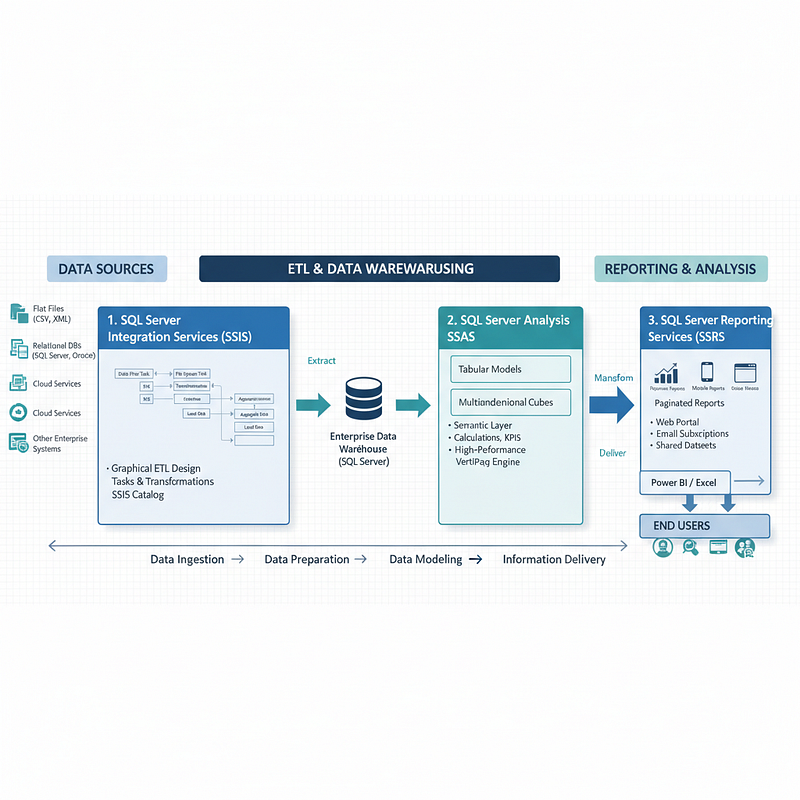
Comprehensive Overview of Microsoft SQL Server Business Intelligence (BI) Stack
Three core components of Microsoft’s on-premises Business Intelligence platform:
- SQL Server Integration Services (SSIS)
- SQL Server Analysis Services (SSAS)
- SQL Server Reporting Services (SSRS)
These services work together in a typical data pipeline:
SSIS moves and transforms raw data → SSAS models and aggregates it for analysis → SSRS creates and delivers reports to end users.
1. SQL Server Integration Services (SSIS)
Role: Data Integration & ETL Engine
Purpose
SSIS is a platform for building enterprise-level data integration and transformation solutions. It handles the Extract, Transform, Load (ETL) process to prepare data for analytics.
Key Capabilities
- Extract data from diverse sources:
- Flat files (CSV, text)
- XML files
- Relational databases (e.g., SQL Server, Oracle)
- Transform data (e.g., cleansing, aggregating, enriching)
- Load data into targets (e.g., data warehouses, databases)
Architecture & Tools
- Graphical tools for building packages (visual workflows) — no coding required.
- Built-in tasks and transformations for common operations (e.g., file copy, data conversion).
- SSIS Catalog: A dedicated database to store, run, and manage packages securely.
- Programmable object model for custom development (e.g., custom tasks, automated package generation).
- Installed as part of SQL Server setup.
- Also available in the cloud via SSIS Integration Runtime in Azure Data Factory.
Example Use Cases
- Nightly loading of a data warehouse
- Automating file transfers between servers
- Cleaning customer data before reporting
2. SQL Server Analysis Services (SSAS)
Role: Analytical Engine & Semantic Modeling
Purpose
SSAS is an analytical data engine (VertiPaq) that provides enterprise-grade semantic data models for business intelligence and decision support.
Key Capabilities
- Creates tabular or multidimensional data models.
- Supports data mining and Power Pivot for SharePoint (in on-premises deployments).
- Models encapsulate business logic: calculations, KPIs, and hierarchies.
- Serves as a single source of truth for reporting tools.
Data Sources
- Models are populated from other systems, typically data warehouses.
- Explicitly supports: SQL Server and Oracle.
- Tabular models support more data source types (implies broader connectivity, though PostgreSQL is not explicitly named).
Workflow
- Install SSAS instance (on-premises or VM)
- Create a model in Visual Studio (SSDT) using a Tabular or Multidimensional template
- Deploy the model to the server
- Process (load) data into the model
- Assign permissions
- End users connect via Power BI, Excel, SSRS, etc.
Deployment Options
- On-premises SQL Server
- Azure Analysis Services (cloud)
- Power BI Premium / Microsoft Fabric
3. SQL Server Reporting Services (SSRS)
Role: Enterprise Reporting Platform
Purpose
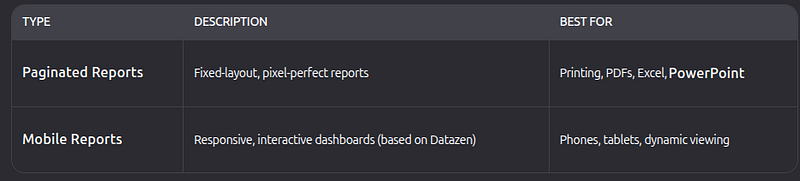
SSRS is an on-premises reporting platform to create, deploy, and manage reports for business users.
Tools
- Report Builder / Report Designer (SSDT): For paginated reports
- Mobile Report Publisher: For mobile reports
Delivery & Access
- View via a modern HTML5 web portal (works in all major browsers)
- Organize content: reports, KPIs, Excel files, shared datasets
- Email subscriptions, on-demand access, and scheduling
- Hybrid Power BI integration: Pin SSRS visuals to Power BI dashboards
Deployment Modes
- Native mode: Standalone SSRS server
- SharePoint integrated mode: Reports managed within SharePoint
Programming
- APIs available to embed or extend reporting in custom applications
How They Work Together: End-to-End BI Pipeline
- SSIS
→ Extracts sales data from Oracle and logs from flat files
→ Cleanses and loads into a SQL Server data warehouse - SSAS
→ Connects to the warehouse
→ Builds a tabular model with time intelligence, sales KPIs, and hierarchies
→ Publishes the model for analysis - SSRS
→ Connects to the SSAS model
→ Generates a paginated monthly sales report (PDF) and a mobile dashboard for executives
→ Delivers via web portal and email
⚙️ How They Work Together
Here’s the typical flow:
- SSIS — Get and clean the data
- SSAS — Model and analyze the data
- SSRS — Report and share the results
💡 Example:
SSIS loads sales data →
SSAS builds a model of sales KPIs →
SSRS shows reports and dashboards for management
Summary Table
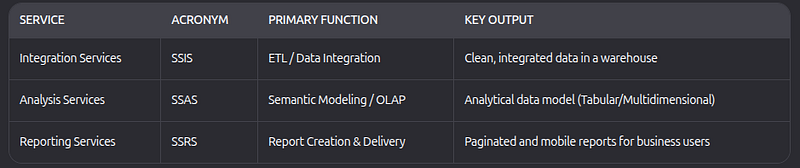
This integrated stack enables organizations to build secure, scalable, and maintainable BI solutions entirely on-premises — or extend into the cloud using Azure and Power BI.
Integrating Microsoft Business Intelligence (BI) Stack with PostgreSQL Databases
Microsoft’s Business Intelligence (BI) platform, which includes SQL Server Integration Services (SSIS), SQL Server Analysis Services (SSAS), and SQL Server Reporting Services (SSRS), is traditionally designed to work with Microsoft SQL Server as its primary data source.
However, organizations that rely on PostgreSQL for data storage can still integrate their databases into the Microsoft BI ecosystem by using standardized connectivity interfaces and third-party drivers.
1. SQL Server Integration Services (SSIS) and PostgreSQL
SSIS is the ETL (Extract, Transform, Load) engine within Microsoft’s BI suite. It enables the movement and transformation of data across heterogeneous systems.
Compatibility:
SSIS can natively connect to PostgreSQL using an ODBC or ADO.NET provider. Commonly used drivers include:
- PostgreSQL ODBC Driver (official)
- Npgsql ADO.NET Data Provider
Integration Workflow:
- Install the chosen PostgreSQL driver on the SSIS host machine.
- Create a new Connection Manager in SSIS using the ODBC or ADO.NET provider.
- Define data flow tasks to extract data from PostgreSQL tables, perform transformations, and load the data into another system, such as a SQL Server data warehouse or flat file.
Typical Use Case:
Organizations often use SSIS to extract data from operational PostgreSQL databases, cleanse and enrich it, and load it into a centralized SQL Server data warehouse for analytical purposes.
2. SQL Server Analysis Services (SSAS) and PostgreSQL
SSAS serves as the analytical engine in Microsoft’s BI stack, providing semantic data models and analytical capabilities.
Compatibility:
SSAS does not include a native connector for PostgreSQL. However, integration can be achieved through the following approaches:
- ODBC Connection: Create an ODBC data source pointing to the PostgreSQL database and configure the SSAS model to use it.
- Linked Server: Establish a linked server connection in SQL Server that points to PostgreSQL, then design the SSAS model using SQL Server as the intermediate source.
Alternative Approach:
For cloud-based or modern analytics environments, Azure Analysis Services or Power BI Premium is recommended, as both offer direct PostgreSQL connectors and broader data source compatibility.
3. SQL Server Reporting Services (SSRS) and PostgreSQL
SSRS is Microsoft’s enterprise reporting solution that enables the design, deployment, and management of paginated and mobile reports.
Compatibility:
SSRS can connect directly to PostgreSQL through the Npgsql ADO.NET provider or ODBC data source.
Configuration Steps:
- Install the Npgsql driver on the SSRS server.
- In the SSRS configuration, define a new Data Source using the Npgsql or ODBC connection type.
- Provide the PostgreSQL connection string (including server address, database name, username, and password).
- Build reports using SQL queries against the PostgreSQL schema.
Use Case Example:
A company can create monthly operational reports directly from PostgreSQL without replicating data into SQL Server, reducing complexity and data latency.
End-to-End Integration Scenarios
Depending on the organization’s data architecture, multiple integration patterns are possible:
Scenario 1 — Full Microsoft BI Pipeline
PostgreSQL  →  SSIS (ETL)  →  SQL Server Data Warehouse  →  SSAS (Model)  →  SSRS / Power BI
(Reports)
This approach is suitable for enterprises requiring centralized data modeling and historical analytics.
Scenario 2 — Direct Reporting from PostgreSQL
PostgreSQL → SSRS / Power BIThis simplified model is ideal for organizations focusing on lightweight reporting or when SQL Server infrastructure is not available.
Recommendations
- For ETL processes, SSIS provides robust capabilities to integrate and transform data from PostgreSQL through ODBC or ADO.NET.
- For analytics and semantic modeling, consider migrating to Power BI Premium or Azure Analysis Services to take advantage of native PostgreSQL support.
- For reporting, SSRS can efficiently connect to PostgreSQL using Npgsql, enabling real-time reporting directly from operational databases.
Conclusion
While Microsoft’s BI stack is natively optimized for SQL Server, it can effectively integrate with PostgreSQL through open connectivity standards and external drivers. By properly configuring SSIS, SSAS, and SSRS, organizations can extend their BI capabilities to PostgreSQL environments — enabling comprehensive, cross-platform data analytics and reporting solutions.