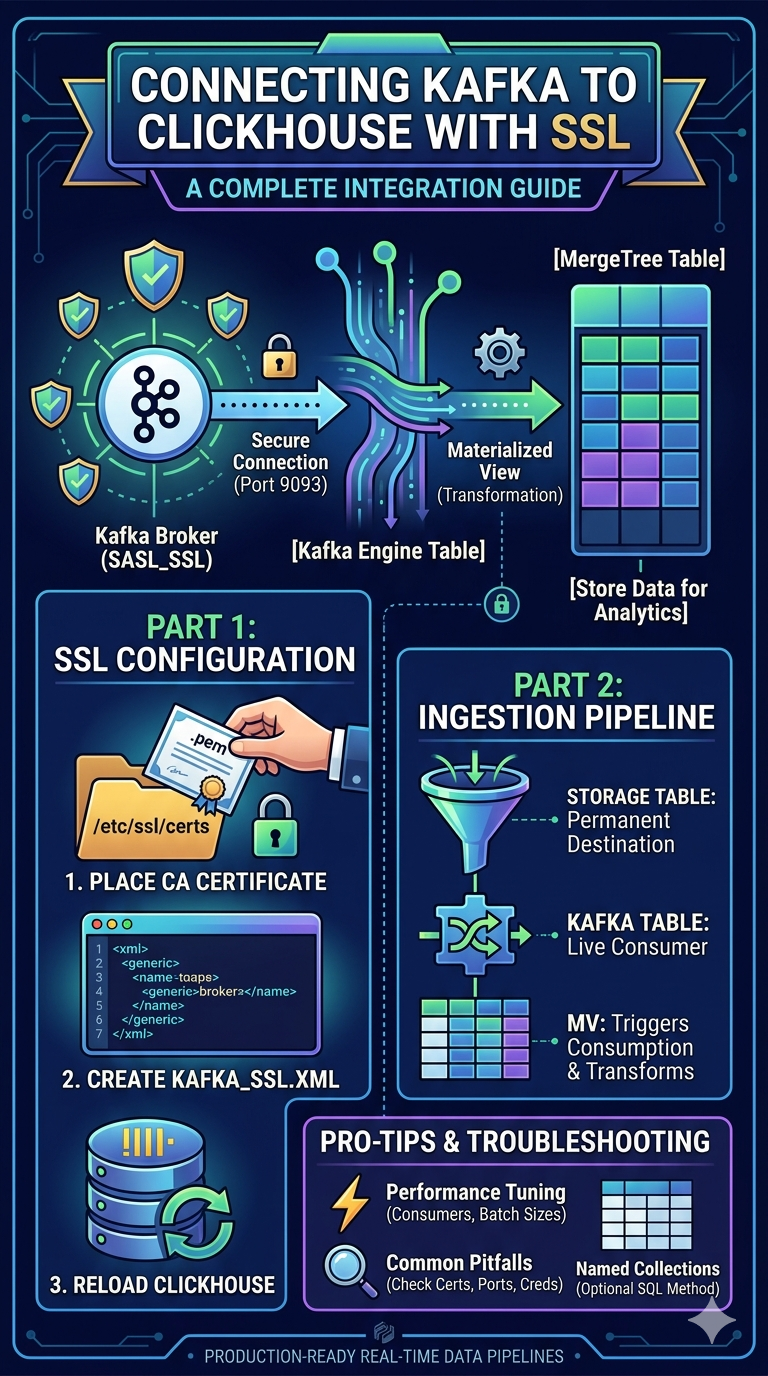
Setting up a production-ready data pipeline requires balancing high performance with rigorous security. When integrating ClickHouse with a Kafka cluster secured by SASL_SSL, engineers often hit a “wall” trying to pass SSL certificates directly through SQL commands.
This guide provides a definitive walkthrough for configuring server-side security, building the ingestion pipeline, and tuning the engine for performance.
Architecture Overview
The ClickHouse Kafka engine acts as a “buffer.” To move data into permanent storage, you need three distinct objects working in tandem:
- Kafka Engine Table: A virtual table that acts as a live consumer/pointer to the Kafka stream.
- Materialized View: The “glue” that triggers consumption and handles data transformation.
- MergeTree Table: The final destination where data is physically stored and indexed for analytics.
Part 1: Infrastructure & Security Configuration
The most common error when setting up this integration is Code: 115 (UNKNOWN_SETTING). This happens because ClickHouse (as of v25.8) does not allow library-level SSL configurations — like kafka_ssl_ca_location—to be "inlined" in a CREATE TABLE statement.
Step 1: Deploy the CA Certificate
Place your Kafka CA certificate on the ClickHouse server. The clickhouse user must have explicit read access.
sudo
mkdir -p /etc/clickhouse-server/certs
sudo cp your-ca.pem /etc/clickhouse-server/certs/kafka-ca.pem
sudo
chown clickhouse:clickhouse /etc/clickhouse-server/certs/kafka-ca.pem
sudo
chmod 440 /etc/clickhouse-server/certs/kafka-ca.pem
Step 2: Configure Server-Side Security
By placing credentials in a configuration file rather than SQL, you keep sensitive data out of query logs and system metadata. Create a new file in the config.d directory:
sudo nano /etc/clickhouse-server/config.d/kafka_ssl.xml
<clickhouse>
<kafka>
<ssl_ca_location>/etc/clickhouse-server/certs/kafka-ca.pem</ssl_ca_location>
<security_protocol>sasl_ssl</security_protocol>
<sasl_mechanism>scram-sha-512</sasl_mechanism>
<sasl_username>your_kafka_user</sasl_username>
<sasl_password>your_kafka_password</sasl_password>
</kafka>
</clickhouse>
Note: Ensure the XML tags match your broker’s required mechanism (e.g., PLAIN, SCRAM-SHA-256).
Step 3: Verify Connectivity
Restart the server to apply changes and use openssl to ensure the ClickHouse host can reach the broker over port 9093:
sudo systemctl restart clickhouse-serveropenssl s_client -connect <broker-ip>:9093 -CAfile
/etc/clickhouse-server/certs/kafka-ca.pem
Part 2: Building the Ingestion Pipeline
With security handled at the server level, your SQL code remains clean and focused on the data schema.
1. The Destination Table
This is your “Source of Truth,” optimized for analytical queries.
CREATE TABLE events_destination (
    event_id UInt64,
    event_name String,
    event_time DateTime,
    payload String,
    ingested_at DateTime DEFAULT now()
)
ENGINE = MergeTree()
ORDER BY (event_time, event_id);
2. The Kafka Engine Table
This table defines the connection to the topic. Because of our XML config, we don’t need to specify SSL details here.
CREATE TABLE kafka_queue_stream (
    event_id UInt64,
    event_name String,
    event_time DateTime,
    payload String
)
ENGINE = Kafka
SETTINGS
    kafka_broker_list = 'ip:9093,ip:9093',
    kafka_topic_list = 'your_topic_name',
    kafka_group_name = 'clickhouse_consumer_v1',
    kafka_format = 'JSONEachRow',
    kafka_num_consumers = 4, -- Matches Kafka partitions for parallel reading
    kafka_skip_broken_messages = 1;
3. The Materialized View
Once created, this object starts the background consumption process.
CREATE MATERIALIZED VIEW kafka_ingest_mv TO events_destination ASSELECT event_id, event_name,
event_time, payloadFROM kafka_queue_stream;
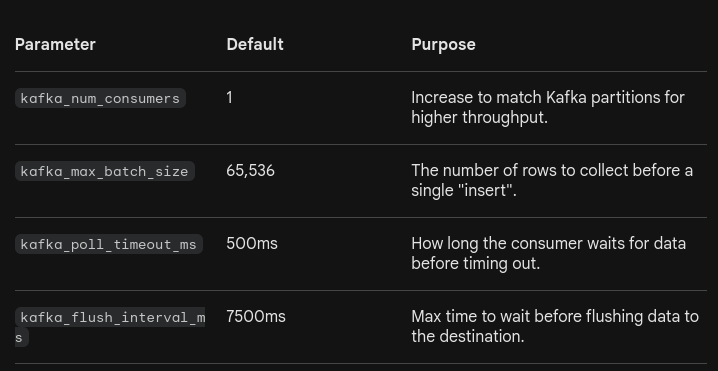
Performance Tuning Parameters
To scale your pipeline, adjust these settings within the Kafka Engine SETTINGS block:
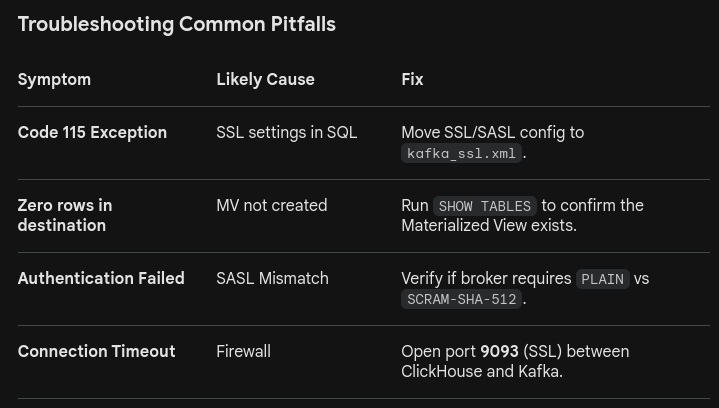
Summary
By separating infrastructure concerns (SSL/SASL in XML) from application concerns (schemas and topics in SQL), you create a robust, secure, and maintainable pipeline. This architecture ensures that sensitive credentials stay out of logs while maintaining the high-performance “at-least-once” delivery guarantees ClickHouse is known for.