What is Go Micro?
“Go Micro is a pluggable RPC based library which provides the fundamental building blocks for writing microservices in Go. The Micro philosophy is “batteries included” with a pluggable architecture. Out of the box, it implements service discovery using consul, communication via http and encoding using proto-rpc or json-rpc.” @asimaslam
In this article, I want to install and go-micro from the beginning to make my extensive application.
The best and easiest way to install Golang is following a formal tutorial. Another way is using snap to install Golang on your ubuntu device.
cdmkdir gocd gomkdir srcexport PATH=$PATH:/usr/local/go/binexport PATH=$PATH:$(go env GOPATH)/binexport GOPATH=$(go env
GOPATH)cd ~cat .bashrc# Set the GOPROXY environment variableexport GOPROXY=https://goproxy.io,direct# Set
environment variable allow bypassing the proxy for specified repos (optional)export
GOPRIVATE=git.mycompany.com,github.com/my/privateexport PATH="$PATH:$HOME/.local/bin"export
PATH="$PATH:$(go env GOPATH)/bin"export GOPATH=$(go env GOPATH)cat .profileexport
PATH=$PATH:/usr/local/go/binInstall Protoc
Run: vim ~/.bash_profile   Add:export GO_PATH=~/goexport PATH=$PATH:/$GO_PATH/binRun:source
~/.bash_profile
Go-micro repository address
Go-micro Demo
Go-micro CLI
Go-micro Dashboard
Let’s start with Go-micro CLI
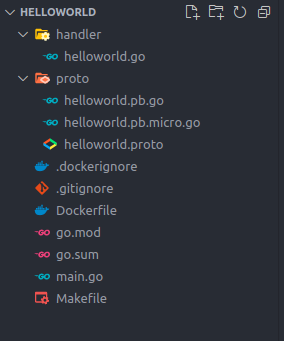
go install github.com/go-micro/cli/cmd/go-micro@latestGenerte microservice by command. This work is so beatiful that I can make it easily without any problem to copy hidden files.
go-micro new service helloworld
cd helloworld
make init proto update tidycd helloworldmake proto tidygo-micro runSend Request with GRPC
go-micro call helloworld Helloworld.Call '{"name": "John"}'It is so easy to change helloworld.proto and then build
make protoGo-micro also has a refresh mode. It means that when you change a file, Go-micro will automatically build the project.
main.go file of project will be like this.
func main() {
    // Create service srv := micro.NewService() srv.Init(micro.Name(service),
micro.Version(version),)// Register handler if err := pb.RegisterHelloworldHandler(srv.Server(), new(handler.Helloworld));
err != nil { logger.Fatal(err) } // Run service if err := srv.Run(); err != nil {
logger.Fatal(err) }}execute go-micro
go-micro runJaeger
go-micro new service --jaeger helloworldhandler/helloworld.go
package helloworldimport (
"context""go-micro.dev/v4/logger""helloworld/greeter" pb "helloworld/proto")type Helloworld struct {
}func (e *Helloworld) Call(ctx context.Context, req pb.CallRequest, rsp *pb.CallResponse) error {
logger.Infof("Received Helloworld.Call request: %v", req)
rsp.Msg = greeter.Greet(ctx, req.Name)
return nil
}greeter/greeter.go
package greeterimport (
"context"
"fmt""go-micro.dev/v4/cmd/micro/debug/trace")func Greet(ctx context.Context, name string) string {
defer trace.NewSpan(ctx).Finish()
return fmt.Sprint("Hello " + name)
}I want to add jaeger to the go-micro project
go-micro new service --jaeger helloworld
cd helloworld
make init proto update tidy
go-micro run
go-micro
call helloworld Helloworld.Call '{"name": "John"}'version: "3.7"services:
# -----------------------------
# jaeger servcie
# -----------------------------
jaeger:
image: jaegertracing/all-in-one:1.20
ports:
- "1314:6831/udp"
- "1315:16686"
networks:
- backend# -----------------------------# networks# -----------------------------networks:
backend:
external: true— — — — — — — — — — — — — — — — — — — — — — — — — — —
https://www.bookstack.cn/read/microservices-in-golang/1.md
— — — — — — — — — — — — — — — — — — — — — — — — — — — — — — — —
Good Example
— — — — — — — — — — — — — — — — — — — — — — — — — — — — — — — — — -
Go-micro Make new Project
For initial project use below command
go-micro new service helloworlddownload the dependency
go mod tidy go get -uWrite the GRPC and then make it
make protoImport name of folder base on the path on the git hub in go.mod and import
Subscribe to DDIntel Here.
DDIntel captures the more notable pieces from our main site and our popular DDI Medium publication. Check us out for more insightful work from our community.
Register on AItoolverse (alpha) to get 50 DDINs
Support DDI AI Art Series: https://heartq.net/collections/ddi-ai-art-series
Join our network here: https://datadriveninvestor.com/collaborate