Installing Application for Golang developer After installing Ubuntu 22.04 LTS
In this article, I will explain which package is necessary after installing Ubuntu 22.04 LTS as a Golang developer.
Install Neokey
https://github.com/MatsuriDayo/nekoray/releases/download/2.9/nekoray-2.9-2022-12-19-linux64.zip./nekoray: error while loading shared libraries: libQt5Network.so.5: cannot open shared object file: No such file or directory
sudo
apt-get install libqt5gui5
Install GPU Driver
sudo apt install hwinfo
hwinfo — gfxcard — short
sudo apt install nvidia-driver-515 nvidia-dkms-515
ubuntu-drivers devices== /sys/devices/pci0000:00/0000:00:01.0/0000:01:00.0 ==modalias :
pci:v000010DEd000025A0sv00001043sd00001CCCbc03sc00i00vendor   : NVIDIA Corporationmodel    : GA107M
[GeForce RTX 3050 Ti Mobile]manual_install: Truedriver   : nvidia-driver-525-open - distro non-free
recommendeddriver   : nvidia-driver-515 - distro non-freedriver   : nvidia-driver-515-open - distro
non-freedriver   : nvidia-driver-525 - distro non-freedriver   : nvidia-driver-470-server - distro
non-freedriver   : nvidia-driver-525-server - distro non-freedriver   : nvidia-driver-470 - distro
non-freedriver   : nvidia-driver-510 - distro non-freedriver   : nvidia-driver-515-server - distro
non-freedriver   : xserver-xorg-video-nouveau - distro free builtin
https://www.cyberciti.biz/faq/ubuntu-linux-install-nvidia-driver-latest-proprietary-driver/
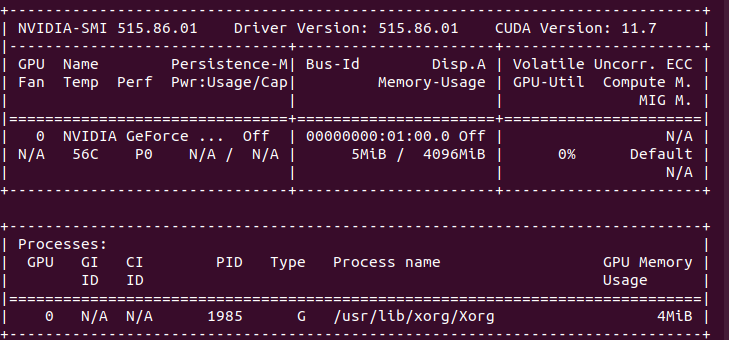
nvidia-smiMake Windows USB bootable
Make USB for running windows as dual boot next to the Ubuntu. Only use Rufus in windows to build this one
Make USB for with Ubuntu operation system.
sudo add-apt-repository ppa:tomtomtom/woeusb
sudo
apt update &&
sudo
apt install woeusb-frontend-wxgtk
https://www.omgubuntu.co.uk/2017/06/create-bootable-windows-10-usb-ubuntu
Asus problem to install windows
Cannot find drives when installing Windows 11/10
Install VirtualBox on Ubuntu and Linux Mint
It’s very easy to install VirtualBox on Ubuntu. All you need to do is to use the command below:
sudo
apt install virtualboxsudo
apt-get install unrarunrar e filename.rarInstall VPN
https://armagankaratosun.github.io/post/2018-09-02-setup-l2tp-vpn-on-ubuntu/
sudo
apt install network-manager-l2tpsudo add-apt-repository ppa:nm-l2tp/network-manager-l2tpsudo
apt -y install network-manager-l2tpsudo
apt-get install network-manager-l2tp-gnomesudo
apt install --install-suggests network-manager-l2tp-gnomeInstall Terminal Tor
https://linuxconfig.org/install-tor-proxy-on-ubuntu-20-04-linuxsudo systemctl status tor
sudo
apt-get install -y proxychains
sudo
apt install proxychains4Upload and install Ubuntu 22.04
After installing ubuntu as the first step is nessacary to update OS to get the last update.
sudo
apt-get update
Initial and import install applications
sudo
apt-get install git
sudo
apt-get install htop
sudo
apt-get install sshuttle
sudo
apt-get install iotop
sudo
apt-get install vim
sudo
apt-get install curl
Install G partition
sudo
apt install gparted
Add Persian fonts
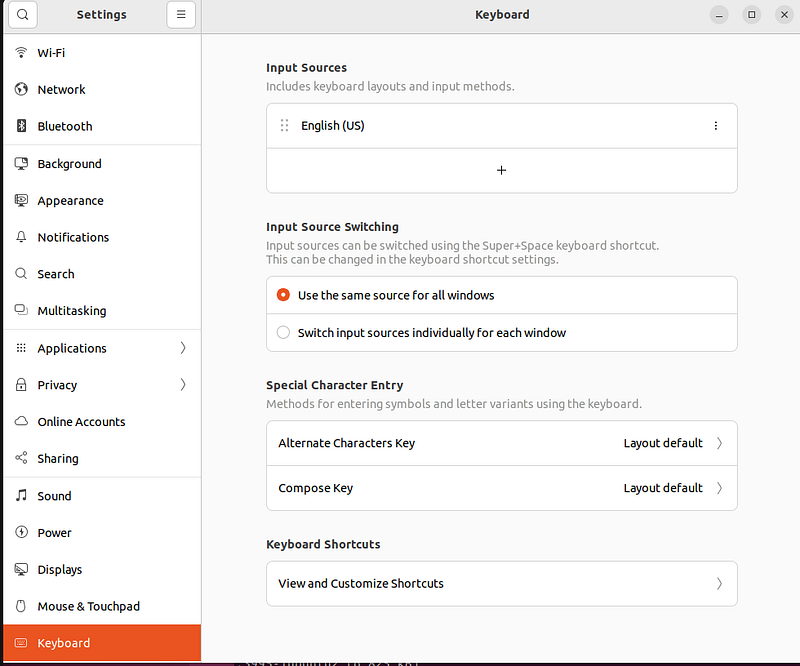
in setting part add Input sources and then add Persian source
Installing Fonts
some Persian font not available on Ubuntu so download them install in ~/.fonts
downloading font from these web site and put in ~/.fonts folder
cp -ar 384.Font.Farsi ~/.fonts/
Region And Language
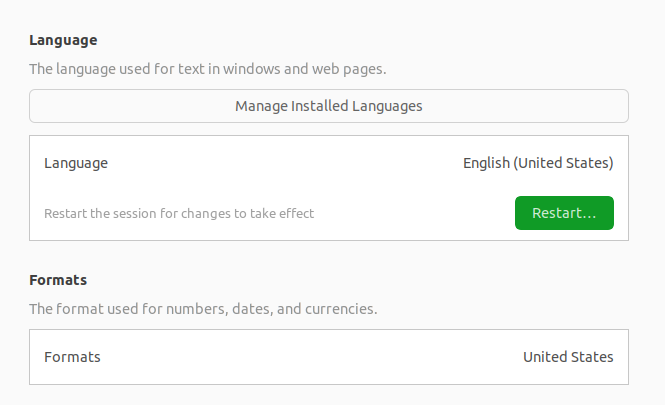
Settings > Time and date > ClockFont google
https://www.fontyab.com/download?id=7782
https://soft98.ir/graphic/font/14282-Font-Collection-Farsi.html
Install chrome
wget https://dl.google.com/linux/direct/google-chrome-stable_current_amd64.debsudo
apt install ./google-chrome-stable_current_amd64.debVscode IDE
Vscode is compatible with many language such as Php, Python, Docker, Git, Css , Html, Blade, JS and etc.
sudo snap install --classic codeExtentions: git lens + git graph + git history + prettier +Bracket Pair Colorizer 2 + One Dark Pro + Material Icon Theme + prettier + Code Runner + Tabnine AI Autocomplete for Javascript, Python, Typescript, PHP, Go, Java, Ruby & more + go +
press cntl + shift + p and then type setting.json
"workbench.editor.enablePreview": false,Protection on eye and low back pain
sudo add-apt-repository ppa:slgobinath/safeeyes
sudo apt update
sudo apt install safeeyes
if you familiar with pomodoro install it
sudo apt-get install gnome-shell-pomodoro
Docker
if you have problem with connection to docker use shckan proxy.
Set docker as sudoer
sudo groupadd docker
sudo gpasswd -a $USER dockernewgrp dockerdocker --versionDocker version 19.03.8, build afacb8b7f0docker psCONTAINER ID IMAGE COMMAND
CREATED STATUS PORTS NAMESInstall docker-composer
sudo
apt install docker-compose
Install Portainer with Docker on Linux
docker run -d -p 8000:8000 -p 9443:9443 --name portainer --restart=always -v
/var/run/docker.sock:/var/run/docker.sock -v portainer_data:/data portainer/portainer-ee:latest
FileZilla
sudo apt-get install filezilla
Change background with Bing
Esay way to use Bing Wall Paper every day
sudo snap install bing-wallsudo snap install wonderwallfor changing background need run bingwallpaper in Terminal
Option Two: Bing Desktop Wallpaper Changer (No Watermark)
Install Telegram
Install Golang
The easiest way
Follow original link
Add Export PATH in $HOME/.bashrc
export PATH=$PATH:/usr/local/go/binexport PATH=$PATH:$(go env GOPATH)/binexport GOPATH=$(go env
GOPATH)# Powerline configurationif [-f /usr/share/powerline/bindings/bash/powerline.sh];
then powerline-daemon -q POWERLINE_BASH_CONTINUATION=1 POWERLINE_BASH_SELECT=1 source
/usr/share/powerline/bindings/bash/powerline.shfi
Other way
sudo snap install go --classicsnap listAdd /usr/local/go/bin to the PATH environment variable.You can do this by adding the following line to your $HOME/.profile or /etc/profile (for a
system-wide installation):export PATH=$PATH:/usr/local/go/binNote: Changes made to a profile file may not apply until the next time you log into your computer. To apply the changes immediately, just run the shell commands directly or execute them from the profile using a command such as source $HOME/.profile.
Add Export PATH in $HOME/.bashrc
# Set the GOPROXY environment variableexport GOPROXY=https://goproxy.io,direct# Set environment
variable allow bypassing the proxy for specified repos (optional)export
GOPRIVATE=git.mycompany.com,github.com/my/privateexport PATH="$PATH:$HOME/.local/bin"export PATH="$PATH:$(go env GOPATH)/bin"Using Goproxy
ENV GOPROXY=
https://goproxy.io,direct
Install Go-micro Cli
go install github.com/go-micro/cli/cmd/go-micro@latestInstall Nats-Service
https://github.com/nats-io/nats-server/releases
sudo
apt install ./nats-server-v2.9.15-386.deb nats-server -js -m 9090go get github.com/nats-io/nats-streaming-server
nats server run --jetstreamInstall Protobuf via Snap
sudo snap install go --classicsnap listInstall Protobuf
sudo
apt install protobuf-compilerhttps://grpc.io/docs/languages/go/quickstart/protoc --versionlibprotoc 3.12.4Install Protobuf manually
Install pre-compiled binaries (any OS)
Download last version of release and replace.
https://github.com/grpc-ecosystem/grpc-gateway
go install \
  github.com/grpc-ecosystem/grpc-gateway/v2/protoc-gen-grpc-gateway \
  github.com/grpc-ecosystem/grpc-gateway/v2/protoc-gen-openapiv2 \
  google.golang.org/protobuf/cmd/protoc-gen-go \
  google.golang.org/grpc/cmd/protoc-gen-go-grpc
protoc-gen-micro: program not found or is not executablePlease specify a program using absolute path or make sure the program is available in your PATH system variable — micro_out: protoc-gen-micro: Plugin failed with status code 1.make: *** [Makefile:12: proto] Error 1
@go get -u google.golang.org/protobuf/proto @go install
google.golang.org/protobuf/cmd/protoc-gen-go@latest @go install
github.com/go-micro/generator/cmd/protoc-gen-micro@latest
protoc-gen-micro: program not found or is not executable #890
Download Release file and put in bin
in /etc/environment add path /root/go/bin/
sudo gedit /etc/environment /root/go/bin/Install GCC
sudo
apt-get install build-essential
Install ELK with docker-compose
https://github.com/deviantony/docker-elkInstall Terminal Calculator
sudo
apt install calc
Goland
after install Goland add below plugin:
in address File -> Setting -> Plugins
Dracula Theme for JetBrains and Atom Material File Icons and GitHub Copilot uses OpenAI Codex to suggest code
Tmux
sudo
apt  install tmux
Termial
Powerline is a text-based tool that provides useful information in a variety of contexts.
https://www.ricalo.com/blog/install-powerline-ubuntu/#Ohmyposh
Oh My Posh is a custom prompt engine for any shell that has the ability to adjust the prompt string with a function or variable.
https://ohmyposh.dev/The fuck
https://github.com/nvbn/thefuckDiscord
sudo snap install discordHow to Set Up SSH Keys on Ubuntu 20.04
Install Postman
sudo snap install postmanInstall Sqlc
sudo snap install sqlc
go install github.com/kyleconroy/sqlc/cmd/sqlc@latest
Install sound recorder
sudo
apt install gnome-sound-recorder