Installing Application for Golang developer After installing Ubuntu 24.04 LTS
This document outlines a comprehensive setup guide for Golang developers working on Ubuntu 22.04 LTS. It covers a wide range of essential tools, applications, and configurations that are useful for backend development work.
The guide begins with instructions for setting up a VPN connection using openfortivpn, followed by DNS configuration. It then moves on to installing various development tools and applications, including:
1. Hiddify (a multi-platform auto-proxy client)
2. Telegram Desktop
3. Golang and associated environment setup
4. Visual Studio Code with recommended plugins
5. Git version control
6. Docker and docker-compose
7. Various system utilities and programming tools
Additionally, the guide covers setting up SSH keys, installing web browsers like Firefox and Google Chrome, and even includes recommendations for eye strain prevention software.
This detailed walkthrough is designed to help Golang developers quickly set up a productive development environment on a fresh Ubuntu 22.04 LTS installation, ensuring they have all the necessary tools at their disposal for backend development work.
Installing Application for Golang developer After installing Ubuntu 22.04 LTS
Install openfortivpn
cd Desktop
sudo openfortivpn -c config
Set DNS
sudo vi /etc/resolv.conf#nameserver 185.179.168.168#nameserver 51.91.204.69#nameserver 146.59.189.113#nameserver
178.22.122.100#nameserver 185.51.200.2#nameserver 10.202.10.202#nameserver 10.202.10.102nameserver
10.202.10.10nameserver 10.202.10.11#nameserver 9.9.9.13#nameserver 8.8.4.4Install Hiddify
Install Telegram
Setup telegram based on Hiddify
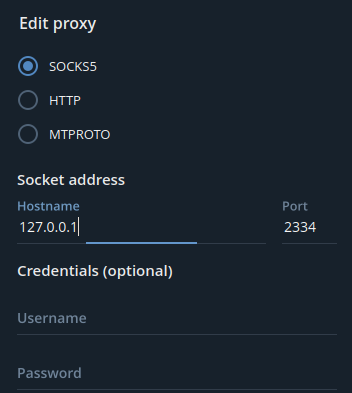
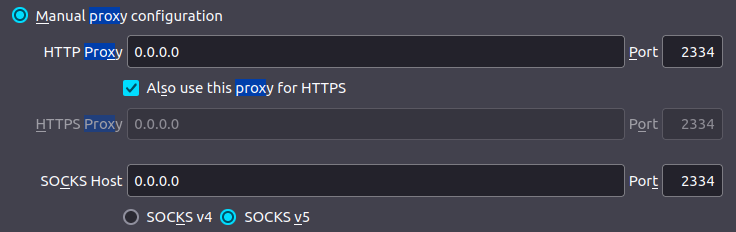
Setup Firefox based on Hiddify
Install htop
sudo
apt  install htop
Install Golang
$ sudo rm -rf /usr/local/go && sudo tar -C /usr/local -xzf go1.23.1.linux-amd64.tar.gzexport PATH=$PATH:/usr/local/go/bin$ go versionMake a folder
$HOME/go/src$HOME/go/pkg$HOME/go/binAdd in Bashrc
gedit $HOME/.bashrc
export PATH=$PATH:/usr/local/go/binexport PATH=$PATH:$(go env GOPATH)/binexport GOPATH=$(go env
GOPATH)
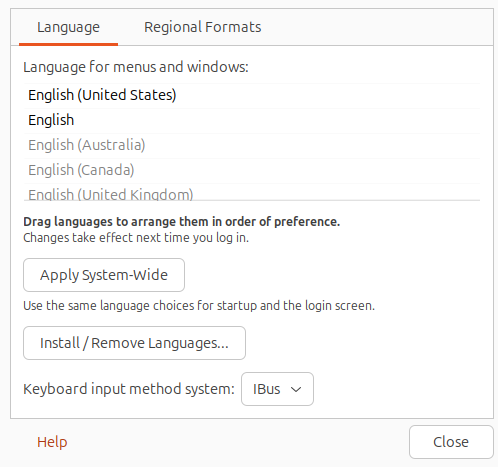
Install Language
Install Skype
sudo snap install skypeInstall Curl
sudo
apt  install curl
Kubectl
https://kubernetes.io/docs/tasks/tools/install-kubectl-linux/Install Vscode
press cntl + shift + p and then type setting.json
"workbench.editor.enablePreview": false,Best List of Vscode Plugin as Golang developer in Backend position
How to Set Up SSH Keys on Ubuntu 22.04
Install Git
sudo
apt install gitgit --version
Install Chrome
sudo dpkg -i google-chrome-stable_current_amd64.debInstall Fonts
Installing Fonts
some Persian font not available on Ubuntu so download them install in ~/.fonts
downloading font from these web site and put in ~/.fonts folder
cp -ar 384.Font.Farsi ~/.fonts/Protection of eye and low-back pain
sudo add-apt-repository ppa:slgobinath/safeeyes
sudo
apt update
sudo
apt install safeeyes
Docker
Install docker-compose
curl -L
"https://github.com/docker/compose/releases/latest/download/docker-compose-$(uname -s)-$(uname -m)"
-o /usr/local/bin/docker-compose
chmod +x /usr/local/bin/docker-compose
docker-compose --version
Install tools
sudo
apt install calc
sudo
apt-get install unrar
sudo
apt-get install iotop
sudo
apt-get install vim
sudo
apt-get install curl
sudo
apt-get install build-essential
Install Protobuf
sudo
apt install protobuf-compilerhttps://grpc.io/docs/languages/go/quickstart/protoc --versiongo get google.golang.org/grpc/cmd/protoc-gen-go-grpc
go install
google.golang.org/grpc/cmd/protoc-gen-go-grpcInstall Buf
go get github.com/bufbuild/buf/cmd/[email protected]
go install github.com/bufbuild/buf/cmd/[email protected]
buf
--versionexport PATH=$PATH:$(go env GOPATH)/binsource ~/.bashrcbuf --versionInstall Postman
sudo snap install postmanInstall PG Admin
## Setup the repository## Install the public key for the repository (if not done previously):curl
-fsS https://www.pgadmin.org/static/packages_pgadmin_org.pub | sudo gpg --dearmor -o
/usr/share/keyrings/packages-pgadmin-org.gpg# Create the repository configuration file:sudo sh -c
'echo "deb [signed-by=/usr/share/keyrings/packages-pgadmin-org.gpg] https://ftp.postgresql.org/pub/pgadmin/pgadmin4/apt/$(lsb_release -cs) pgadmin4 main" > /etc/apt/sources.list.d/pgadmin4.list && apt update'## Install pgAdmin## Install for both desktop and web modes:sudo apt install pgadmin4# Install for desktop mode only:sudo apt install pgadmin4-desktop# Install for web mode only: sudo apt install pgadmin4-web # Configure the webserver, if you installed pgadmin4-web:sudo /usr/pgadmin4/bin/setup-web.sh
Run Vscode debugger
Add configuration in .vscode/launch.json
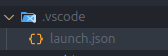
{    // Use IntelliSense to learn about possible attributes.    // Hover to view descriptions of
existing attributes.    // For more information, visit:
https://go.microsoft.com/fwlink/?linkid=830387    "version": "0.2.0",    "configurations": [
{            "name": "Go Debug",            "type": "go",            "request": "launch",
"mode": "debug",            "program": "${workspaceFolder}/cmd/app/.",            "cwd":
"${workspaceFolder}"        }    ]}
Change background with bing wallpaper
sudo snap install bing-wallInstall Shamsi calendar Extention
sudo apt install gnome-shell-extensions
https://extensions.gnome.org/extension/240/persian-calendar/Install Vitals Extention
Lens
Diodon
/usr/bin/diodon
Stackademic 🎓
Thank you for reading until the end. Before you go:
- Please consider clapping and following the writer! 👏
- Follow us X | LinkedIn | YouTube | Discord
- Visit our other platforms: In Plain English | CoFeed | Differ
- More content at Stackademic.com