Make simple CRUD requests with NestJS
This article details the steps involved in creating a basic CRUD (Create, Read, Update, Delete) API using NestJS, a popular framework for building Node.js applications.
Prerequisites
- Node.js and npm (or yarn) installed on your system.
Installation
- Install NestJS CLI:
- Create a new NestJS project
- Start the development server
Project Structure
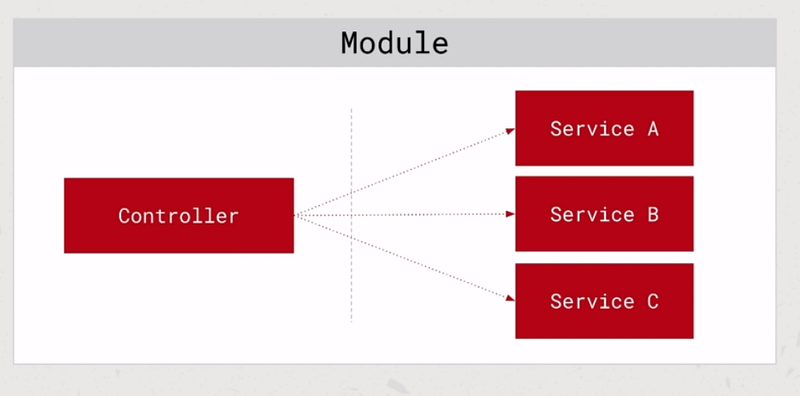
NestJS utilizes a modular approach, where functionalities are organized into modules. The core building blocks include:
- Modules: Group controllers, services, and other providers.
- Controllers: Handle incoming requests and interact with services.
- Services: Implement business logic and interact with data sources.
CRUD Operations
1. Create
2. Read
3. Update
4. Delete
Additional Features
- Data Transfer Objects (DTOs): Define DTOs to handle data validation and transfer between layers.
- Filtering and Searching: Implement functionalities to filter and search tasks based on criteria.
Testing with Postman
- Download and install Postman, a popular API client.
- Use Postman to send requests (GET, POST, PUT, DELETE) to the defined API endpoints with appropriate data.
- Verify the responses and ensure they align with expectations.
Download Node.js®
bash
# installs nvm (Node Version Manager)
curl -o-
https://raw.githubusercontent.com/nvm-sh/nvm/v0.39.7/install.sh | bash# download and install Node.js
(you may need to restart the terminal)nvm install 20# verifies the right Node.js version is in the
environmentnode -v # should print `v20.14.0`# verifies the right NPM version is in the
environmentnpm -v # should print `10.7.0`
text
node -v # should print `v20.14.0`v20.14.0
Install Nestjs
bash
yarn global add @nestjs/clibash
npm install -g @nestjs/cliExtension for vscode
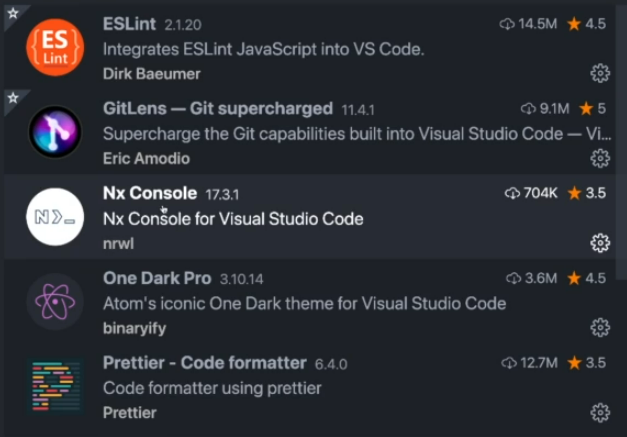
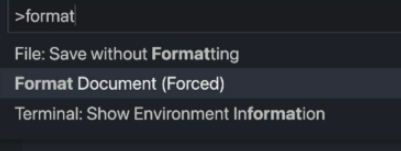
Format document
Install new project
text
nest new nestjs-task-management? Which package manager would you ❤️ to use? yarnGet start
bash
cd nestjs-task-management
yarn run start
Run Server
text
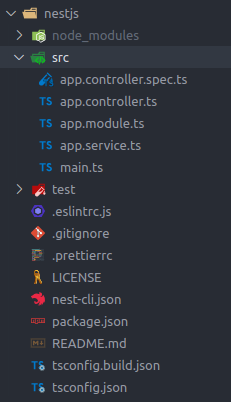
http://127.0.0.1:3000/Structure of project
decorators
typescript
@Module({
  imports: [], controllers: [AppController], providers: [AppService],
})
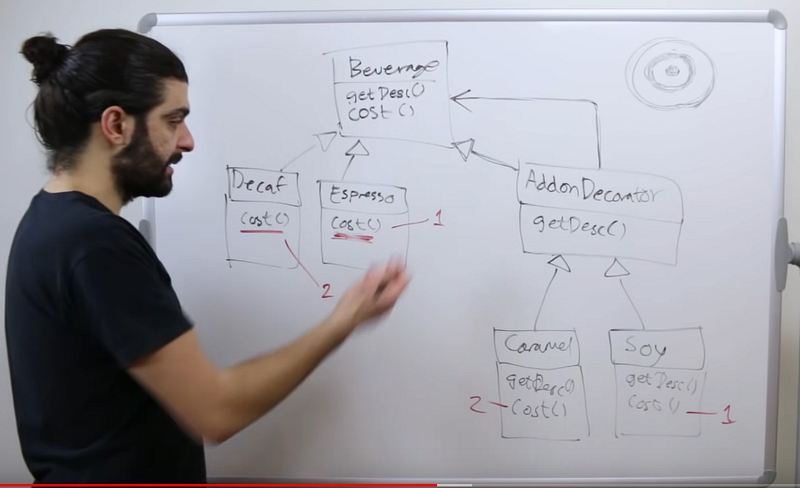
What you need to know about Decorators
Decorator Pattern — Design Patterns (ep 3)
Python Decorators in 1 Minute!
Golang decorators pattern
Run in developer mode
bash
yarn start:devNest Command line
text
nest g --help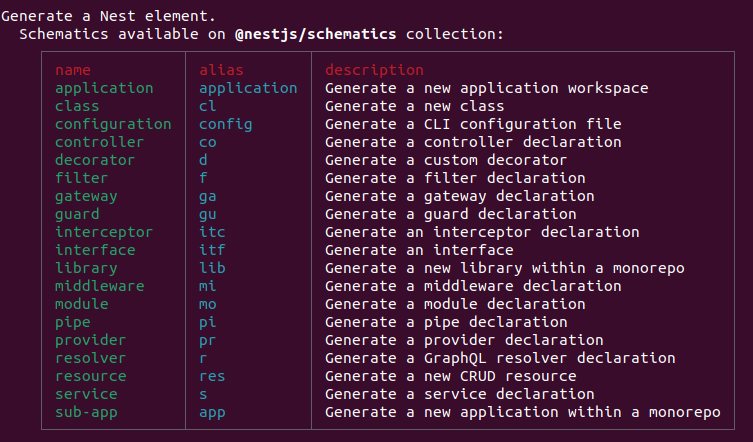
Create Nest module
text
nest g module tasks_name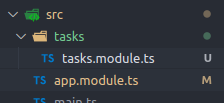
Create Nest controller
text
nest g controller tasks_nameCreate a Nest Controller without a test
text
nest g controller tasks --no-spectypescript
import {
  Controller
}
from '@nestjs/common';
@Controller('tasks')
export class TasksController {
}
Create Services
text
nest g service tasks --no-specAdded to module
typescript
import {
  Module
}
from '@nestjs/common';
import {
  TasksController
}
from './tasks.controller';
import {
  TasksService
}
from './tasks.service';
@Module({
  controllers: [TasksController], providers: [TasksService],
})
export class TasksModule {
}
Add service to controller constructor
typescript
import {
  Controller
}
from '@nestjs/common';
import {
  TasksService
}
from './tasks.service';
@Controller('tasks')
export class TasksController {
  tasksService: TasksService;
  constructor(tasksService: TasksService) {
    this.tasksService = tasksService;
  }
  helloWorld() {
    this.tasksService.helloWorld();
  }
}
Set service as private element in Controller
typescript
import {
  Controller
}
from '@nestjs/common';
import {
  TasksService
}
from './tasks.service';
@Controller('tasks')
export class TasksController {
  constructor(private tasksService: TasksService) {
  }
  helloWorld() {
    this.tasksService.helloWorld();
  }
}
Define Controller and service example
controller
typescript
import {
  Controller, Get
}
from '@nestjs/common';
import {
  TasksService
}
from './tasks.service';
@Controller('tasks')
export class TasksController {
  constructor(private tasksService: TasksService) {
  }
  @Get() getAllTasks() {
    return this.tasksService.getAllTasks();
  }
}
Service
typescript
@Injectable()
export class TasksService {
  private tasks = [];
  getAllTasks() {
    this.tasks.push({
      id: 1, title: 'Task 1', description: 'Description 1'
    });
    return this.tasks;
  }
}
postman
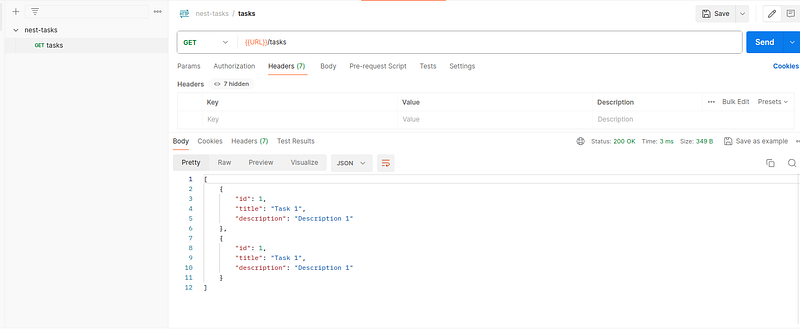
Download Postman
Create model
tasks.model.ts
typescript
export interface Task {
  id: number;
  title: string;
  description: string;
  status: TaskStatus;
}
export enum TaskStatus {
  OPEN = 'OPEN', IN_PROGRESS = 'IN_PROGRESS', DONE = 'DONE',
}
tasks.service.ts
typescript
import {
  Injectable
}
from '@nestjs/common';
import {
  Task
}
from './tasks.model';
@Injectable()
export class TasksService {
  private tasks: Task[] = [];
  getAllTasks(): Task[] {
    return this.tasks;
  }
}
tasks.controller.ts
typescript
import {
  Controller, Get
}
from '@nestjs/common';
import {
  TasksService
}
from './tasks.service';
import {
  Task
}
from './tasks.model';
@Controller('tasks')
export class TasksController {
  constructor(private tasksService: TasksService) {
  }
  @Get() getAllTasks(): Task[] {
    return this.tasksService.getAllTasks();
  }
}
Create task
add uuid
bash
yarn add uuidimport { v4 as uuid } from 'uuid';id: uuid(),add service
typescript
createTask(title: string, description: string): Task {    const task: Task = {      id: uuid(),
title,      description,      status: TaskStatus.OPEN,    };    this.tasks.push(task);    return
task;  }
add controller
typescript
@Post() createTask(@Body('title') title: string, @Body('description') description: string,): Task {
  console.log(title, description);
  return this.tasksService.createTask(title, description);
}
Data Transfer Object (DTO)
Transfer data to different layers.
http request -> Controller -> Service -> Controller -> http response
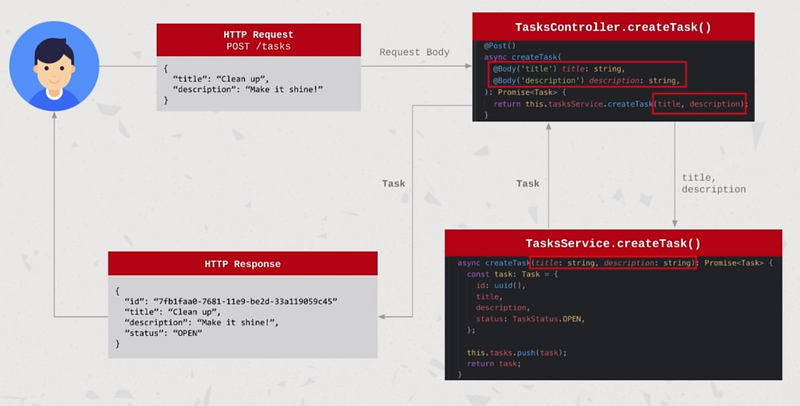
It would be necessary to add all of these parts when adding a new element.
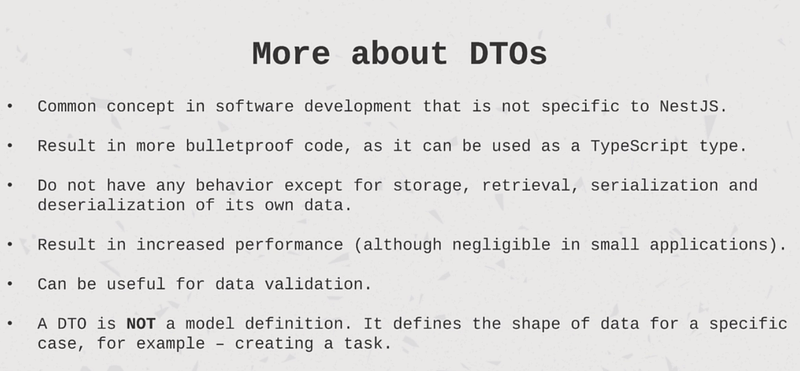
DTO
typescript
export class CreateTaskDto {
  title: string;
  description: string;
}
Controller
typescript
@Post() createTask(@Body() createTaskDto: CreateTaskDto): Task {
  console.log(createTaskDto.title, createTaskDto.description);
  return this.tasksService.createTask(createTaskDto);
}
Service
javascript
createTask(createTaskDto: CreateTaskDto): Task {    const { title, description } = createTaskDto;
const task: Task = {      id: uuid(),      title,      description,      status: TaskStatus.OPEN,
};    this.tasks.push(task);    return task;  }
Add get method id
Controller
typescript
@Get('/:id') getTaskById(@Param('id') id: number): Task {
  return this.tasksService.getTaskById(id);
}
Service
typescript
getTaskById(id: number): Task {
  return this.tasks.find((task) => task.id === id);
}
Delete Task
controller
typescript
@Delete('/:id') deleteTask(@Param('id') id: number): void {
  return this.tasksService.deleteTask(id);
}
service
typescript
deleteTask(id: number): void {
  this.tasks = this.tasks.filter((task) => task.id !== id);
}
Update Task

controller
typescript
@Patch('/:id/status') updateTaskStatus(@Param('id') id: string, @Body('status') status:
Task['status'],): Task {
  return this.tasksService.updateTaskStatus(id, status);
}
service
typescript
updateTaskStatus(id: string, status: TaskStatus): Task {    const task = this.getTaskById(id);
console.log(status);    task.status = status;    return task;  }
Search Task
dto
typescript
import {
  TaskStatus
}
from '../tasks.model';
export class GetTasksFilterDto {
  status?: TaskStatus;
  search?: string;
}
controller
typescript
@Get() getTasks(@Query() filterDTO: GetTasksFilterDto): Task[] {
  if (Object.keys(filterDTO).length) {
    return this.tasksService.getTasksWithFilters(filterDTO);
  }
  else {
    return this.tasksService.getAllTasks();
  }
}
service
javascript
getTasksWithFilters(filterDTO: GetTasksFilterDto): Task[] {    const { status, search } = filterDTO;
let tasks = this.getAllTasks();    if (status) {      tasks = tasks.filter((task) => task.status ===
status);    }    if (search) {      tasks = tasks.filter(        (task) =>
task.title.includes(search) || task.description.includes(search),      );    }    return tasks;  }
Stackademic 🎓
Thank you for reading until the end. Before you go:
- Please consider clapping and following the writer! 👏
- Follow us X | LinkedIn | YouTube | Discord
- Visit our other platforms: In Plain English | CoFeed | Differ
- More content at Stackademic.com