At this time, MongoDB is not supported by Ubuntu 22.04 on their official site.
I followed the instruction for installing MongoDB based on Ubuntu 20.04 instructions, but I encountered the bCongratulations! Your article is live on our publication. Do consider submitting more articles. Don’t forget to follow us on https://blog.devops.dev/ & on Twitter (https://twitter.com/devops_blog)rrors.
The following packages have unmet dependencies: mongodb-org-mongos : Depends: libssl1.1 (>= 1.1.1)
but it is not installable mongodb-org-server : Depends: libssl1.1 (>= 1.1.1) but it is not
installable mongodb-org-shell : Depends: libssl1.1 (>= 1.1.1) but it is not installable
After researching in internet and following up on MongoDB communication, I found the topic of installing MongoDB on Ubuntu 22.04.
Suddenly after copying pastes the solution in the MongoDB community tutorial, I encountered other errors.
The following packages have unmet dependencies: mongodb-org-mongos : Depends: libssl1.1 (>= 1.1.1)
but 1.1.0g-2ubuntu4 is to be installed mongodb-org-server : Depends: libssl1.1 (>= 1.1.1) but
1.1.0g-2ubuntu4 is to be installed mongodb-org-shell : Depends: libssl1.1 (>= 1.1.1) but
1.1.0g-2ubuntu4 is to be installedE: Unable to correct problems, you have held broken packages.
I decided to do another thing and come back to the main question. Why do I need to install it directly on my Ubuntu device?
I need to export data from my local machine and import it into the server.
So I decided to use the Web-based MongoDB admin interface, one of the best tools I have seen for MongoDB is Mongo-express.
I put Mongo-express inside of my docker-compose in local machine and want of DevOps team that put Mongo-express in the stage version of MongoDB.
finally i wrote docker-compose to access immediately to data.
version: '2'services:
mongodb:
image: docker.io/bitnami/mongodb:5.0
ports:
- "27017:27017"
volumes:
- 'mongodb_data:/bitnami/mongodb'
networks:
- backendmongoex: image: mongo-express environment: - ME_CONFIG_MONGODB_SERVER=mongodb -
ME_CONFIG_MONGODB_PORT=27017 ports: - "8085:8081" networks: - backend restart:
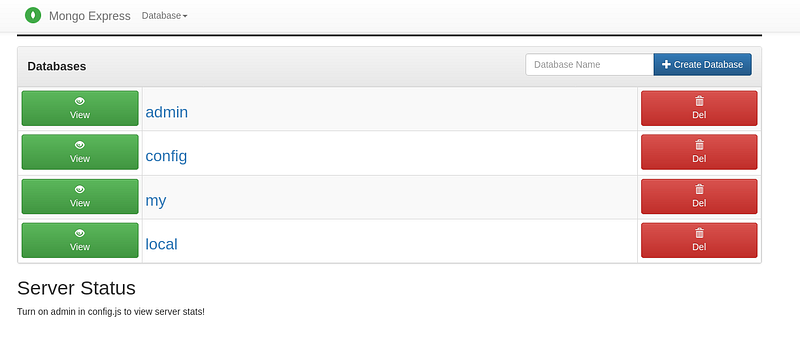
always depends_on: - mongodbvolumes: mongodb_data: driver: localnetworks: backend: external: trueexternal: trueAs you see in the below image, It has a straightforward interface to import and export data.