Topic Modeling with TF-IDF and k-means and Chat GPT 3.5
In this article, I want to pre-process texts of questions and use the TF-IDF to change them into vector clusters with K-means and then find the best topic for them with chat GPT 3.5.
Read CSV file
import pandas as pddf = pd.read_csv('data.csv')print(df.to_string())Group by
df = pd.DataFrame({'Animal': ['Falcon', 'Falcon',                              'Parrot', 'Parrot'],
'Max Speed': [380., 370., 24., 26.]})df   Animal  Max Speed0  Falcon      380.01  Falcon      370.02
Parrot       24.03  Parrot       26.0df.groupby(['Animal']).mean()        Max SpeedAnimalFalcon
375.0Parrot       25.0
Sort by
df.sort_values(by=['col1'])  col1  col2  col3 col40    A     2     0    a1    A     1     1    B2
B     9     9    c5    C     4     3    F4    D     7     2    e3  NaN     8     4    D
Select special rows
I’m interested in the Titanic passengers from cabin class 2 and 3.
class_23 = titanic[titanic["Pclass"].isin([2, 3])]class_23.head()Out[17]:    PassengerId  Survived
Pclass  ...     Fare Cabin  Embarked0            1         0       3  ...   7.2500   NaN         S2
3         1       3  ...   7.9250   NaN         S4            5         0       3  ...   8.0500
NaN         S5            6         0       3  ...   8.4583   NaN         Q7            8         0
3  ...  21.0750   NaN         S[5 rows x 12 columns]
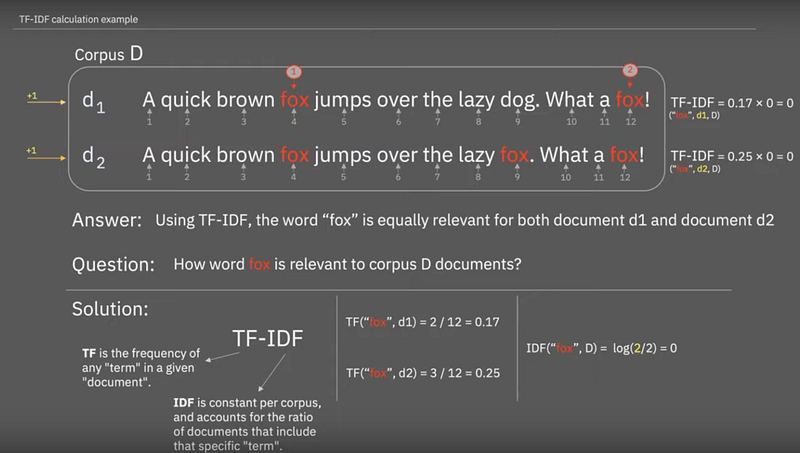
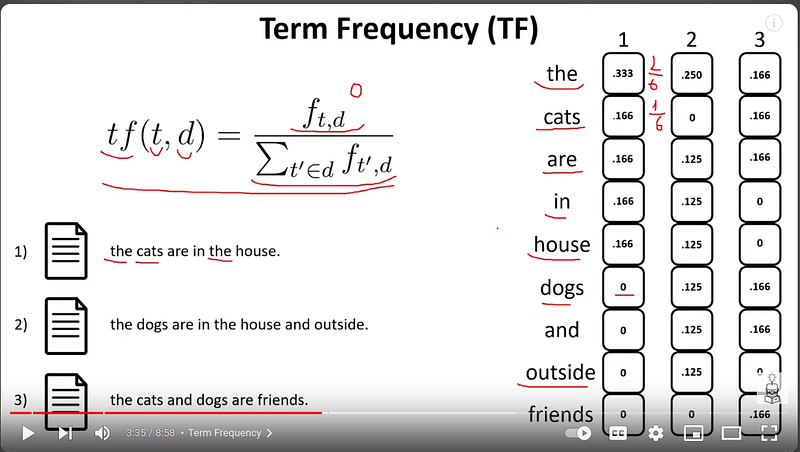
TF-IDF
bag of words algorithms.
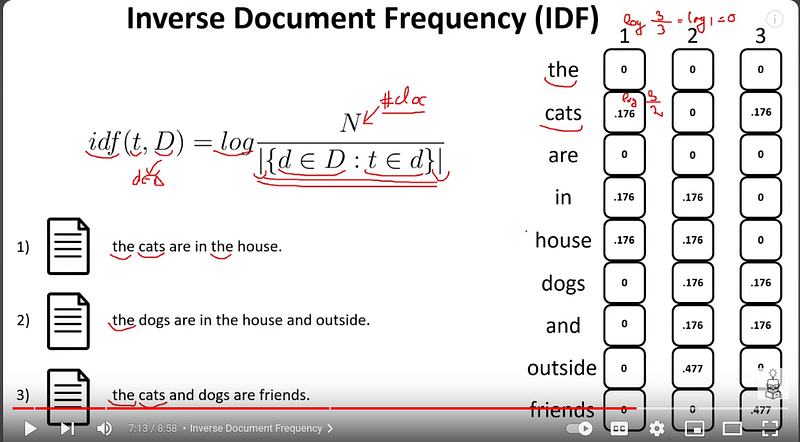
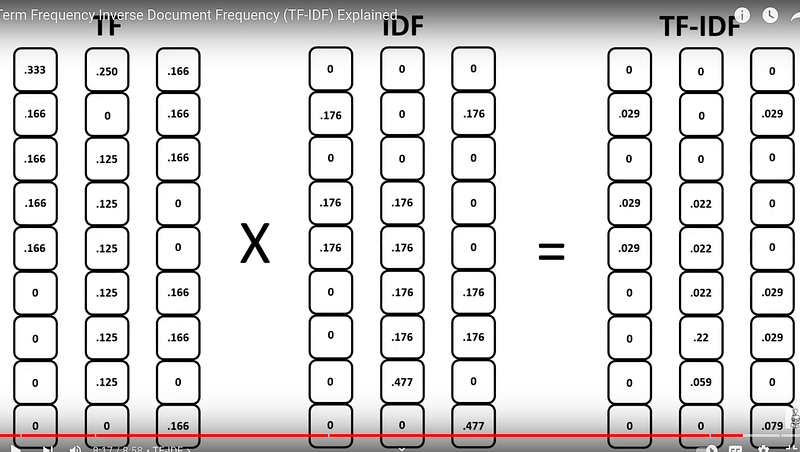
TF-IDF Example
from sklearn.feature_extraction.text
import TfidfVectorizer>>> corpus = [...     'This is the first document.',...
'This document is the second document.',...     'And this is the third one.',...
'Is this the first document?',... ]>>> vectorizer = TfidfVectorizer()>>> X =
vectorizer.fit_transform(corpus)>>> vectorizer.get_feature_names_out()array(['and', 'document',
'first', 'is', 'one', 'second', 'the', 'third',       'this'], ...)>>> print(X.shape)
Converting text content into a numerical vector
That’s great! Converting text content into a numerical vector is a valuable step in many NLP tasks. Here’s a deeper dive into the methods you mentioned:
1. Bag-of-Words (BoW):
- Simple and computationally efficient.
- Treats documents as unordered collections of words, losing word order and context.
- Useful for tasks like topic modeling and similarity comparisons based on word presence.
2. TF-IDF (Term Frequency-Inverse Document Frequency):
- Addresses limitations of BoW by weighting words based on their importance within a document and across a corpus.
- Words appearing frequently in a document but rarely overall get higher weights.
- Helps identify distinctive and informative terms.
3. Word Embeddings:
- Go beyond word presence by capturing semantic meaning and relationships between words.
- Train word embedding models on large text corpora to learn vector representations.
- Popular options include:
- Word2Vec: Captures word relationships based on context (e.g., “king” is similar to “queen”).
- GloVe: Combines statistical information and word co-occurrence data.
- fastText: Handles subword information well, useful for languages with complex morphology.
4. Document Embeddings:
- Represent entire documents as single vectors, useful for tasks like document classification and retrieval.
- Methods include:
- Doc2Vec: Learns document vectors based on word embeddings and document structure.
- Universal Sentence Encoder (USE): Pre-trained model representing sentences as dense vectors.
Choosing the right method depends on your specific task and needs:
- For simple tasks, BoW or TF-IDF might suffice.
- For capturing semantic relationships and context, word embeddings are powerful.
- For representing whole documents, document embeddings are valuable.
I hope this clarifies the options available! Feel free to ask if you have further questions about specific methods or have a particular NLP task in mind.
Word embedding
Word embedding in NLP is an important term that is used for representing words for text analysis in the form of real-valued vectors. It is an advancement in NLP that has improved the ability of computers to understand text-based content in a better way.
TF-IDF Code
from sklearn.feature_extraction.text
import TfidfVectorizervectorizer = TfidfVectorizer(
    max_df=0.5,
    min_df=5,
    stop_words="english",)t0 = time()X_tfidf =
    vectorizer.fit_transform(dataset.data)print(f"vectorization done in {time() - t0:.3f} s")print(f"n_samples: {X_tfidf.shape[0]}, n_features: {X_tfidf.shape[1]}")
Kmeans Code
from sklearn.cluster
import KMeansfor seed in range(5):
    kmeans = KMeans(        n_clusters=10,        max_iter=100,        n_init=1,
    random_state=seed,
    ).fit(X)
    cluster_ids, cluster_sizes = np.unique(kmeans.labels_, return_counts=True)
    print(f"Number of elements assigned to each cluster: {cluster_sizes}")
Final code
import pandas as pd
from sklearn.feature_extraction.text
import TfidfVectorizer
import numpy as np
from sklearn.cluster
import KMeans
from openai
import OpenAI
import os
from dotenv
import load_dotenvdata = pd.read_csv('data.csv')corpus = data['Text'].to_list()# TF-IDFvectorizer =
TfidfVectorizer(
    max_df=0.5,
    min_df=5,
    stop_words="english",)X = vectorizer.fit_transform(corpus)vectorizer.get_feature_names_out()#
    Kmeanskmeans = KMeans(
    n_clusters=80,
    max_iter=100,
    n_init=5,).fit(X)cluster_ids, cluster_sizes = np.unique(kmeans.labels_,
    return_counts=True)print(f"Number of elements assigned to each cluster: {cluster_sizes}")labels
    = kmeans.labels_data["Cluster"] = labelscluster = data.copy()cluster =
    cluster.sort_values('Cluster')cluster.to_csv('label.csv',index=True)# groupsgroups =
    cluster.groupby('Cluster', as_index=False).aggregate('count')groups =groups[['Cluster' ,
    'Index']]groups.sort_values('Index')groups.to_csv('sort_label.csv',index=True)selected_cluster =
    groups.query('Index < 30')# open AIload_dotenv()key = os.getenv('OPENAI_API_KEY')client =
    OpenAI(api_key=key)
def group_meaning_gpt(questions):
    messages = [        {"role": "user", "content":
    f'What do the following customer questions have in common? .\n\nCustomer questions:\n"""\n{questions}\n"""\n\nTheme:'}
    ]
    response = client.chat.completions.create(        model="gpt-3.5-turbo-1106",
    messages=messages,        temperature=0,        max_tokens=64,        top_p=1,
    frequency_penalty=0,        presence_penalty=0)
    return response.choices[0].message.content.replace("\n", "")questions = ""for index_cluster in
    selected_cluster['Cluster']:
    batches = cluster[cluster['Cluster'] == index_cluster]
    for batch in batches['Text']:        if questions != "":            questions = questions +
    "\n\n" + batch        else :            questions = batch
    anwser = group_meaning_gpt(questions)
    new_batcher = batches.copy()
    new_batcher.loc[ : , 'Label']  = anwser
    new_batcher.to_csv('cluster_'+str(anwser)+'.csv',index=True)
    break
Special thanks to Elmira Ghorbani
Stackademic
Thank you for reading until the end. Before you go: