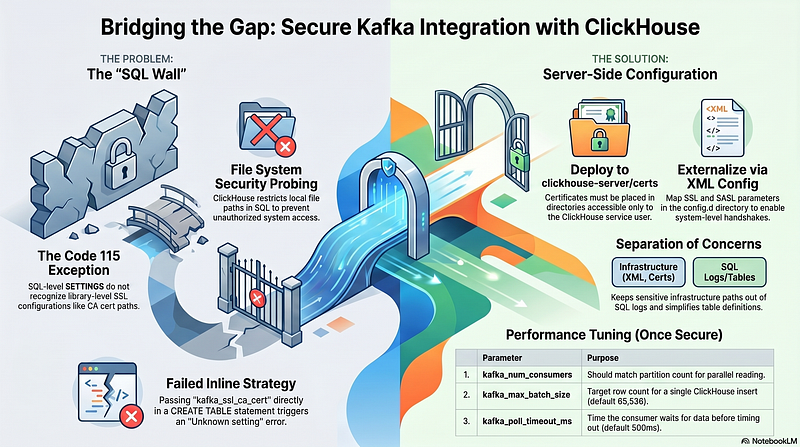
Integrating ClickHouse with a secured Kafka cluster often presents a challenge because of the strict separation between SQL-level settings and server-level security configurations. This article summarizes the journey from initial configuration to a stable, production-ready solution.
The Challenge: SQL vs. Security
In a typical DevOps environment, Kafka is secured with SASL_SSL (using mechanisms like SCRAM-SHA-512). While ClickHouse provides a Kafka storage engine, engineers often encounter a “wall” when trying to pass SSL certificates directly through a CREATE TABLE statement.
Initial Attempt
The initial strategy involved passing the CA certificate path directly into the SETTINGS block:
-- This results in a DB::Exception: Unknown settingSETTINGS    kafka_security_protocol = 'SASL_SSL',
kafka_ssl_ca_cert = '/etc/ssl/certs/ca-cert.pem',    ...
The Problem: ClickHouse (as of v25.8) does not recognize kafka_ssl_ca_cert as a valid SQL setting. Furthermore, for security reasons, ClickHouse restricts the use of local file paths within SQL commands to prevent unauthorized file system probing.
Understanding the Engine Parameters
To optimize performance, four key parameters are used to throttle the data flow. Using the defaults (in parentheses) is a good starting point, but they usually require tuning for high-throughput environments:
- kafka_num_consumers (1): Should be increased to match the number of Kafka partitions to enable parallel reading.
- kafka_max_batch_size (65,536): The target number of rows to collect before performing a single “insert” into ClickHouse.
- kafka_poll_max_batch_size (65,536): The maximum number of messages fetched in a single request to the broker.
- kafka_poll_timeout_ms (500ms): How long the consumer waits for data to arrive before timing out.
The Error: Code 115 (UNKNOWN_SETTING)
When attempting to use kafka_ssl_ca_location or kafka_ssl_ca_pem directly in the SQL console, ClickHouse returns:
Code: 115. DB::Exception: Unknown setting ‘kafka_ssl_ca_location’: for storage Kafka.
This confirms that even in modern versions, library-level SSL configurations cannot be “inlined” in the table definition.
The Final Solution: Server-Side Configuration
The most robust and secure way to resolve this is to move the security configuration to the ClickHouse server files. This allows the database to handle the handshake at the system level.
Step 1: Deploy the Certificate
The CA certificate (.pem) must be placed in a directory accessible to the ClickHouse service user (typically clickhouse).
- Recommended Path: /etc/clickhouse-server/certs/kafka-ca.pem
Step 2: Create a Configuration XML
A new configuration file should be added to the config.d directory. This tells the underlying Kafka driver exactly how to handle SSL.
File: /etc/clickhouse-server/config.d/kafka_ssl.xml
<clickhouse>
<kafka>
<ssl_ca_location>/etc/clickhouse-server/certs/kafka-ca.pem</ssl_ca_location>
<security_protocol>SASL_SSL</security_protocol>
<sasl_mechanism>SCRAM-SHA-512</sasl_mechanism>
</kafka>
</clickhouse>
Step 3: Simplified Table Creation
Once the server configuration is active, the SQL statement becomes much cleaner and no longer causes “Unknown Setting” errors:
CREATE TABLE kafka_raw (
    timestamp DateTime,
    server String,
    metric String,
    value Float64
)
ENGINE = Kafka
SETTINGS
    kafka_brokers = 'ip:9093',
    kafka_topic_list = 'measurements-test-1',
    kafka_group_name = 'clickhouse-consumer',
    kafka_format = 'JSONEachRow',
    kafka_num_consumers = 4; -- Adjusted for performance
Summary
By separating Infrastructure concerns (SSL certificates, SASL mechanisms) from Application concerns (topics, formats, consumers), we achieve a secure and maintainable architecture. This approach ensures that sensitive paths are kept out of the SQL logs and that the database maintains high performance with “at-least-once” delivery guarantees.