Real-Time Data Ingestion: Connecting Distributed Kafka to ClickHouse in Docker
Building a high-throughput analytics pipeline requires a database that can ingest millions of rows per second and a message broker that can handle massive streams. ClickHouse and Kafka are the industry standard for this pair.
When running ClickHouse in a Docker environment while your Kafka cluster lives on a separate service (multi-node), there are specific architectural patterns and networking configurations you must follow.
🚨 HIRING: Tech Talent
💰 $50–$120/hr | 🔥 Multiple Roles
Frontend • Backend • Full Stack • Mobile • AI/ML • DevOps
👉 Apply Here

1. The Three-Tier Architecture
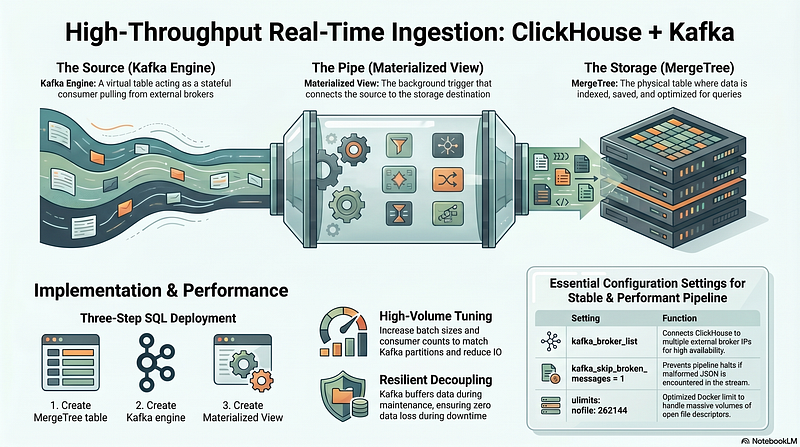
In ClickHouse, the `Kafka` engine does not store data on disk. It acts as a stateful consumer. To move data from Kafka to a permanent table, we use a three-part “Pipe” pattern:
1. The Source (Kafka Engine): A virtual table that pulls data from the broker.
2. The Storage (MergeTree Engine): The physical table where data is indexed and saved.
3. The Pipe (Materialized View): The background trigger that connects the two.
2. Infrastructure Setup (Docker Compose)
Even though Kafka is hosted elsewhere, your ClickHouse instance needs a stable Docker environment. Here is the configuration to run ClickHouse with optimized limits for high-volume ingestion.
services:
  clickhouse:
    image: clickhouse/clickhouse-server:24.8
    container_name: clickhouse
    ports:
      - "9000:9000"
  # Native protocol
      - "8123:8123"
  # HTTP protocol
    environment:
      - CLICKHOUSE_DB=default
      - CLICKHOUSE_USER=default
      - CLICKHOUSE_PASSWORD=pass
      - CLICKHOUSE_DEFAULT_ACCESS_MANAGEMENT=1
    volumes:
      - ./ch_data:/var/lib/clickhouse
    networks:
      - analytics_net
    ulimits:
      nofile:
        soft: 262144
        hard: 262144networks:
  analytics_net:
    driver: bridge
3. Implementing the Pipeline (SQL)
Step 1: Create the Storage Table
This is your final destination. We use the MergeTree engine, which is optimized for time-series and analytical queries.
CREATE TABLE events_destination (
    event_id UInt64,
    event_name String,
    event_time DateTime,
    payload String,
    ingested_at DateTime DEFAULT now()
)
ENGINE = MergeTree()
ORDER BY (event_time, event_id);
Step 2: Create the Kafka Engine
This table connects to your external brokers. Note the kafka_broker_list containing multiple IPs for high availability.
CREATE TABLE kafka_queue_stream (
    event_id UInt64,
    event_name String,
    event_time DateTime,
    payload String
)
ENGINE = Kafka
SETTINGS
    kafka_broker_list = '1.1.1.1:9092,1.1.1.2:9092',
    kafka_topic_list = 'your_topic_name',
    kafka_group_name = 'clickhouse_consumer_v1',
    kafka_format = 'JSONEachRow',
    kafka_skip_broken_messages = 1;
Step 3: Create the Materialized View
The Materialized View acts as the “glue.” As soon as this is created, ClickHouse begins consuming messages from Kafka.
CREATE MATERIALIZED VIEW kafka_ingest_mv TO events_destination ASSELECT     event_id,
event_name,     event_time,     payloadFROM kafka_queue_stream;
4. Connectivity & Performance Tips
External Networking
Since Kafka is on a separate service (IPs 10.x.x.x), ensure your Docker host can route to those IPs. You can verify the connection from inside the ClickHouse container:
docker exec -it clickhouse
curl -v 1.1.1.1:9092
Handling Broken Messages
In a production JSON stream, malformed data is inevitable. The setting kafka_skip_broken_messages = 1 prevents the entire pipeline from stopping if a producer sends invalid JSON.
Performance Tuning
For high-volume streams, consider these settings in your Kafka Table:
- kafka_num_consumers: Increase this to match the number of partitions in your Kafka topic.
- kafka_max_block_size: Increase this (e.g., to 1,000,000) to batch more messages before writing to disk, reducing IO overhead.
Conclusion
By decoupling the consumer (Kafka Engine) from the storage (MergeTree), you create a resilient architecture. If your database needs to go down for maintenance, Kafka will simply buffer the data until the Materialized View starts pulling again, ensuring zero data loss.
Thank you for being a part of the community
Before you go:

👉 Be sure to clap and follow the writer ️👏️️
👉 CodeToDeploy Tech Community is live on Discord — Join now!
Disclosure: This post includes affiliate and partnership links.