
Install CakePHP application on server with the traditional way on Ubuntu 22.0 server
In this article, I want to make a Monolithic Server to run the Cakephp application. I know that Microservices and central systems are ubiquitous today. Still, this company has only one developer, and they don’t have any DevOps team, so I prefer to use the VPS server as a Monolithic server.
I started my configuration based on the below article and then changed my design based on business needs.
Nginx
Absolutely, we need Nginx to handle large amounts of TPS. on my expression Nginx is hardly robust and can handle a million requests per second and serve server without any problem.
sudo
apt install nginx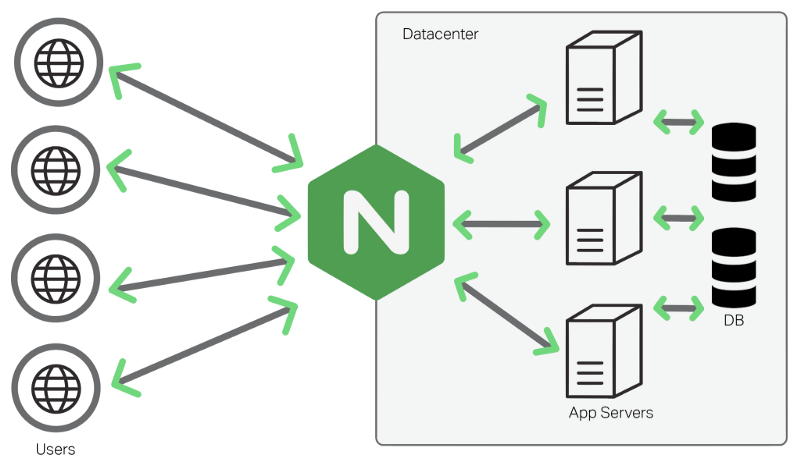
Mysql
Honestly, Mysql or MariaDB is perfect for this project. They maximum has 10K records each year, so they don’t have a severe problem with Mysql.
How do I handle the below bug whenever I want to run Mysql?
sudo mysqlALTER USER 'root'@'localhost' IDENTIFIED
WITH mysql_native_password by 'mynewpassword';mysql -u root -pSHOW DATABASES;I use Mysql Extention in Vscode because I want to connect directly via the ssh tunnel to the Mysql tables.
In another way, we can use ssh on the server and write the direct command in the bash console.
CREATE DATABASE db_name;

USE db_name;

SHOW TABLES;
For loading SQL files into the database, easily upload SQL files via FileZilla and then load with the below command.
mysql -u username -p database_name < file.sqlIf you want to delete the database using the below command. Be careful to use this command; the database will be terminated after this command.
DROP DATABASE [IF EXISTS] database_name;If you use “Group by” in your queries, you will need this command to activate Group by for the query.
SET GLOBAL sql_mode=(
SELECT REPLACE(@@sql_mode,'ONLY_FULL_GROUP_BY',''));
Make sure Mysql DB is secure.
Security is an essential part of all Databases, According to the following command, Mysql will disconnect the anonymous connection and force you to set up a strong password for the DB.
sudo mysql_secure_installationPHP 7.4 is so old, and it was deprecated but but my old code only runs on PHP 7.4 :((
Install PHP 7.4
The way of installing PHP 7.4 on the server has been written below. You don’t need to tell me PHP is deprecated and this application was about five years ago.
sudo
apt-get update
sudo
apt -y install software-properties-common
sudo add-apt-repository ppa:ondrej/php
sudo
apt-get update
sudo
apt install php7.4-fpm php-mysql
Nginx Folder
For running Nginx, it is necessary to make a file and use GIT to pull from the server. As I mentioned, we don’t have a DevOps team to run a pipeline for this problem.
sudo
mkdir /var/www/your_domain
sudo
chown -R $USER:$USER /var/www/your_domain
sudo
chown -R www-data:www-data /var/www/your_domain
sudo vim /etc/nginx/sites-available/your_domain
add ssh key to server
Instead of using a CI/CD pipeline to deploy the system, we use a traditional way to pull code from the Main branch into the Monolotic server. This method has many disadvantages, but it’s a good solution whenever I have only one developer.
cat ~/.
ssh/ssh-keygencd /home/user/.sshcat id_rsa.pubssh -T [email protected]git add user name and email
git config --global user.name "FIRST_NAME LAST_NAME"git config --global user.email "[email protected]"Nginx Configuration
server {
listen 90;
server_name domain.com www.domain.com;
root /var/www/path/webroot;
charset utf-8;
location / {        add_header 'Access-Control-Allow-Origin' '*' always;        proxy_set_header
Host $host;
index index.php;
try_files $uri $uri/ /index.php?$args;    }        # Static files.    # Set expire headers, Turn off
access log    location ~* \favicon.ico$ {      access_log off;      expires 1d;      add_header
Cache-Control public;    }    location ~ ^/(img|cjs|ccss)/ {      access_log off;      expires 7d;
add_header Cache-Control public;    } # Deny access to .htaccess files,    # git & svn repositories,
etc    location ~ /(\.ht|\.git|\.svn|\.ini|\.log|\.conf) {      deny  all;    }    location ~ \.php$
{        include snippets/fastcgi-php.conf;        fastcgi_pass unix:/run/php/php7.4-fpm.sock;
}}
Activate your configuration by linking to the configuration file from Nginx’s sites-enabled directory:
sudo ln -s /etc/nginx/sites-available/your_domain /etc/nginx/sites-enabled/Then, unlink the default configuration file from the /sites-enabled/ directory:
sudo unlink /etc/nginx/sites-enabled/defaultThis will tell Nginx to use the configuration next time it is reloaded. You can test your configuration for syntax errors by running the following:
sudo nginx -tnginx: the configuration file /etc/nginx/nginx.conf syntax is oknginx: configuration file
/etc/nginx/nginx.conf test is successfulYour new website is now active, but the web root /var/www/your_domain is still empty. Create an index.html file in that location so that you can test that your new server block works as expected:
sudo systemctl reload nginxInstall composer
https://computingforgeeks.com/install-cakephp-framework-on-ubuntu/
composer installcomposer updateCakePHP
copy app.php in config file
Make tmp directory , and cache and grant full permission to them.
Cakephp commands
bin/cake cache clear_allbin/cake migrations migrateMakeing API in Cakephp
bin/cake bake all productdetails --prefix adminbin/cake bake all banners --prefix adminHow to Install php-curl in Ubuntu ?
sudo
apt-get install php7.4-curl
sudo
apt-get install php7.4-intl
sudo
apt-get install php7.4-mbstring
sudo
apt-get install php7.4-gd
sudo
apt install php7.4-xml
sudo
apt-get install php-mbstring
sudo
apt-get install php7.4-common
sudo
apt-get install php7.4-zip
sudo
apt-get install php7.4-fpm php7.4-cli php7.4-mysql php7.4-
curl php7.4-json -y
Unistall php
only just want to clear PHP version and install another version
sudo
apt-get purge 'php*'
Cronjob
crontab -ecrontab -lCRON_TZ=Europe/London* * * * * /var/www/path/bin/cake command_name >> /var/www/path/ex1.log 2>&1*/5
* * * * /var/www/path/bin/cake command_name >> /var/www/path/ex2.log 2>&1Transfer Data from one server to another server
scp -P 44 path/to/local/file.ext user@remote-host:path/to/remote/file.ext
scp -r source
user@target:dest
scp -P port -r  ./uploads root@ip:/var/www/uploads
change all files permission to 644 and 755
find  ./path  -type f -exec chmod 644 '{}' \;
sudo find ./path -type d -exec chmod 755 {} \;
sudo
chmod 777 -R tmp
sudo chmod 777 -R logs
Git Discard
git status
git stash save --keep-index --include-untrackedgit reset <file>Anti virus ClamAV on Ubuntu
Cronjob backup database server
base on below articles I made cronjob for backup system then I copy via scp to another server.
I change script.sh to below commands.
#!/bin/bashnow=$(date +%d%m%Y-%H:%M:%S)filename=$1backupfilename=$1-$nowmysqldump
--defaults-file=/root/backup/.my.cnf  elaart  > /root/backup/sql$backupfilename.sqlzip -r
/root/backup/sql$backupfilename.zip /root/backup/sql$backupfilename.sqlrm
/root/backup/sql$backupfilename.sql
add put my user name and password in .my.cnf file
[mysqldump]user=myusernamepassword='MYPASSWoRD'Then add time in cronjob execute this shell script
*/10 * * * * /root/backup/script.shSet time zone in Ubuntu
https://linuxize.com/post/how-to-set-or-change-timezone-on-ubuntu-20-04/
timedatectl set-timezone Asia/TehranGet Free domain
Secure Nginx with Let’s Encrypt on Ubuntu 22.04
https://community.cloudflare.com/t/redirect-example-com-to-www-example-com/78348
root .htaccess: <IfModule mod_rewrite.c>   RewriteEngine on   RewriteRule ^(\.well-known/.*)$ $1 [L]
RewriteRule    ^$ app/webroot/    [L]   RewriteRule    (.*) app/webroot/$1 [L]   AddDefaultCharset
UTF-8 </IfModule>app/.htaccess:<IfModule mod_rewrite.c>    RewriteEngine on    RewriteRule
^(\.well-known/.*)$ $1 [L]    RewriteRule    ^$    webroot/    [L]    RewriteRule    (.*)
webroot/$1 [L] AddDefaultCharset UTF-8 </IfModule>sudo certbot renew --dry-runSMPT Run on server