Installing Application for web developer After installing Ubuntu 20.04 LTS
one of the nightmare for the developer is changing OS. Always we have a lot of tasks Todo that never finishes! When a new version of the ubuntu realizes, that’s annoying us as mental thinking to changing OS.
in this article, I write a Minumum application needing to back to work.

Be care full before any action it’s necessary backup all project even you using git repository.
Upload and install Ubuntu 20.04
after install ubuntu first step is update to get last update.
sudo
apt-get update
Initial and import install applications
sudo
apt-get install git
sudo
apt-get install htop
sudo
apt-get install sshuttle
sudo
apt-get install iotop
sudo
apt-get install vim
sudo
apt-get install curl
Installing Fonts
some Persian font not available on Ubuntu so download them install in ~/.fonts
downloading font from these web site and put in ~/.fonts folder
cp -ar 384.Font.Farsi ~/.fonts/
font google
https://www.fontyab.com/download?id=7782
https://soft98.ir/graphic/font/14282-Font-Collection-Farsi.html
Install chrome
wget https://dl.google.com/linux/direct/google-chrome-stable_current_amd64.debsudo
apt install ./google-chrome-stable_current_amd64.debSync Firefox and chromium account
Firefox saving all your password and accounts in the web browser and make the helpful thing to migrating new OS.
sudo
apt install — assume-yes chromium-browser
Vscode IDE
Vscode is compatible with many language such as Php, Python, Docker, Git, Css , Html, Blade, JS and etc.
sudo snap install --classic codeExtentions: git lens + git graph + git history + prettier +Bracket Pair Colorizer 2
press cntl + shift + p and then type setting.json
"workbench.editor.enablePreview": false,NetBeans Apache
if you are an old developer in java you must remember Netbeans and Eclipse. Netbeans has a plugin for Cakephp that extremely helpful.
first install java:
java -versionsudo
apt updatesudo
apt install -y default-jdkdownload the last version of Netbeans Apache from their website:
download it and run as Sudo.
LAMP Linux Apache Mysql Php and PhpmyAdmin and Composer
take a breath, actually in my mind I’m scared to install these things and in my opinion take a lot of time but it takes only 5 minute!
sudo
apt updatesudo
apt install apache2after complete installation check 127.0.0.1 from your browser
sudo
apt-get updatesudo
apt-get install mysql-serverafter install check version
mysql --version
mysql Ver 8.0.21-0ubuntu0.20.04.4 for Linux on x86_64 ((Ubuntu))install php:
sudo
apt update
sudo
apt-get install php php-cli php-fpm php-json php-pdo php-mysql php-zip php-gd php-mbstring php-
curl php-xml php-pear php-bcmathConfirm PHP version:
$ php --versionPHP 7.4.3 (cli) (built: Mar 26 2020 20:24:23) ( NTS )Copyright (c) The PHP GroupZend
Engine v3.4.0, Copyright (c) Zend Technologies with Zend OPcache v7.4.3, Copyright (c), by Zend
Technologiesinstalling soap:
sudo apt-get install php7.4-soap
sudo systemctl restart apache2
download and install Phpmyadmin:
sudo
apt update
sudo
apt install phpmyadmin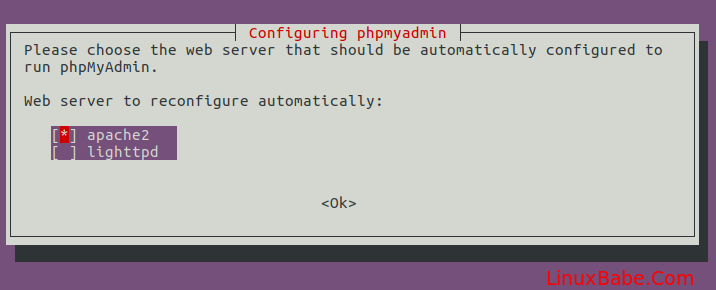
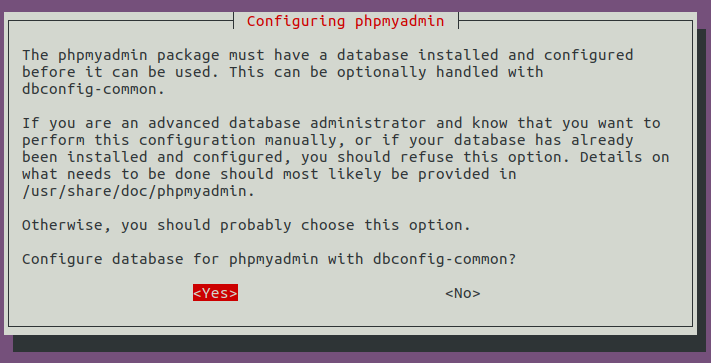
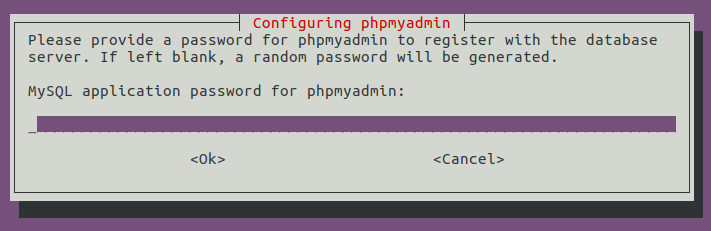
show grants for phpmyadmin@localhost;added phpmyadmin to apache configuration
sudo vi /etc/apache2/apache2.confInclude /etc/phpmyadmin/apache.confget permition to directory of apache
sudo gedit /etc/apache2/apache2.conf<Directory /var/www/> Options Indexes FollowSymLinks AllowOverride All Require
all granted</Directory>restart apache
sudo service apache2 restartPRIVILEGES Phpmyadmin user in Mysql
sudo mysql -u root -pGRANT ALL PRIVILEGES ON *.* TO phpmyadmin@’localhost’;FLUSH PRIVILEGES;Changing php.ini
sudo gedit /etc/php/7.4/apache2/php.ini
post_max_size = 30M
upload_max_filesize = 30M
Composer installing
sudo curl -s https://getcomposer.org/installer | php
Add Language
Open the Activities overview and start typing Region & Language.
Click on Region & Language to open the panel.
Click the Manage Installed Languages button to open Language Support.
Click Install / Remove Languages…. The Installed Languages window lists all the available languages, with the currently installed languages checked.
Check the languages you want to install, and uncheck those currently installed languages you want to remove.
Click Apply Changes.
Administrative privileges are required. Enter your password, or the password for the requested administrator account.
Add git key on git repository
ssh-keygen
ls ~/.ssh/id_rsa.pub
cat ~/.ssh/id_rsa.pub
added to git repository
Setup virtual website
sudo gedit /etc/apache2/sites-available/000-default.conf
added below lines to add new website on 127.0.0.1:8001
<VirtualHost *:8001> ServerAdmin webmaster@localhost DocumentRoot /var/www/html/folder ErrorLog
/var/www/html/folder/error.log CustomLog ${APACHE_LOG_DIR}/access.log combined</VirtualHost>and add listen to port with apache:
sudo gedit /etc/apache2/ports.conf
Listen 8001
Cakephp requirement
sudo
apt-get install php-intl
sudo
apt-get install php-mbstring
sudo a2enmod proxy_fcgi setenvif
sudo a2enconf php7.4-fpm
sudo service apache2 restart
sudo
apt install php7.4-intl
sudo a2enmod rewriteProtection on eye and low back pain
sudo add-apt-repository ppa:slgobinath/safeeyes
sudo apt update
sudo apt install safeeyes
if you familiar with pomodoro install it
sudo apt-get install gnome-shell-pomodoro
Docker
if you have problem with connection to docker use shckan proxy.
sudo
apt-get update
sudo
apt-get install \
apt-transport-https \
ca-certificates \
curl \
gnupg-agent \
software-properties-commoncurl -fsSL https://download.docker.com/linux/ubuntu/gpg |
sudo apt-key add -sudo apt-key fingerprint 0EBFCD88pub rsa4096 2017-02-22 [SCEA] 9DC8 5822 9FC7 DD38 854A E2D8
8D81 803C 0EBF CD88uid [ unknown] Docker Release (CE deb) <[email protected]>sub rsa4096
2017-02-22 [S]sudo
apt-get update
sudo
apt-get install docker
sudo
apt-get install docker.ioset docker as sudoer
sudo groupadd docker
sudo gpasswd -a $USER dockernewgrp dockerdocker --versionDocker version 19.03.8, build afacb8b7f0docker psCONTAINER ID IMAGE COMMAND CREATED STATUS
PORTS NAMESInstall docker-composer
https://www.digitalocean.com/community/tutorials/how-to-install-and-use-docker-compose-on-ubuntu-20-
04
Conflict Docker with server
https://stackoverflow.com/questions/52225493/change-default-docker0-bridge-ip-addressFileZilla
sudo apt-get install filezilla
GIMP
sudo snap install gimp
Postgre
sudo apt-get update
sudo apt-get install postgresql-12 pgadmin4
sudo
apt install postgresql
sudo
apt install pgadmin3sudo
apt install postgresql postgresql-contribdocker pull dpage/pgadmin4
docker run -p 80:80 \
-e '[email protected]' \
-e 'PGADMIN_DEFAULT_PASSWORD=SuperSecret' \
-d dpage/pgadmin4Driver of php in postgre
sudo apt-get install php7.4-pgsql
Set password in postgre and make db
sudo -u postgres psql
ALTER USER postgres PASSWORD ‘passwod’;
CREATE DATABASE databasename;
change background with Bing
sudo add-apt-repository ppa:whizzzkid/bingwallpapersudo
apt-get updatesudo
apt-get install bingwallpaperfor changing background need run bingwallpaper in Terminal
Option Two: Bing Desktop Wallpaper Changer (No Watermark)
alias python=python2sudo snap install bing-wallno compatible source was found for this media
sudo apt install libavcodec-extra
Install L2tp VPN connection
sudo
apt install network-manager-l2tp
sudo add-apt-repository ppa:nm-l2tp/network-manager-l2tp
sudo
apt -y install network-manager-l2tp
sudo
apt-get install network-manager-l2tp-gnome
sudo
apt install --install-suggests network-manager-l2tp-gnomehttps://armagankaratosun.github.io/post/2018-09-02-setup-l2tp-vpn-on-ubuntu/Install Php Storm
downloading php storm from iran source or get it from original source
Install MongoDB Client
sudo
apt install mongo-tools
Install Golang
https://go.dev/dl/
https://go.dev/doc/install
Install Postman
https://www.postman.com/downloads/sudo snap install postmanInstall Redis
sudo
apt install redis-serverhttps://www.digitalocean.com/community/tutorials/how-to-install-and-secure-redis-on-ubuntu-20-04https://snapcraft.io/redis-desktop-managersudo snap install redis-desktop-managerInstall Skype
sudo snap install skype --classicInstall MongoDB
https://linuxhint.com/install_mongodb_ubuntu_20_04/
https://docs.mongodb.com/manual/tutorial/install-mongodb-on-ubuntu/