
Use GPU in Tensorflow on Ubuntu 22.04
This document provides a guide on installing TensorFlow with GPU support on Ubuntu 22.04. It details the necessary steps to install the required software components, including Nvidia drivers, CUDA Toolkit, and cuDNN. Additionally, it troubleshoots a common error message encountered during the installation process and offers solutions.
In this tutorial, I am going to use GPU in the tensorflow framework.
https://www.cyberciti.biz/faq/ubuntu-linux-install-nvidia-driver-latest-proprietary-driver/
The procedure to install proprietary Nvidia GPU Drivers on Ubuntu 16.04 / 17.10 / 18.04 / 18.10 / 20.04 / 22.04 LTS is as follows:
- Update your system running the apt-get command
- You can install Nvidia drivers either using the GUI or CLI method
- Open the “Software and Updates” app to install the Nvidia driver using GUI
- OR type “sudo apt install nvidia-driver-535 nvidia-dkms-535” at the CLI
- Reboot the computer/laptop to load the drivers
- Verify drivers are working
Finding out information about your GPU
Naturally, you can only install Nvidia driver if you have Nvidia GPU in your system. Type the hwinfo command/lshw command to find out info about your GPU
hwinfo --gfxcard --short
OR
sudo lshw -C display
Ubuntu Install Nvidia driver using the CLI method
apt-cache search nvidia-driverMy computer Nvidia model
sudo apt install nvidia-driver-550 nvidia-dkms-550
Nvidia-smi
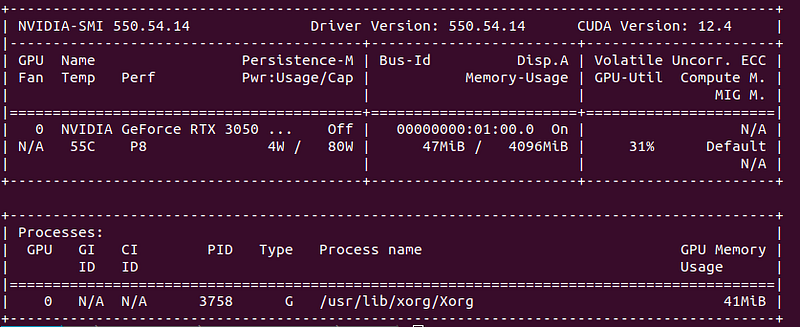
Find bug report
nvidia-bug-report.sh
/var/log/kern.log:nvidia-settings
sudo apt install nvidia-settings
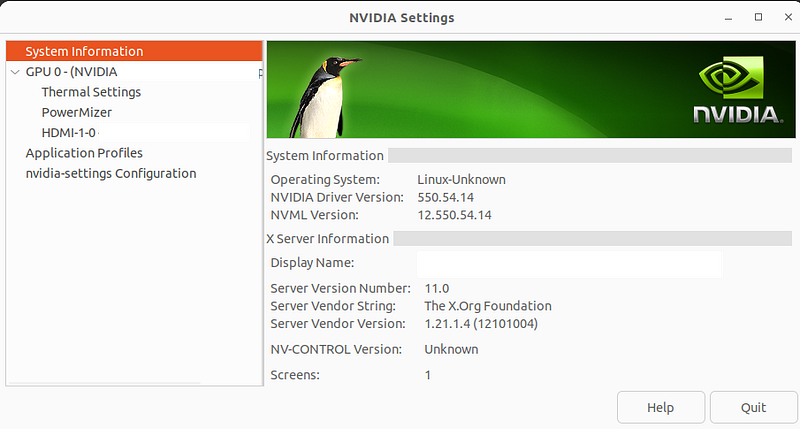
Reinstall Nvidia
sudo
apt reinstall linux-headers-$(uname -r)
sudo
apt install nvidia-driver-525lspci | grep -i nvidiaCUDA Toolkit 12.4 Downloads
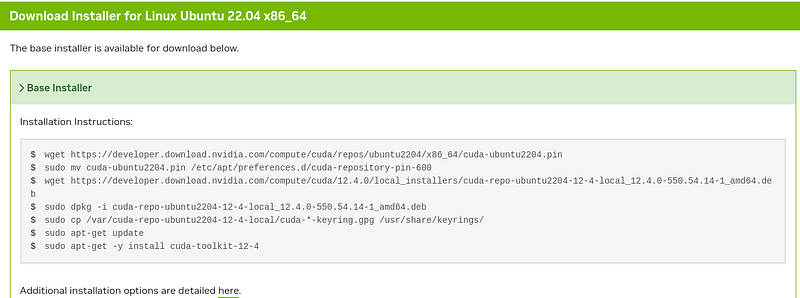
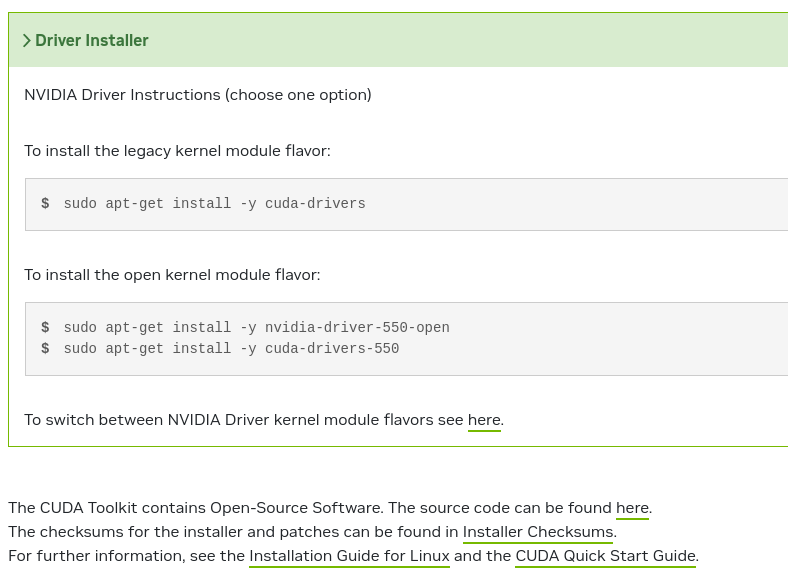
Ubuntu users
Nvidia cuda toolkit
sudo
apt-get install nvidia-cuda-toolkit
unistall
sudo
apt-get remove nvidia-cuda-toolkit
How to remove cuda completely from ubuntu?
sudo
apt-get purge nvidia*
sudo
apt-get autoremove
sudo
apt-get autoclean
sudo rm -rf /usr/local/cuda*
Easy install CUDA
sudo
apt-get install cuda
cuDNN 9.0.0 Downloads
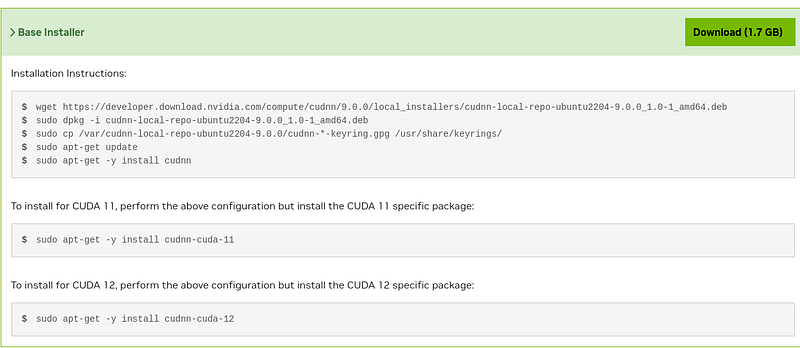
How to install TensorFlow2 with GPU support on Ubuntu 22.04
whereis cudacuda: /usr/lib/cuda /usr/include/cudapython3 -m pip install tensorflow[and-cuda]# Verify the installation:python3 -c
"import tensorflow as tf; print(tf.config.list_physical_devices('GPU'))"2024-03-30 08:45:30.386306:
W tensorflow/core/common_runtime/gpu/gpu_device.cc:2251] Cannot dlopen some GPU libraries. Please
make sure the missing libraries mentioned above are installed properly if you would like to use GPU.
Follow the guide at https://www.tensorflow.org/install/gpu for how to download and setup the
required libraries for your platform.Skipping registering GPU devices...[]It's just tensorflow can't see the Cuda libraries.Instal tensorflow[and-cuda] and add this to your .bashrc or conda activation script. Adjust python
version in it according to your setup.gedit ~/.bashrcNVIDIA_PACKAGE_DIR="$CONDA_PREFIX/lib/python3.12/site-packages/nvidia"for dir in $NVIDIA_PACKAGE_DIR/*; do if [ -d "$dir/lib" ]; then export
LD_LIBRARY_PATH="$dir/lib:$LD_LIBRARY_PATH" fidonesource ~/.bashrcFor example on Ubuntu:
N
V
I
D
I
A_
P
A
C
K
A
G
E_
D
I
R="$HOME/.local/lib/python3.10/site-packages/nvidia/"for dir in $NVIDIA_PACKAGE_DIR/*; do    if [ -d
"$dir/lib" ]; then        export
L
D_
L
I
B
R
A
R
Y_
P
A
T
H="$dir/lib:$LD_LIBRARY_PATH"    fidoneexport
N
V
M_
D
I
R="$HOME/.nvm"[ -s "$NVM_DIR/nvm.sh" ] && \. "$NVM_DIR/nvm.sh"  # This loads nvm[ -s
"$NVM_DIR/bash_completion" ] && \. "$NVM_DIR/bash_completion"  # This loads nvm bash_completion
Cannot dlopen some GPU libraries. Please make sure the missing libraries mentioned above are installed properly if you would like to use GPU.
In this case, you need to set an environment in bashrc.
nvcc --versionnvcc: NVIDIA (R) Cuda compiler driverCopyright (c) 2005-2021 NVIDIA CorporationBuilt
on Thu_Nov_18_09:45:30_PST_2021Cuda compilation tools, release 11.5, V11.5.119Build
cuda_11.5.r11.5/compiler.30672275_0
Error : ValueError: JAX requires ml_dtypes version 0.4.0 or newer; installed version is 0.3.2.
pip install ml_dtypes==0.4.0Stackademic 🎓
Thank you for reading until the end. Before you go:
- Please consider clapping and following the writer! 👏
- Follow us X | LinkedIn | YouTube | Discord
- Visit our other platforms: In Plain English | CoFeed | Venture | Cubed
- More content at Stackademic.com